NT Compatible
  • News
    • Channels
    • Archive
    • Search
    • Submit
  • Articles
    • Categories
  • Knowledgebase
  • Compatibility
    • Search
  • Links
  • Forums
  • Twitter
Advertisement

Latest News
[ Windows | Linux | Apple ]

· Apple Seeds First OS X 10.8.5 Beta to Developers
· Microsoft will pay up to $100K for new Windows exploit techniques
· DSA 2711-1: haproxy security update
· System Builder Marathon, Q2 2013 and more
· Microsoft delivers biggest update to date to TypeScript
· Tiff/nss-pam-ldapd Updates for Debian
· Update for Windows 8/Server 2012
· Apple TV 5.4 beta adds iTunes Radio, Conference Room Display
· DSA 2710-1: xml-security-c security update
· Intel DZ87KLT-75K Kinsley Thunderbolt Motherboard Review

Upcoming News
· Thermaltake Urban S31 Chassis Review
· [RHSA-2013:0957-01] Critical: java-1.7.0-openjdk security update
· [RHSA-2013:0958-01] Important: java-1.7.0-openjdk security update
· Kingston HyperX Beast Black 16 GB 2133 C11 (2x8 GB) @ techPowerUp
· Canon PowerShot N Review @ TechReviewSource.com
· Gunpoint Review (PC)
· E3 2013: Wrap Up Coverage @ Legit Reviews
· Cougar Spike Micro ATX Case @ LanOC Reviews
· Logitech G400s Gaming Mouse Video Review with Dave Chaos @ HardwareHeaven.com
· Intel Core i7-4770K Haswell Processor Review @ ThinkComputers.org

Windows Compatibility
· Norton Antivirus Corporate Server & Client v8.0
· Time Commando
· Delta Force 2
· Adobe Photodeluxe Home Edition 4.0
· Warcraft 3: Frozen Throne
· Borland C++ 4.51
· FaxTalk Messenger Pro V6.0 SP1
· Dragon's Lair 3D
· 3Com Etherlink XL 10/100 PCI NIC/3C905C
· Trident 4dWave DX

New Forum Topics
· Building a new PC: how EXACTLY to install USB mouse?
by: joyask43
on: 2013-06-09 14:36
6 replies, 2675 views

· Packet CD
by: natalieksh5
on: 2013-06-06 14:19
4 replies, 3455 views

· THE SIMS 2 DIRECTX 9.0C ERROR MESSAGE!! HELP! URGENT!!
by: tandrask34
on: 2013-06-05 14:06
28 replies, 93224 views

· Hello
by: barryherne
on: 2013-06-05 13:09
0 replies, 185 views

· shutdown link ?
by: estirwent
on: 2013-05-11 17:46
18 replies, 6900 views

News Channels
· Drivers
· Guides
· Reviews
· Security
· Software
· Press Release
· Windows XP
· Microsoft
· Updates
· Interviews
· Windows Server 2003
· General
· Windows Vista
· Webcasts
· Windows Server 2008
· Windows Home Server
· Windows 7
· Windows 8
· Windows Phone 7

What's New
Login to see an overview of all news stories since your last visit.

Affiliates

Welcome to our website

To take full advantage of all features you need to login or register. Registration is completely free and takes only a few seconds.

NT Compatible » Articles » WinTasks 4 Professional Review » Page 1

3 pages 1 2 3

WinTasks 4 Professional Review

Posted by: Philipp Esselbach on: 11/30/1999 12:00 AM [ Print | 0 comment(s) ]

WinTasks, by Leading Interactive, is a powerful replacement for the Windows taskmanager. With WinTasks you can easily start/stop processes, change the priorities of processes, and examine their use of.
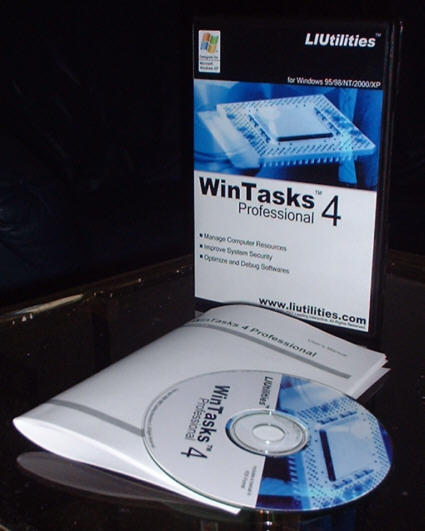


I tested the boxed version of WinTasks Professional for this review. The boxed version comes with a 20-pages user’s manual in an Amaray case. The user’s manual is also included as PDF file on the WinTasks Professional CD.

Features:

Manage Computer Resources

- Remove unnecessary processes instantaneously
- Free up valuable memory and cpu resources
- Create presets to optimize all common tasks
- Use the built-in logs and statistics to eliminate resource leaks and other problems
- Create custom scripts to automatically optimize the use of important resources

Software Development & Debugging

- Inspect your application's cpu and memory usage in realtime to optimize memory and cpu usage
- View up to 24 hours of cpu and memory usage statistics to find memory leakage and other bugs
- View windows, modules and threads owned by your application
- Terminate unwanted processes and clean up after a program crash without having to reboot the entire system
- Create scripts to start or stop your own programs when a particular condition is meet. For example, you could stop a server automatically whenever the client is stopped

Increased Security

- Find and kill unwanted backgroung processes like viruses and trojans
- Use the process log to find out which processes have been executed on your computer
- Create scripts to prevent a specific process from running
- Save the current process configuration to a preset, allowing you to instantly restore that configuration and terminate all unwanted processes.

WinTasks Professional features that are missing in WinTasks Standard:

- Search for modules,windows and autostart entries
- Print customized listings of any available information
- Add or remove autostarted programs from the registry
- Close, Show, Hide or change the size of any window
- List all modules (dlls) used by a process
- View cpu usage and memory usage graphs for the last 24 hours
- View cpu usage and memory usage graphs per process for the last 24 hours (Windows NT/2000/XP only)
- View thread count (not NT), cpu usage (NT/2000/XP only), memory usage (NT/2000/XP only) and start time per process
- View detailed logs containing created and removed processes, dlls loaded by any process, windows and autostart entries or print logs with timestamps for later examinations
- Create scripts with the built-in scripting language to start, stop or modify processes when a particular condition is meet
- Customize the user interface to save space and improve usability

System requirements:

Windows 98/NT/2000/XP
10MB free hard disc capacity
32MB RAM
Pentium 200 MHz or higher


Bookmark and Share

3 pages 1 2 3

NT Compatible » Articles » WinTasks 4 Professional Review » Page 1
All products mentioned are registered trademarks or trademarks of their respective owners.
© 1998-2013 Esselbach Internet Solutions - All Rights Reserved. Terms and privacy policy
Powered by Contentteller® Business Edition