DisplayLink has announced a Docking Station Expansion for Microsoft’s Surface Pro Tablet
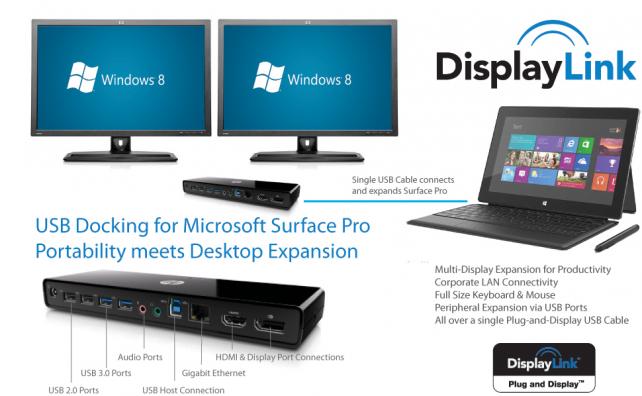
DisplayLink, the leading provider of USB Graphics Technology, today announced support for Microsoft’s new Windows 8 Surface Pro tablets with DisplayLink enabled docking stations providing multiple displays, audio, full size keyboard and mouse, corporate Ethernet networks along with multiple USB ports for peripheral expansion, all via a single USB cable connection.
“Everyone loves the mobility and portability of tablets, however in the office we still long for a full desktop experience so we can be productive”
DisplayLink enabled docking stations fulfill employee requests for mobility and BYOD (Bring Your Own Device), and ease the challenges facing IT organizations struggling to support these trends. DisplayLink’s goal is to eliminate connectivity barriers and enhance ease-of-use and deployment, while maximizing overall flexibility and productivity.
“Everyone loves the mobility and portability of tablets, however in the office we still long for a full desktop experience so we can be productive”, said John Cummins, Vice President Sales and Marketing for DisplayLink, “DisplayLink enabled docking stations and displays are the perfect accompaniment for Microsoft Surface Pro tablet users, enabling mobility when traveling while providing a full desktop experience when back at the office via a single plug-and-display USB cable. With this level of connectivity and expansion, the tablet is transformed from just another content consumption device to a full content creation and productivity workstation.”
For IT Managers, adding connectivity for corporate LAN, desktop audio for Skype conferencing, and multiple displays couldn’t be easier. The universal nature of DisplayLink’s USB connectivity ensures that all office computers, whether they are Ultrabooks, Desktops, or Tablets like the new Surface Pro can connect and expand via a single USB cable connection.
DisplayLink delivers ultra low latency and pixel accurate quality to ensure the best user experience when adding multiple displays, and bringing this unique capability to the new Windows 8 interface makes for a truly pleasurable experience. When combined with new touch screen USB displays, the Microsoft Surface Pro opens up a whole new user experience that greatly enhances productivity.
Availability
The latest software driver with support for Windows 8 is available for download now, free of charge from DisplayLink’s website, visit http://www.displaylink.com
DisplayLink, the leading provider of USB Graphics Technology, today announced support for Microsoft’s new Windows 8 Surface Pro tablets with DisplayLink enabled docking stations providing multiple displays, audio, full size keyboard and mouse, corporate Ethernet networks along with multiple USB ports for peripheral expansion, all via a single USB cable connection.
“Everyone loves the mobility and portability of tablets, however in the office we still long for a full desktop experience so we can be productive”
DisplayLink enabled docking stations fulfill employee requests for mobility and BYOD (Bring Your Own Device), and ease the challenges facing IT organizations struggling to support these trends. DisplayLink’s goal is to eliminate connectivity barriers and enhance ease-of-use and deployment, while maximizing overall flexibility and productivity.
“Everyone loves the mobility and portability of tablets, however in the office we still long for a full desktop experience so we can be productive”, said John Cummins, Vice President Sales and Marketing for DisplayLink, “DisplayLink enabled docking stations and displays are the perfect accompaniment for Microsoft Surface Pro tablet users, enabling mobility when traveling while providing a full desktop experience when back at the office via a single plug-and-display USB cable. With this level of connectivity and expansion, the tablet is transformed from just another content consumption device to a full content creation and productivity workstation.”
For IT Managers, adding connectivity for corporate LAN, desktop audio for Skype conferencing, and multiple displays couldn’t be easier. The universal nature of DisplayLink’s USB connectivity ensures that all office computers, whether they are Ultrabooks, Desktops, or Tablets like the new Surface Pro can connect and expand via a single USB cable connection.
DisplayLink delivers ultra low latency and pixel accurate quality to ensure the best user experience when adding multiple displays, and bringing this unique capability to the new Windows 8 interface makes for a truly pleasurable experience. When combined with new touch screen USB displays, the Microsoft Surface Pro opens up a whole new user experience that greatly enhances productivity.
Availability
The latest software driver with support for Windows 8 is available for download now, free of charge from DisplayLink’s website, visit http://www.displaylink.com


