NT Compatible
  • News
    • Channels
    • Archive
    • Search
    • Submit
  • Articles
    • Categories
  • Knowledgebase
  • Compatibility
    • Search
  • Links
  • Forums
  • Twitter
Advertisement

Latest News
[ Windows | Linux | Apple ]

· System Builder Marathon, Q2 2013 and more
· Microsoft delivers biggest update to date to TypeScript
· Tiff/nss-pam-ldapd Updates for Debian
· Update for Windows 8/Server 2012
· Apple TV 5.4 beta adds iTunes Radio, Conference Room Display
· DSA 2710-1: xml-security-c security update
· Intel DZ87KLT-75K Kinsley Thunderbolt Motherboard Review
· Microsoft launches Surface RT discount for schools
· MacStadium to provide new Mac Pro hosting and colocation
· Netflix outside the USA - in Linux & with Tunlr

Upcoming News
· Fractal Design Arc Midi R2 Case Review
· Mad Catz Cyborg F.R.E.Q. 5 Gaming Headset @ Benchmark Reviews
· News: MSI's Z87-GD65 Gaming motherboard reviewed
· OCZ Vertex 450 256GB SSD Review @ Hardware Canucks
· ASUS Z87-PRO Motherboard Review @ HiTech Legion
· REVIEW: Cooler Master Seidon 240M @ PureOverclock
· NVIDIA Announces It Will Its License Graphics IP, Goes After PowerVR
· ANNOUNCE: AT-SPI 2.9.3 released
· Mutter 3.9.3
· GNOME Shell 3.9.3

Windows Compatibility
· Norton Antivirus Corporate Server & Client v8.0
· Time Commando
· Delta Force 2
· Adobe Photodeluxe Home Edition 4.0
· Warcraft 3: Frozen Throne
· Borland C++ 4.51
· FaxTalk Messenger Pro V6.0 SP1
· Dragon's Lair 3D
· 3Com Etherlink XL 10/100 PCI NIC/3C905C
· Trident 4dWave DX

New Forum Topics
· Building a new PC: how EXACTLY to install USB mouse?
by: joyask43
on: 2013-06-09 14:36
6 replies, 2635 views

· Packet CD
by: natalieksh5
on: 2013-06-06 14:19
4 replies, 3445 views

· THE SIMS 2 DIRECTX 9.0C ERROR MESSAGE!! HELP! URGENT!!
by: tandrask34
on: 2013-06-05 14:06
28 replies, 93196 views

· Hello
by: barryherne
on: 2013-06-05 13:09
0 replies, 179 views

· shutdown link ?
by: estirwent
on: 2013-05-11 17:46
18 replies, 6892 views

News Channels
· Drivers
· Guides
· Reviews
· Security
· Software
· Press Release
· Windows XP
· Microsoft
· Updates
· Interviews
· Windows Server 2003
· General
· Windows Vista
· Webcasts
· Windows Server 2008
· Windows Home Server
· Windows 7
· Windows 8
· Windows Phone 7

What's New
Login to see an overview of all news stories since your last visit.

Affiliates

Welcome to our website

To take full advantage of all features you need to login or register. Registration is completely free and takes only a few seconds.

NT Compatible » News » August 2012 » WiebeTech UltraDock v5 Review

WiebeTech UltraDock v5 Review

Posted by Philipp Esselbach on: 08/15/2012 12:16 PM [ Print | 0 comment(s) ]

ThinkComputers.org posted a review on WiebeTech UltraDock v5
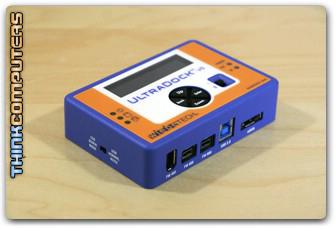


Recovering data from a hard drive can be a very annoying task, especially if the drive that dies or has an error is your operating system drive. Hard drive docks and adapters have been around for a long time and they make it extremely simple to connect your hard drive, then connect the dock to your PC so you can troubleshoot and repair the drive. The product we are taking a look at today is the WiebeTech UltraDock v5 which supports SATA and IDE hard drives and has USB 3.0, Firewire 400, Firewire 800 and eSATA connections so no matter what computer you will be connecting it to it will work. Will the UltraDock v5 be the newest addition to your PC troubleshooting and repair tools? Read on to find out!

Features
LCD and Menu system – Four buttons (up/down/back/enter) make it easy to navigate the new menu system.
Three FireWire Ports – Two FireWire 800 and one FireWire 400, all support daisy chaining. You can connect up to two new FireWire devices behind UltraDock.
USB 3.0 Port – Connect to your computer via USB 3.0/2.0.
eSATA Port – Connect to your computer via eSATA
DC Power In – Allows powering using the included AC adapter.
SATA Disk Drive Power In – Allows powering from standard SATA drive power connectors as is found in most computers.
Power Input LED – Identifies valid power input source on DC input jack.
Power Output LED – Verifies that power output is operational.
On / Off Switch – Recessed to prevent accidental switching.
IDE Cable Connector – Supports attachment to drives inside of computers.
SATA Cable Connector – Connect 2.5″ or 3.5″ SATA drives
Aluminum case – Briefcase tough; excellent heat dissipation.
Small size – Take it anywhere.


WiebeTech UltraDock v5 Review


Bookmark and Share

« All-in-Ones: HP 8600 Officejet Plus vs Brother MFC-J5910DW · StarTech.com InfoSafe SATA HDD Enclosure Review »

NT Compatible » News » August 2012 » WiebeTech UltraDock v5 Review
All products mentioned are registered trademarks or trademarks of their respective owners.
© 1998-2013 Esselbach Internet Solutions - All Rights Reserved. Terms and privacy policy
Powered by Contentteller® Business Edition