Page 1
Windows XP Beta 2 Review
Written by Dan Powell, MCSE, A+ Certified
I have been using the Beta 2 version of Windows XP for about a week now and I must say this OS is very impressive, by far my favorite product ever produced by Microsoft! I have installed and used this several times on two plat-forms and a Compaq Armada 7800 laptop and (for the real test) a 500IS Emachine desktop! The Emachine is not of factory specs. I have upgraded the RAM to 128 Meg, added a Monster 3D Voodoo 2 card, NIC, and a 30 gig 7200 RPM Western Digital hard drive. This review will actually only cover my experience with Microsoft Windows XP running on the 500IS Emachine, however, I will tell you that with the Compaq Armada laptop, it installed with NO problems at all and is running great. If you have ever used an Emachine then you know that they are extremely proprietary and normally only run properly if you have installed the imaged operating system from the supplied recovery CD. I have actually had major problems trying to install a fresh copy of Windows 98 on this particular Emachine!!
I am going to make this simple. First I will explain the install on the Emachine, what I thought would happen, and what did happen. Below that section will be some bullets, each one is a highlight which I am very impressed and excited about, and below that is a brief description. I hope you enjoy it!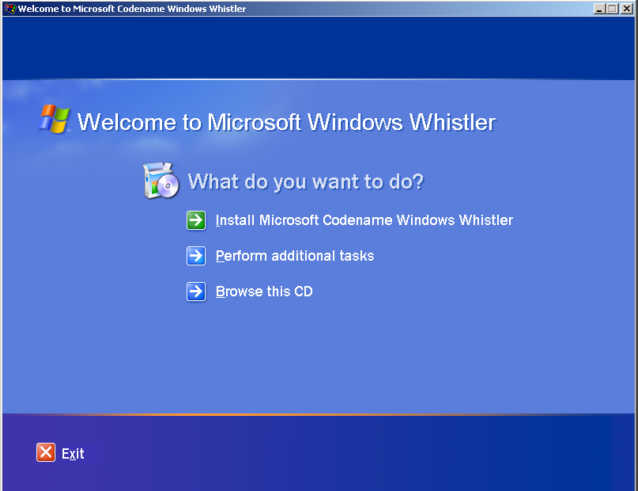
The Install:
In the past (as mentioned above) I had tried installing a few operating systems on a newly created and formatted partition to no avail, too many missing drivers and for some reason, the BIOS only wanted the imaged copy of WIN98 SE installed on this computer, I had given up, then XP!
I re-partitioned my hard drive and formatted it, I then booted to a WIN 98 boot disk with CDROM support, switched to the E: drive (E:i386 actually) and ran winnt.exe, the install began. First it copies the DOS setup files, reboots, and then copies the Windows setup files. Next you find yourself looking at the typical setup screen (Paragraph after paragraph telling you about the improvements thus far in XP), I have to be honest here, I didn't read a single word of it J.
After the final reboot (only 24 minutes later!), I was looking at the new XP setup wizard, this is a five step process that I must say is very user friendly and actually had some good tips in it. Lastly, I was looking at the new XP login screen (very cool). For each user that has a local account on the system, Windows XP randomly creates a different icon; I ended up with a rose J. Anyway, I click my icon, provide my password (passwords do not have to be used with XP), it says “Loading personal settings for DPowell” and BOOM, I am at my desktop. I must stop here and tell you that I am a 2nd Tier helpdesk technician and I can't tell you how many times I have gotten a call and the end user's desktop had began to come up, however, the icons hadn't finished loading and the processor was still churning away when suddenly the end user starts clicking like a mad man trying to get Quake 3 to run. By the time he got a hold of me he is looking at a beautiful “Fatal exception OE” error and Quake 3 needs to be reinstalled. This simply WILL NOT happen with XP! Windows leaves you looking at the “applying personal settings” screen until the OS if fully loaded and then BADA BING!!, you're desktop is loaded and completely ready to go, kudos to Microsoft! Let's move on to the bulleted highlights I promised you….
Highlights:
Goodbye icons!!!
By default, you do not use icons on the desktop. Everything can be accessed from the start menu, I love this feature. The start menu is completely customizable but is very well structured and easy to use by default.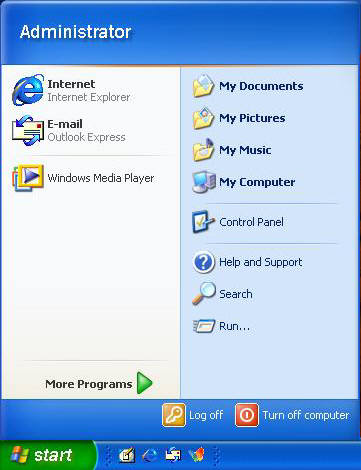
If for some reason you do not like this, you can simply right click the start button, go to properties and switch back to “Classic Start menu”, this gives you all the normal icons back on your desktop (My computer, My network places, recycle bin, Etc) and puts you back to the start menu look and feel that you have seen in past Microsoft operating systems. Side note: If you are one of those people that like having hundreds of icons on your desktop, you no longer need to fear the dreadful “dead links”. Whistler has a built in desktop cleaner for you sick icon people and it is constantly verifying the shortcuts, and letting you know when you have a shortcut that you aren't using very often, heaven forbid you want to get rid of it J.
No more “resource killing” wallpaper!!!
I have never used wallpaper simply because it seems to make the system run like a dog, until now. Whistler comes with some very intense, beautiful wallpaper (1.37 Meg bitmaps) that seamlessly mold to your desktop. Maybe it's because the operating system completely finishes loading before presenting you with your desktop, but whatever it may be, it sure does run smoother while using wallpaper. Thirty-one breathtaking bitmaps that I'm sure you are going to love and use.
Much better error description!!!
Everyone has seen the wonderful Microsoft errors like “Windows has encountered an error, it will now close”. They have put forth what appears to be a lot of effort in preventing such errors in Windows XP. Upon trying to crash this great operating system by deleting, moving and just plain causing havoc, I was able to produce some great errors (don't ask me to remember), all of which were described in fair detail and should be understandable even to the typical end user.


