How to Install and Make the Most of NanaZip 6.0 Preview 2 on Windows
NanaZip 6.0 Preview 2 is the newest open‑source archiver that builds on 7‑Zip’s core while adding a modern UI, dark mode, and a laundry list of security hardenings. This guide shows how to get the preview onto a PC, points out the most useful new features, and warns about the quirks that still need polishing.
Downloading and Installing the MSIX Package
- Grab the latest MSIX bundle from the official GitHub releases page.
- Double‑click the file; Windows will prompt to install it as a trusted app. Accept the permissions – the package is signed, so no extra steps are required.
- After installation, pin NanaZip to the taskbar if you plan to use it frequently; the shortcut appears in the Start menu under “NanaZip”.
Why MSIX matters: unlike classic installers, MSIX keeps the app sandboxed, makes updates atomic, and removes leftover registry junk that older installers often leave behind.
Dark Mode, Mica, and Per‑Monitor DPI
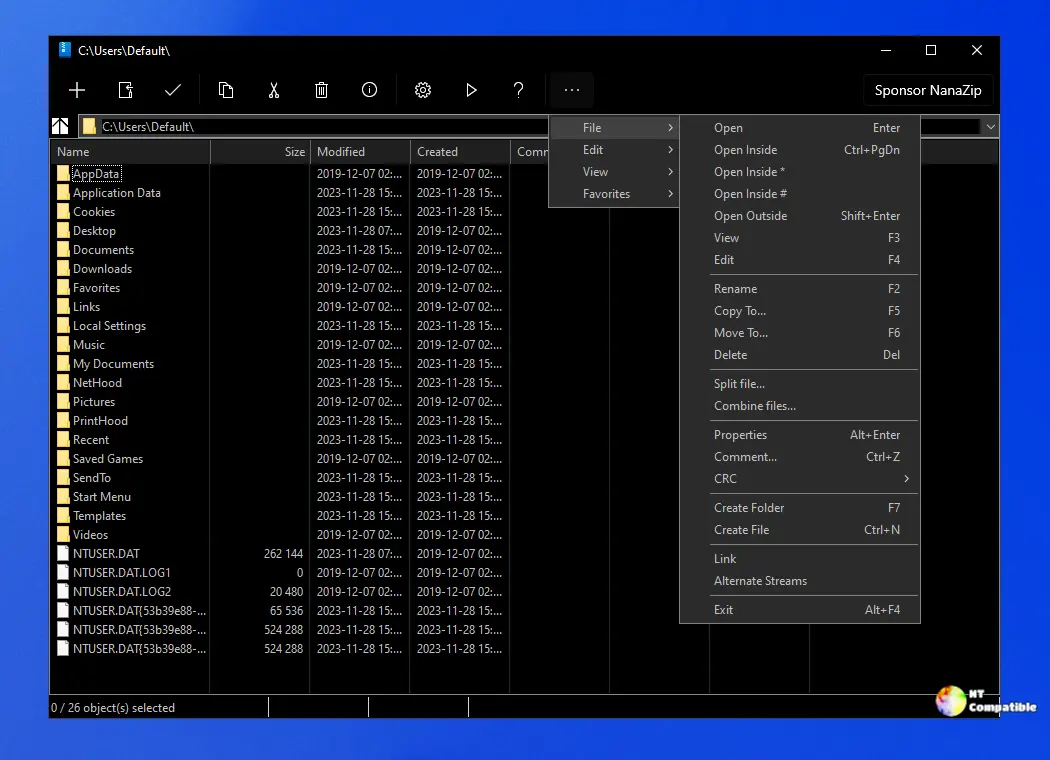
The preview finally respects Windows 11’s visual language. When the system theme is set to dark, NanaZip applies a full‑window Mica effect (provided HDR is off). The interface also scales cleanly on high‑DPI monitors – no more blurry text when dragging the window between a laptop screen and an external 4K display.
A common complaint with older archivers was that dialogs looked like they were stuck in Windows 7. This version fixes those visual glitches, and the contrast tweaks make list items readable even in low‑light environments.
Context Menu Integration That Actually Works
Many users have seen the “Compress with NanaZip” entry disappear after a Windows update. The preview restores the context‑menu handler for both Windows 10 and Windows 11, using a short prefix to avoid clashes with other shell extensions. Right‑click any file or folder, choose NanaZip → Add to archive, and you’re good to go.
Security Mitigations You Can Trust
The developers added several hardening flags that are rarely seen in consumer utilities:
- Control Flow Guard (CFG) and CET Shadow Stack support protect against ROP attacks.
- Strict handle checks block invalid handles at runtime, reducing crash surfaces.
- Dynamic code generation is disabled in release builds, limiting the attack surface for malicious plug‑ins.
If you’ve ever worried about a compromised archive spawning unwanted processes, these mitigations are a welcome safety net.
New Compression Codecs and Hash Algorithms
Beyond the classic 7‑Zip formats, NanaZip 6.0 now includes:
- Brotli, Fast‑LZMA2, Lizard, Zstandard – all with both encoder and decoder support.
- A full suite of modern hash functions (BLAKE3, SHA‑3 variants, XXH64) for integrity checking.
For power users who need to verify large downloads or create reproducible builds, the expanded algorithm set saves a separate checksum tool.
Things That Still Need Tweaking
- The “Open folder after extraction” option works, but it occasionally opens the wrong path when extracting nested archives – a regression that appeared after the XAML refactor.
- Some users reported flickering in list views when switching between light and dark themes; the issue is mitigated on Windows 11 builds newer than 22H2 but persists on legacy Windows 10 installations.
If those bugs are deal‑breakers, stick with stable 7‑Zip for now and revisit the preview after the next point release.
Should You Switch from 7‑Zip?
For most everyday users, 7‑Zip remains a rock‑solid choice: it’s lightweight, has fewer moving parts, and its installer is familiar. NanaZip shines when you want a UI that matches Windows 11, need per‑monitor DPI awareness, or care about the extra security mitigations baked into the MSIX package.
Power users who love tinkering with hash algorithms or appreciate context‑menu shortcuts will likely find the preview worth the occasional hiccup.
Give NanaZip 6.0 Preview 2 a spin – it’s free, open source, and may just feel like a more modern 7‑Zip without sacrificing compatibility.
Release NanaZip 6.0 Preview 2 (6.0.1621.0)
I'm excited to announce that we've released the NanaZip 6.0 Preview 2, now available for download. Starting with NanaZip 6.0, the development team will adopt the new release-tag rule.