Bloatynosy 1.11 finally lets the community run the Windows debloater's recipe book
After nearly dying twice, Belim's free open-source debloater ships a pull-request-driven update system, and it still refuses to grow by a single byte.
Every Windows PC arrives stuffed with things you never asked for. Solitaire. Cortana. The Office hub. TikTok. They sit there quietly, eating storage and background attention, while the Start Menu happily serves you ads. For years a whole corner of the Windows community has tried to strip it all away under the banner of "debloating." The catch is doing it by hand is a fine way to break your machine, since the changes live deep in the registry and in PowerShell manifests. Bloatynosy, the free portable open-source utility from a developer known as Belim, lets you see exactly what Windows is doing and decide what stays.
On 5 November 2026, with Bloatynosy 1.11, the tool does something it never did before. It opens the recipe shelf to everyone.
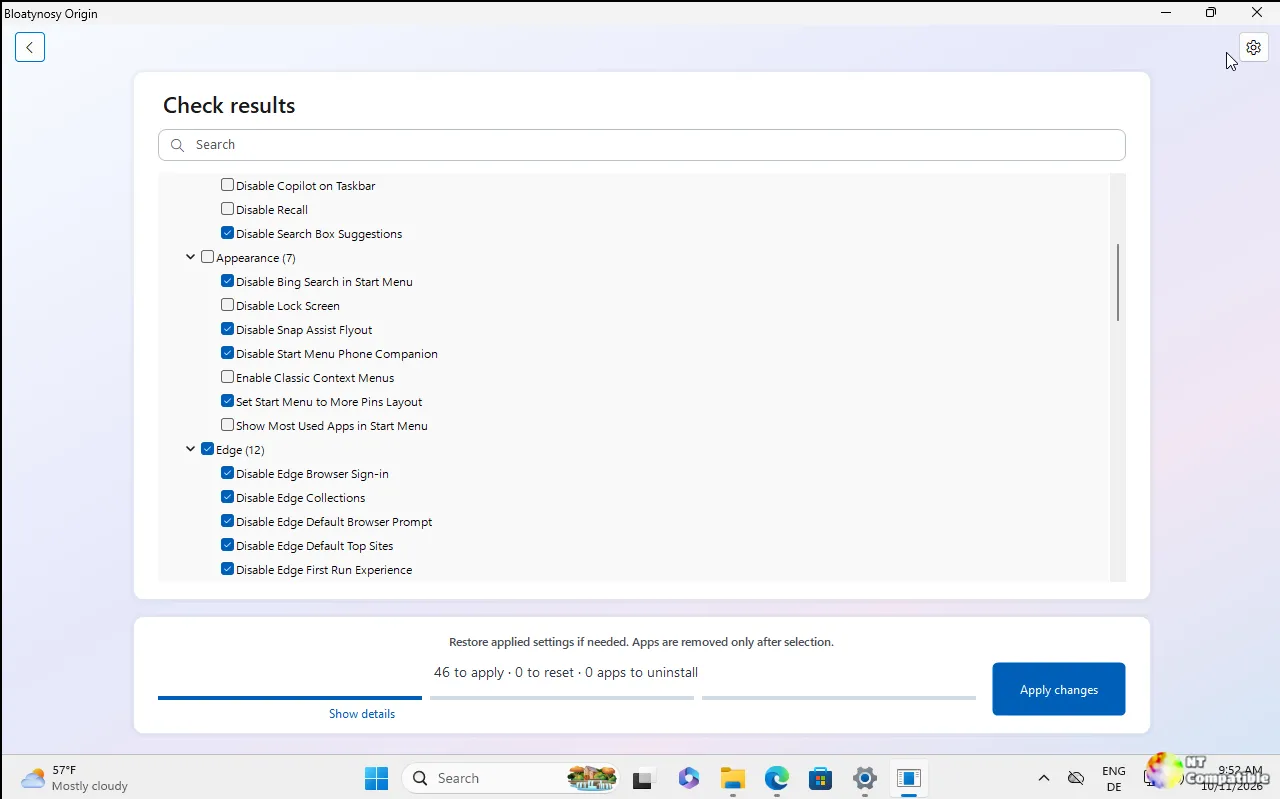
Until now the catalog of tweaks came prepackaged with whatever the last build happened to contain, curated by one person. In 1.11 recipes now live in the project's GitHub repository, anyone can submit one with a pull request, and the app fetches them at runtime, previews them against your own machine, and applies nothing until you click through. That's the developer's stated ethos for the whole release: "Still portable. Still WinForms. Still nothing applied just because you opened the app."
Keep in mind that the community recipe system is the headline, but it is one of four changes. Let's walk through them.
What's actually new in 1.11
Per the release announcement posted by Belim on GitHub and mirrored in discussion thread #310, these four items define the build.
First, the recipes. The tweak catalog is "no longer whatever the installer happened to contain." They live in the repo, are submitted via pull request, and fetched at runtime. There is a deliberate assumption that you may not always be online. If you're offline, the bundled copies step in rather than leaving you staring at an empty page. The preinstalled recipe, which strips apps Windows ships but nobody asked for, has also been expanded. It now targets TikTok, Instagram, Threads and Clipchamp, on top of the usual suspects: Solitaire, the Bing apps, Skype, Maps, Cortana, the Office hub, 3D Builder and Teams.
The commit behind the release says a lot about the mechanism. Commit c13384f, titled "update-recipes", touched just two files and changed only a handful of lines. A Community/Recipes/index.json file acts as the manifest. An entry points to a recipe file such as less-preinstalled.json, which lists the Windows app package families the tool should remove, including BytedancePte.Ltd.TikTok_6yccndn6064se and Instagram.ThreadsanInstagramapp_j6x8nmkwhnr18.
Second, there's a refresh button that needs no restart. It sits beside the tabs and "checks the collection for anything added since you opened the app, for recipes and tweak packs alike." The developer's note is pointed: "Restarting was never a feature."
Third, the preview now sorts itself out. The proposed changes display by consequence, so what will happen sits above what won't, each block tallying itself in a heading you can read. Skipped entries explain why: already applied, protected, not found, or on your ignore list. Conflicts get promoted to the top and highlighted in amber instead of hiding as some thirteenth line.
Fourth, the interface got sharper without getting heavier. Spacing, alignment, colour and states were refined across the app. The download, meanwhile, "did not grow by a single kilobyte." The emphasis on size is deliberate. Bloatynosy is hand-drawn WinForms, and Belim preempts the obvious question: "In case you were about to ask where the Electron is: there never was any, and that is the point."
It's arguably the most honest feature of all. In a market where debloaters routinely arrive as megabytes of Electron wrapped around a web page, a single portable exe that refuses to grow is a genuine differentiator.
How the thing actually works. What sets Bloatynosy apart from most debloaters is how plainly it exposes its own actions. The README spells out an almost deliberate lack of mystery: it changes documented registry values only, does not patch system files, does not stop services, and has no mysterious "Optimize" button that runs a script you cannot read.
Every change is verified the old-fashioned way. A value is checked before it is written, then read back afterward. If the readback doesn't match, the setting counts as failed and lands in the report rather than silently pretending it worked.
Store apps come out through PowerShell's Remove-AppxPackage. Packages that Windows flags as non-removable, framework, or resource packages are refused outright. Classic Win32 programs are drawn from the same three Uninstall registry keys the Control Panel reads, filtered so updates, runtimes and shared components stay put. The stored UninstallString is handed to cmd.exe unchanged. That is exactly why an MsiExec /I entry opens the maker's maintenance window instead of silently removing things behind your back.
The flow itself is a simple three steps. First it checks your PC, reading settings and apps without changing anything. Then it shows you a browsable tree split into available changes and already applied, where you tick what should go and untick what you keep. A plain-language explanation sits at the bottom of each row, and "Show details" reveals the actual registry path and value. Finally it applies the changes and reports what worked, what failed, and what wants a restart.
Everything down to the knowledge base is just text. Tweaks live in Data/WinRules.ini and app rules in Data/AppRules.ini. The plugin system is nothing more than dropping another .ini file into the Data folder, no DLL to compile, no manifest, no API. If a section name already exists, it replaces the original, which means a contributor can correct an entry rather than only append. A file that can't be read gives you one missing plugin, not a crash.
Profiles are plain JSON files you can save from the finished report and hand off to another machine. The ignore list lives separately in Data/Settings.json so it doesn't get silently passed along.
There's also an optional "Explain" feature, and by default it's off. When you turn it on and add your own API key, Groq, OpenAI, Anthropic, or any OpenAI-compatible endpoint, it can ask an AI provider for a second opinion on the selected entry. Only the name and technical details of that one entry go out, never a scan of your PC. Without it, the app is completely local. It runs on Windows 10 or 11 with .NET Framework 4.8 and needs just a writable folder for the single portable exe.
A comeback, and why it matters
To see why 1.11 lands the way it does, you need a bit of the backstory, because this tool nearly died, twice.
Bloatynosy launched in mid-January 2023 as Belim's first-ever release. It then weathered what the developer calls two identity crises, getting renamed along the way: ThisIsWin11, Debloos, BloatyNosy, and finally Bloatynosy. In May 2023 it was briefly listed in the Microsoft Store before being pulled, with Belim describing it as being "banned by Microsoft overnight" over a rejected update and a claim that the app lacked a valid certificate.
The version people still point to is 0.85. That was "one window, a list, and a button." Later builds added tabs, a plugin store, dark mode, an AI-driven bloatware filter, WinGet support, and even a module for installing Windows 11 on unsupported hardware. But per Belim, the appeal faded. "Everything I built after that added more and solved less."
The last real update came in January 2025, followed by roughly a year of silence.
What pulled him back was oddly specific. In the Origin announcement he described seeing an employee at "a well-known company" Googling Bloatynosy and trying to download it. To him that was proof that "the legend lives on." Since nobody else was going to revive the original vision, he took the job himself. The Origin line's 1.0.0 shipped on 9 October 2026, candid to a fault, since the build had been sitting in his "ready to publish" folder for eight or nine days and he'd simply never pressed the button. It still needed an icon and some polish, both of which arrived within weeks.
If you want the full run of releases, the Origin line found its footing unusually fast. 1.0.103 landed on 20 October with a Windows 11-style navigation column and a real app icon. "Shelf" (1.02.142) followed on 25 October, adding the .ini-based plugin system and a self-updating catalog. 1.10 on 3 November gave you a workspace instead of a welcome screen, dark by default, with recipes you could save and share. Then came 1.11 on 5 November.
Bloatynosy 1.11 sits at a fairly interesting intersection. It leans into a return to lean, honest software: a single portable exe, hand-drawn UI, and full transparency about every registry write in an era when free utilities are frequently suspected of being malware vectors. It offloads catalog maintenance to the community via GitHub pull requests while keeping an offline fallback. And it treats consent as a feature, preview before commit, reversible changes, an honest report, nothing applied merely by opening it.
The developer is candid that the project is "still early." Windows reshuffles registry values with every build, so a value that works today can be ignored tomorrow, and he asks users reporting problems to state their Windows version. There's polish left to do.
Bloatynosy 1.11 is available now from the GitHub releases page. Head here to grab it, and here to read the release discussion. Keep in mind that, like anything that touches your registry, it's worth running the preview against a machine you don't mind breaking first.


