Bloatynosy 1.12.10 gets a Windows 11 makeover and a community recipe shelf
The popular Windows debloater lands its first real redesign plus a new system for sharing tweaks, though the download options are more confusing than helpful.
Bloatynosy, the Windows debloater that has clung to near-legendary status in the free-tools corner of GitHub, shipped a genuine redesign today. The 1.12.10 release, posted on 12 November 2026 by developer Belim under the builtbybel organisation, is the first visual overhaul this app has gotten in years. It also does something the project never attempted before: it opens the tweak catalogue to the public.
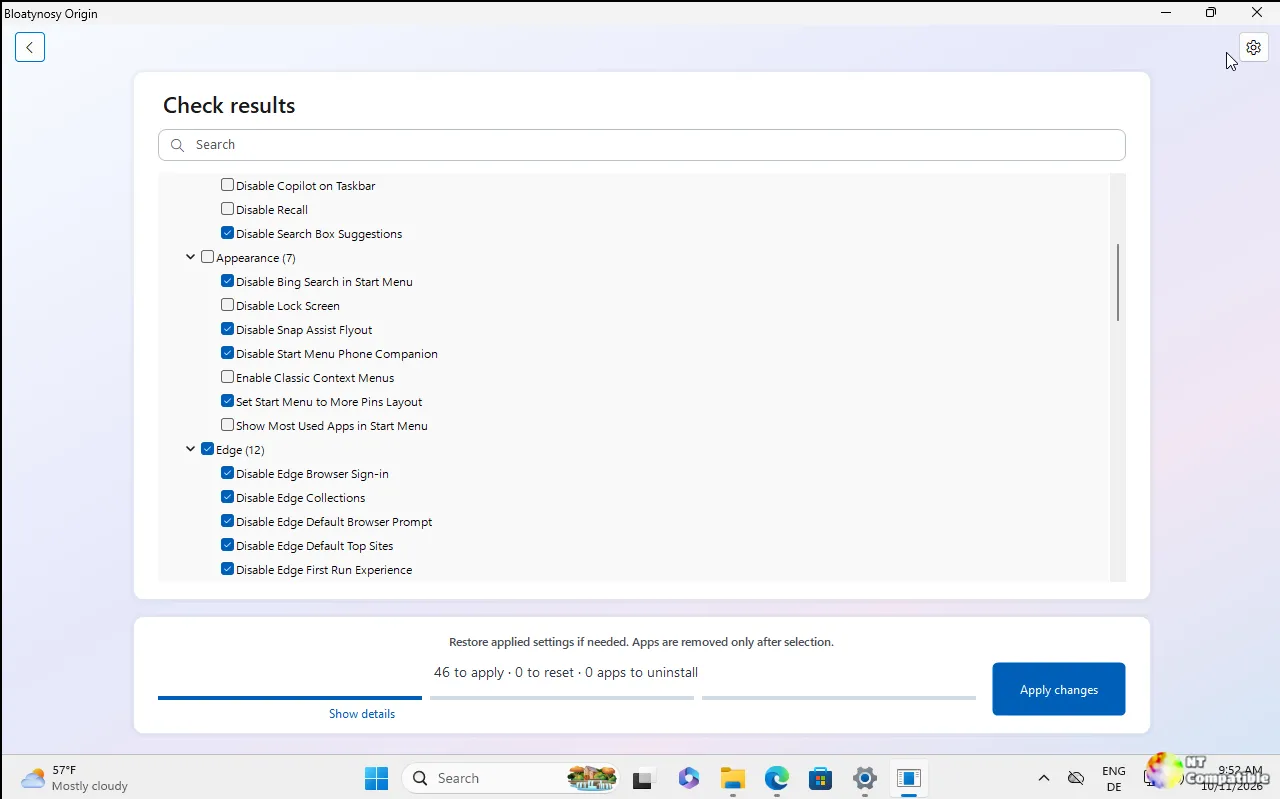
Roughly speaking, the update quietly packs two jobs into one release. There's the new look, now styled to match Windows 11. And there's a community recipe shelf that lets anyone fork, preview, and publish their own sets of changes. Both ride on top of an app that is stubbornly old-school by design.
Pick your inconvenience
The most visible quirk here isn't a feature. It's a split. The same feature set ships as two separate downloads, and builtbybel framed the choice without much warmth in the release notes. Pick your inconvenience.
One is a .NET Framework 4.8 build. The portable one. You unzip it, double-click, and it runs on any machine with no extra setup, which makes it the natural USB-stick candidate. The other targets .NET 11. It gets the new look but demands the .NET 11 Desktop Runtime as a one-time install.
Both carry the same rules and the same single file. The difference is mostly cosmetic plus a runtime dependency. The .NET 11 build looks fresher. The Framework build is the one you'd actually keep on a flash drive.
Here's the part that'll trip up anyone writing this cleanly. The downloadable Framework build is still internally labelled 1.11.5. So you're getting a 1.12.10 build and a 1.11.5 build under one "1.12" banner. Third-party sites already list the version numbers inconsistently. Some still show older labels like 1.02.142. Keep that in mind if you quote a number, and head here to the official releases page if you'd rather just grab the right one.
A Windows 11 face and a community shelf
Builtbybel's argument is that Windows modernised and Bloatynosy simply took a while to catch up. The .NET 11 build delivers on that in a few specific ways.
There's a real light mode now. Dark stays the default, which makes sense for a tool people run at midnight, but Settings has a switch and it applies after a restart. Buttons are rounded, drawn the way Windows 11 draws its own controls rather than through some bespoke theme engine. Surfaces and borders pull straight from system colours, so Windows High Contrast mode actually works instead of the app faking it.
The developer is pointed about one detail. Windows' own dark blue reads at a 2.6:1 contrast ratio, which "is not good enough," so the accent blue and gold are hand-picked by design. The whole thing is repeated for emphasis, too: still portable. Still WinForms. Still nothing applied just because you opened the app. A companion video, Bloatynosy.mp4, backs that claim up.
If the redesign is the face of this release, the community recipe shelf is the structural change. Historically Bloatynosy shipped a fixed set of tweaks baked into the installer. Now that catalogue has moved out of the app and onto GitHub. Recipes live in the repository, and anyone can submit one via a pull request. The app fetches them at runtime and previews them against your PC without touching anything until you say so. If you're offline, the bundled local copies fill in so you never get an empty screen. The preinstalled recipe also now covers social and media bloatware: TikTok, Instagram, Threads, and Clipchamp, on top of the usual McAfee and Avast crowd.
The workflow simply mirrors GitHub itself. Fork someone else's recipe and you get a full local copy you can rename and uncheck. It lands in Recipes / Home, where you can preview it, fork it again, or export it as JSON to turn it back into a pull request. The copy remembers its origin, so credit survives the edit. Forking scans nothing and changes nothing in Windows. It is a copy, not a run.
The preview screen has been sorted out too. "What will happen now" sits above "what will not," each block counting itself in a heading. Skipped entries explain why they skipped. Conflicts move to the top in amber instead of hiding as some obscure line further down. builtbybel notes the interface got sharper without getting bigger, and the download did not grow by a single kilobyte. No Electron anywhere, which is explicitly the point.
Under the hood
For a technical readership, the mechanics are unusually plain to see. The workflow is three steps: check your PC, review the results, apply the changes. Nothing changes while it scans.
The review screen uses a tree view split into "Available changes" and "Already applied," not 300 flat checkboxes. A Show details option exposes the exact registry path for any tweak, a search box filters as you type, and right-clicking gives quick Apply now or Undo now for a single setting.
Every tweak writes a single documented or well-known registry value. The app does not patch system files, stop services, or run any mystery script. A value is read back after writing, and if that readback doesn't match, the setting counts as failed rather than silently claiming victory.
Store apps come out via PowerShell's Remove-AppxPackage, while non-removable packages are refused. Classic Win32 programs pull from the same three Uninstall registry keys Control Panel reads. The stored uninstall string is handed to cmd.exe unchanged, which is exactly why an MsiExec entry opens the vendor's maintenance window instead of wiping things blindly. Paths under the machine hive, or anything containing Policies, need administrator rights, and the app says so rather than failing quietly.
Everything lives in Data/WinRules.ini, one section per setting. Drop any other .ini file into Data and it gets read too. That is the whole plugin system. No DLLs, no manifest, no API. A section with a duplicate name just replaces the original. Profiles save as plain JSON, translations are single JSON files compiled without a rebuild, and there's an optional AI Explain feature that can ask Groq, OpenAI, Anthropic, or any OpenAI-compatible endpoint for a plain-language opinion on a single entry. It's off by default, needs your own API key, and sends only that entry's details rather than a scan of your PC.
Get it
Head here to the Bloatynosy releases page and grab 1.12.10. Pick the build: Bloatynosy-1.11.5-net48.zip for zero-setup portability, or Bloatynosy-1.12.10-net11.0.zip if you want the Windows 11 look (requires the .NET 11 Desktop Runtime). Extract to a writable folder and run Bloatynosy.exe. It's portable, so there's no installer to run. Right-click and Run as administrator if you want machine-wide settings applied, and make a restore point first.
It's a reasonable update for a tool that has earned its place, though the two-build split and the version-number confusion are exactly the kind of thing that'll confuse new users before they've even opened the app.


