Bloatynosy Origin gets its first real update, a week after a stranger made it happen
Belim, the developer behind the popular Windows debloating tool, shipped Bloatynosy Origin 1.01.103 today. It's the first genuine follow-up to a from-scratch revival of a project that's cleared more than 7 million downloads since 2023. And it lands barely a week after the Origin launch build. He wrote that most of the work was simply "the stuff I didn't get finished before I finally pressed publish."
For those who don't remember the backstory, Origin is a comeback. The original Bloatynosy debuted in January 2023 as Belim's very first release. It eventually ballooned to that 7-million figure, picked up a series of identity crises, got briefly booted from the Microsoft Store, and peaked around version 0.85, described affectionately as one window, a list, and a button. The last real update to the classic line came in January 2025. Then silence, for roughly a year.
The comeback had a oddly specific trigger. Belim said he was at "a well-known company" when he noticed an employee Googling Bloatynosy and fumbling to download it. To him, that was proof the "legend lives on." Rather than let the original vision die quietly, he rebuilt it. The announcement was candid in a way launch posts rarely are. He admitted the build had been sitting in a "ready to publish" folder for eight or nine days because he never got around to pressing the button. He also flagged that the app had no icon. That gap is exactly what this update closes.
By the way, Belim frames himself firmly as a hobbyist. His GitHub bio reads something like "Working on pizza printer  ," and he funds the work through PayPal and Ko-Fi links, explicitly asking people not to file support requests and to use the repos instead.
What 1.01.103 actually adds
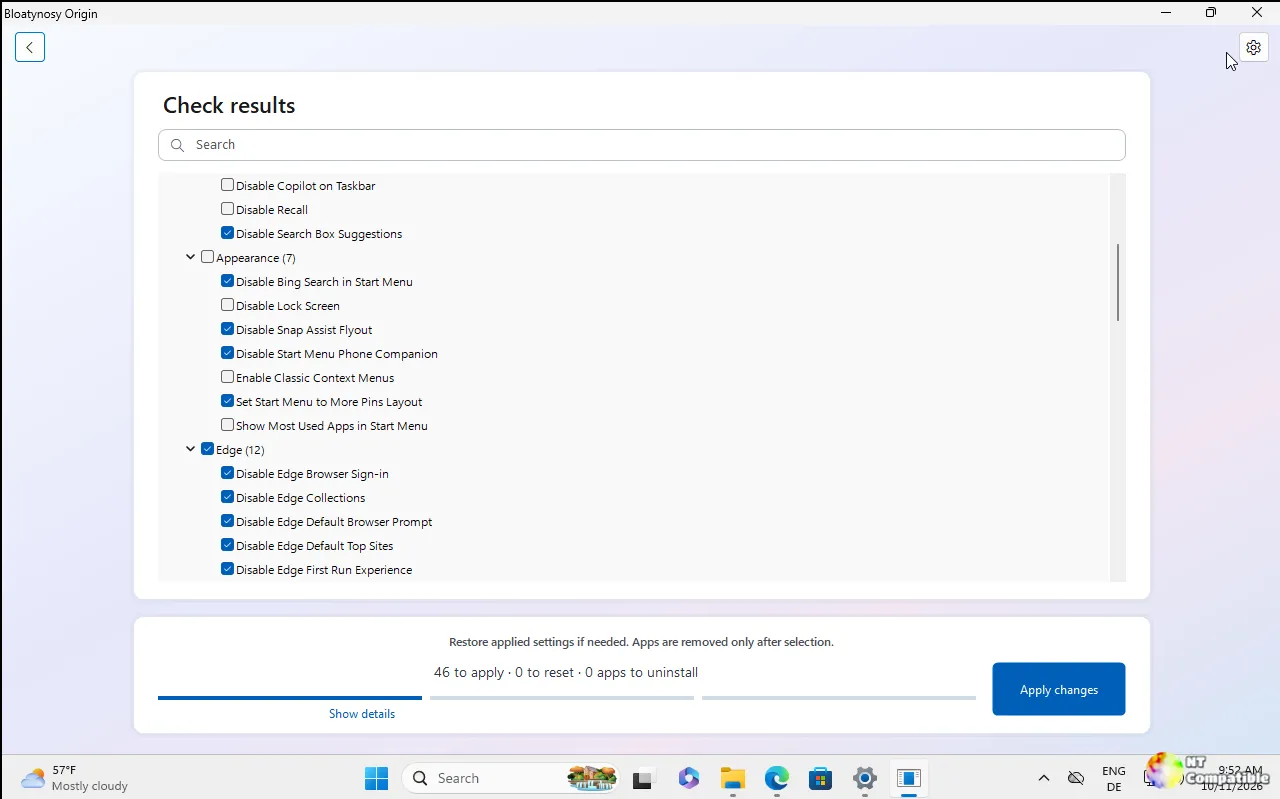
The biggest change is a navigation column on the left. The old setup-style, one-step-at-a-time flow is gone, replaced by Home, Open changes, each category, Installed apps, and the Ignored list, each showing a live count. There's a search box up top, too. "One click to anywhere instead of one step after the other," as Belim puts it.
Under the hood you now get roughly 100 Windows settings, grouped by where they live: Appearance, File Explorer, Privacy, Edge, AI features, Gaming, System, Taskbar, Ads, and Updates. Supported entries can be flipped back to their Windows default. Uninstalling an app asks for confirmation instead of doing it on autopilot.
There's an ignore list for anything you don't want to be nagged about again, plus plain JSON "profiles" that let you point the app at a saved set of preferences. You can even save the current machine as a profile and hand the file to another PC.
The AI helper is opt-in and easy to dismiss if it's not your thing. You bring your own key for Groq, OpenAI, Anthropic, or any OpenAI-compatible endpoint. It stays off until you turn it on, and when active it sends only the name and technical details of the single entry you've selected. No scan of the whole machine, and the key never leaves your PC except to the provider you picked.
And yes, it has an icon now. That was the one thing the 1.0.0 launch build openly admitted was missing.
A debloat that's less about speed
The trust pitch here is transparency. Belim is emphatic about what the tool doesn't do: it doesn't patch system files, doesn't stop services, and has no mysterious "Optimize" button running an unreadable script. Every tweak writes a single documented registry value, checked before writing and read back after. If the readback doesn't match, the setting shows up as failed in the report rather than pretending it worked. App removal routes through PowerShell's Remove-AppxPackage, and packages that Windows treats as non-removable get refused. The entire catalogue lives in plain-text files anyway, WinRules.ini and AppRules.ini, so you can read, edit, and extend everything yourself. Drop another .ini into the folder and it gets read too. That's the whole plugin system, no DLL or manifest in sight.
It's still a tiny thing. Roughly 540 KB, a single exe, no installer, no background service. It does nothing when you aren't using it.
Head here to the official releases page on GitHub,


