Microsoft strips promotions and adds privacy controls to Windows 11 Search Box redesign
The overhaul lands in the Dev channel today, finally giving users a way to turn off web results and clear up years of clutter.
Microsoft has confirmed a significant redesign of the Windows 11 Search Box, and it's addressing the complaints that have dogged the feature since day one. Promotional content is gone. A new privacy toggle lets you kill web and Store suggestions entirely. The changes are live for Windows Insiders in the Experimental Dev channel today.
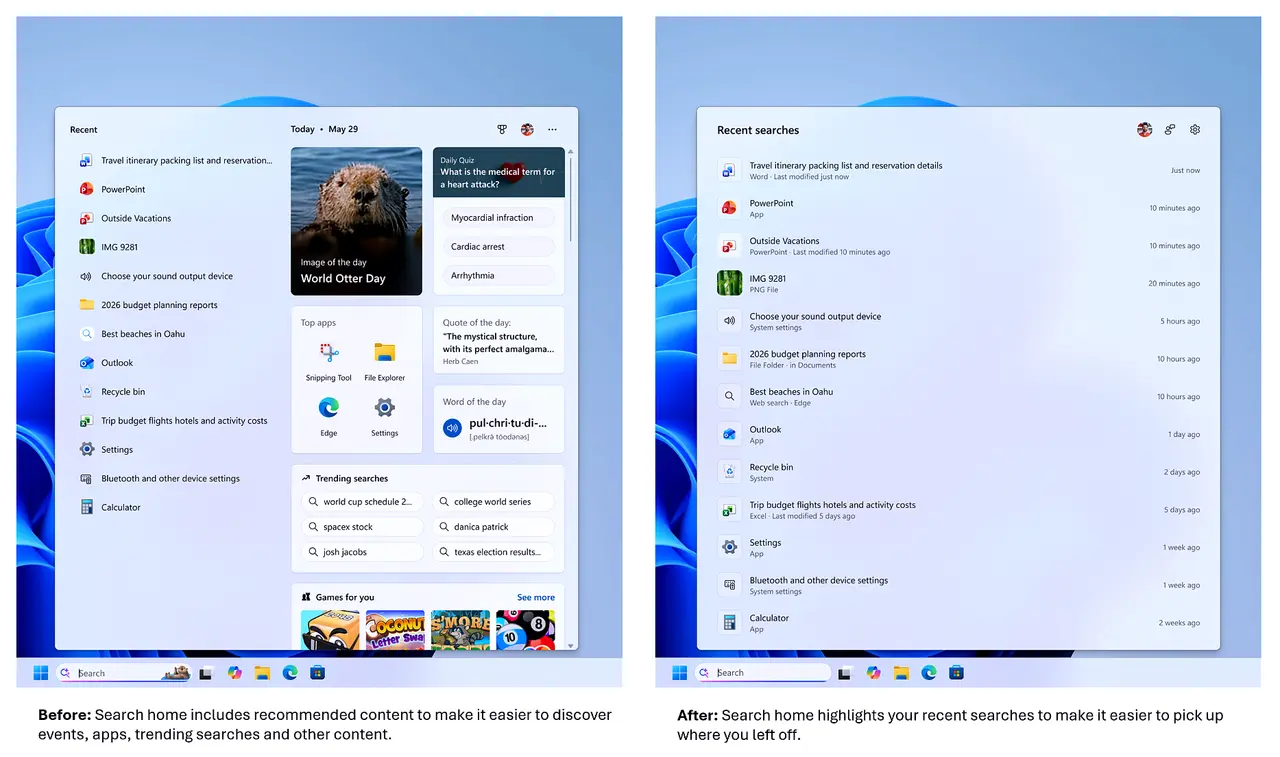
If you've stuck with Windows 11 for a while, you probably remember the early search experience. Type "Calculator" and you'd get Bing ads for calculators. Type "Outlook" and find web tutorials because the system couldn't prioritize the actual app. The home screen was a dense wall of tiles that nobody asked for.
Next, the UI is getting a trim. Microsoft says the home screen is now calmer. Recent searches are easier to scan. Results carry clear labels: app, setting, file, web result, or Store suggestion. You'll know exactly where you're going before you click.
The privacy toggle is the real shift here. You can find it in Settings > Privacy & Security > Search. Turn it off, and web and Store results disappear. Local matches win. Type "This PC" and you get the Recycle Bin and your drives, not a query to Bing.
Keep in mind that while the storefront is cleaner, Bing still powers the web results when you leave the toggle on. The official blog post for this update is co-authored by Jeff Petty from the Windows Experience team and Anderson Aiziro from Bing Search. That signals deeper integration between the OS search infrastructure and Microsoft's search engine, even if the promotional banner ads have been pulled.
For everyday typing, the typo tolerance is meaningfully better. Drop a letter, mash the keyboard, or type partial words, Windows 11 should still catch it. Try "utlook." It finds Outlook. File search now supports two-character queries, so you can find files without typing the full name. Cloud and connected files are also ranked better when they're the right match.
Settings search is getting a first round of ranking improvements. Microsoft notes more tuning is planned later this year. Reliability work is also underway, with reduced crashes and loading issues reported.
However, at the same time, this isn't a guaranteed update for everyone immediately. Microsoft is distributing this via Controlled Feature Rollout. You might get it today, or you might not see it for weeks. Some regions may also see different experiences.
It's a rather expensive redesign in terms of engineering effort, though the functionality and user control improvements help justify the investment. The removal of promotions aligns Windows Search closer to macOS Spotlight and third-party launchers like PowerToys Run, which have long thrived on local-first, distraction-free searching.
To test the changes, jump into the Dev channel, reboot, and report issues in Feedback Hub under Desktop Environment > Search. Jeff Petty and Anderson Aiziro noted that "You've been asking for search that is faster, more relevant, and easier to use," and "We focused first on making results more dependable, easier to scan, and clearer before you click."
If this rollout holds, it marks a turning point for one of the most-used entry points in Windows. After years of users complaining that the search box felt like a shopping ad platform, Microsoft is finally treating it like a system utility.


