Microsoft Rolls Out Five New Windows 11 Builds as Search Grows Up
The latest Insider Preview wave spans four version families and keeps pushing Microsoft's redesigned Windows Search.
Microsoft pushed five new Windows 11 Insider Preview builds into the Beta and Experimental channels today. It also shipped a privacy option for business customers. The announcement, posted by Insider Program lead Stephen Lines, reads less like a feature dump and more like a snapshot of where Windows 11 actually sits right now.
And the picture it paints is busy. In a single week the team polished the current 25H2 release, expanded a major Search overhaul, and advanced two builds that won't land on anyone's PC until 2027 or later.
Five builds, four families
Keep in mind that these aren't just five incremental bumps. The build numbers alone tell you Microsoft is running parallel development tracks that would give most people a headache.
The Beta channel (26220.9836) runs on the current 25H2 feature update and is the one most casual Insiders will actually land on. The Experimental channel (26340.9843) sits on version 26H2. Then come two separate 26H1 tracks, one Beta (28020.3382), one Experimental (28120.3393), plus a Future Platforms build (29698.1000) pointed at undeveloped hardware you're not hearing about yet.
That breadth is deliberate. Microsoft runs these tracks to de-risk features years before they ship, letting a bug in a far-flung track die quietly instead of breaking your Monday morning.
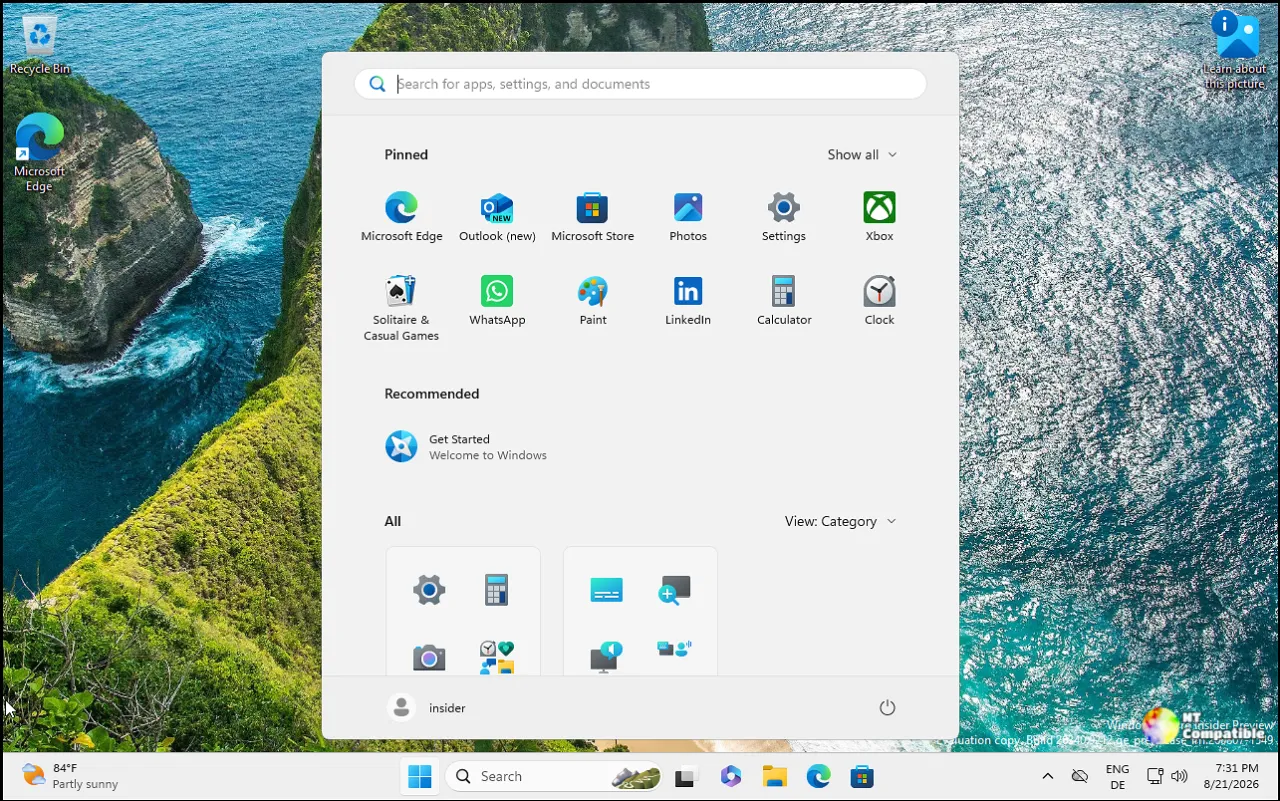
The redesigned Search is the thread running through most of it. It first appeared on the taskbar on October 7, and by the look of things Microsoft intends to keep stacking features until it's doing actual work rather than just finding things.
You can now fiddle with system settings straight from search results. Inline sliders handle volume, brightness, and cursor size, and the UI starts nudging you toward actions so you can figure out what's even possible.
Phone Link got wired in too. With a phone connected, Search can make calls, send texts, and toggle Do Not Disturb without your hands on the phone. Android works right now. iPhone support is slated for early next year, which is the kind of "next year" you might want to keep a skeptical eye on.
Search also throws in richer results: inline file previews showing last-modified dates and authors, plus web answers for things like weather or stock quotes. Store apps show up in results as well, which you can turn off under Settings => Privacy & security => Search if the noise gets loud.
Microsoft says the new Search still opens at the bottom center of the screen, and it's working to make it adjust to different taskbar positions. Searching from the Start menu shows the older experience for now, which is a fair admission that the redesign isn't fully baked.
It matters more than you'd think, honestly. Search is one of the most-used surfaces in Windows, so getting it right reaches far more people than any fancy menu in a corner nobody clicks.
A permission upgrade Insiders have wanted for years also shipped, in both the Beta and Future Platforms builds. Desktop apps can finally have camera, microphone, and location permissions managed one at a time, instead of the old device-wide on/off switch that treated every classic program the same way.
You'll find it under Settings => Privacy & security => Camera, Microphone, or Location. Apps that haven't touched a resource yet will ask permission the first time they need it, and existing choices stick, nothing gets reset on you. Microsoft does warn that some apps may appear under a strange name or as "Unsigned," so grant access to things you actually recognize.
Businesses get their own privacy win. A new Microsoft Intune policy lets commercial customers keep Feedback Hub submissions private to their tenant and hides the public Community feedback page. It requires Feedback Hub app version 2.2608.301 or later.
Here's the curious bit, though. Every single build this week, all five of them, carries the exact same note. Microsoft said it is temporarily rolling back the solid "donut" loading spinners across Boot, Logon, Restart, Shutdown, and Update while it works on a bug. When that same line shows up across four version families, it usually means a recent tweak broke something bigger than anyone wanted to ship. Five builds. Four families. One shared admission that something needed to go into reverse.
Give it a try
Insiders can grab the builds through Windows Update => Windows Insider Program. The new Search rolls out gradually on Experimental, and to preview it sooner you can turn on the "New Windows Search Experience" feature flag under Settings => Windows Update > Windows Insider Program => Feature flags after updating to build 26340.9616 (Experimental) or 28120.3181 (Experimental 26H1).
Then you check for updates and restart. Feedback goes through Feedback Hub (Win + F), under Desktop Environment => Search for the new Search experience or Settings => Privacy Settings for the permission changes.
Not much drama this week. But the Search rollout in particular is the thing worth watching, it's quietly turning Windows' most daily tool into a place to do things, not just find them.
Windows 11 Insider Beta Preview Build 26220.9836 - Windows Insider Program
Release notes for Windows 11 Insider Beta Preview Build 26220.9836
Windows 11 Insider Beta Preview Build 26220.9836 - Windows Insider Program
Windows 11 Insider Experimental Preview Build 26340.9843 - Windows Insider Program
Release notes for Windows 11 Insider Experimental Preview Build 26340.9843
Windows 11 Insider Experimental Preview Build 26340.9843 - Windows Insider Program
Windows 11 Insider Beta (26H1) Preview Build 28020.3382 - Windows Insider Program
Release notes for Windows 11 Insider Beta (26H1) Preview Build 28020.3382
Windows 11 Insider Beta (26H1) Preview Build 28020.3382 - Windows Insider Program
Windows 11 Insider Experimental (26H1) Preview Build 28120.3393 - Windows Insider Program
Release notes for Windows 11 Insider Experimental (26H1) Preview Build 28120.3393
Windows 11 Insider Experimental (26H1) Preview Build 28120.3393 - Windows Insider Program
Windows 11 Insider Experimental (Future Platforms) Preview Build 29698.1000 - Windows Insider Program
Release notes for Windows 11 Insider Experimental (Future Platforms) Preview Build 29698.1000


