PeaZip 11.1.0 Finally Fixes the Extract to Context Menu Without Turning It Into a Bloatware Nightmare
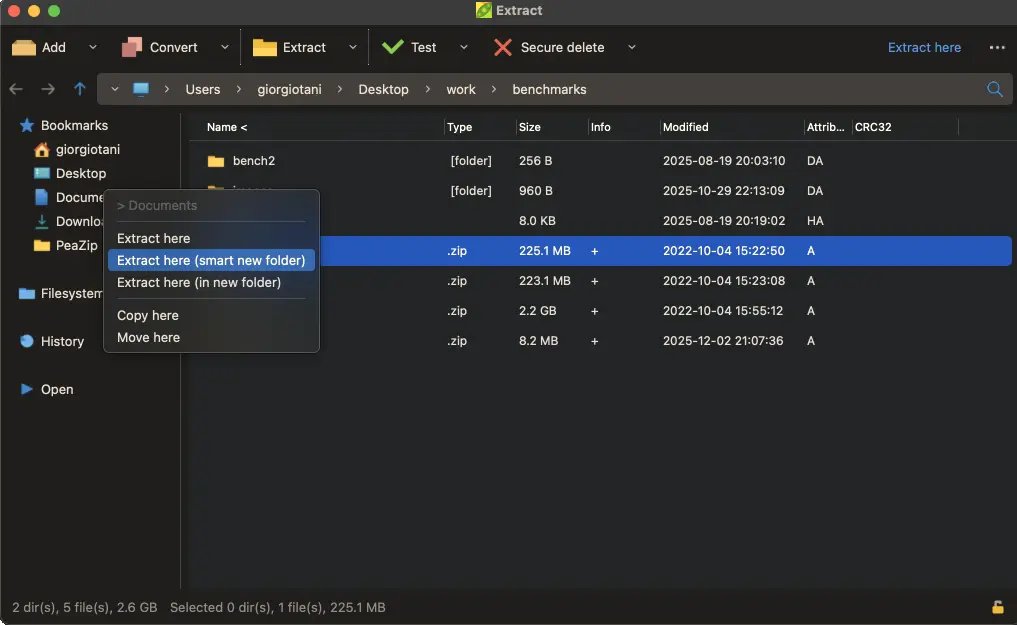
PeaZip 11.1.0 lands with a much needed overhaul to the Extract to context menu and tighter backend compression engines. The update brings last output path memory, bookmark shortcuts, and history tracking directly into the file manager interface. Users who have wrestled with Windows right click menus will notice this release actually respects how people organize their downloads and archives.
PeaZip 11.1.0 Context Menu Overhaul That Actually Makes Sense
The Extract to submenu used to feel like a digital junk drawer where every option lived at the same depth. This version reorganizes that entire group by adding last output path memory, bookmarks, filesystem shortcuts, and history tracking as distinct submenus. This matters because right clicking an archive should not require scrolling past half a dozen redundant options just to drop files into a folder you used yesterday. The file manager now remembers where extraction happened most recently and lets users pin frequently used destinations without navigating through nested dialogs. This kind of context menu bloat tends to show up right after a messy Windows update or a corrupted archive handler, but PeaZip 11.1.0 finally cleans that mess out by grouping related actions logically instead of dumping everything into one flat list.
Backend Engine Updates and Security Patches
Under the hood, PeaZip 11.1.0 pushes the compression libraries forward with 7z and p7zip updated to version 26.01. The non Windows build switches to Tino Reichardt's 7-Zip ZS 25.01 alternative while keeping the native Pea engine at 1.31. These updates matter because older compression backends often leave archives vulnerable to known extraction flaws or struggle with newer file formats. Security fixes are baked into this release, which means fewer corrupted zip files and tighter handling of potentially malicious archive structures. The Lazarus compiler moved to version 4.x for the main build while maintaining backward compatibility with versions 3.x and 2.x. That keeps older systems from breaking when users install fresh copies or roll back after a bad update.
Who Should Actually Install This Update
PeaZip has always sat in that awkward middle ground between Windows built in extraction and heavier archive tools. The 11.1.0 release leans into quality of life improvements rather than adding another layer of settings panels or forced cloud integrations. Users who rely on the right click menu for daily file management will get a smoother workflow without extra bloat. Those running older hardware or legacy systems can still compile and run the software thanks to the maintained Lazarus 3.x and 2.x support. The update does not fix every quirk in the interface, but it trims down friction where it actually matters during routine extraction tasks.
Release PeaZip 11.1.0
PeaZip 11.1.0 improves direct extraction from app's file manager, overhauling the "Extract to..." context menu group, with addition of last output path, and Bookmarks, Filesystem, and History subme...
Grab the installer when you need a cleaner right click experience and stop fighting with nested context menus. The rest of the system will thank you for keeping archives organized without turning your file manager into a control panel.


