Windows Update improvements finally give users actual control over reboots
The latest round of Windows Update improvements finally addresses two complaints that have plagued everyday users for years: unexpected reboots and zero flexibility when pausing them. Instead of forcing background downloads to hijack the power menu or locking people into rigid thirty day windows, Microsoft is rolling out changes that let you skip setup updates, extend pauses indefinitely, and shut down without triggering a surprise installation. These tweaks aim to stop the constant flow interruptions while keeping security patches in place.
Skip updates immediately during setup with new Windows Update improvements
The out of box experience now includes a clear option to delay updates until after the desktop loads. This matters because forcing a fresh install to download gigabytes of patches before reaching the desktop wastes time and often triggers driver conflicts on brand new hardware. Anyone who has rebuilt a system recently knows how frustrating it is to wait for background services to catch up on missing patches, which frequently breaks peripheral recognition or leaves basic utilities unresponsive until manually fixed. Users can land on the desktop first, review system compatibility, and then manually trigger the update when internet speeds are better or when they actually want to deal with it. Commercial devices managed by IT departments will still follow corporate policies, but personal builds get this choice right away.
Extend pause windows without hitting a hard limit
The old thirty five day cap was always a workaround for people who needed longer breaks from forced maintenance. Microsoft now allows users to push the pause date forward by another thirty five days repeatedly, with no stated limit on how many times the reset button can be pressed. This directly helps travelers, students during finals week, or anyone running legacy software that refuses to play nice with recent patches. The calendar picker makes it obvious exactly when the next forced installation will occur, so there is zero guesswork about when the system might demand attention again.
Separate shutdown actions from update installations
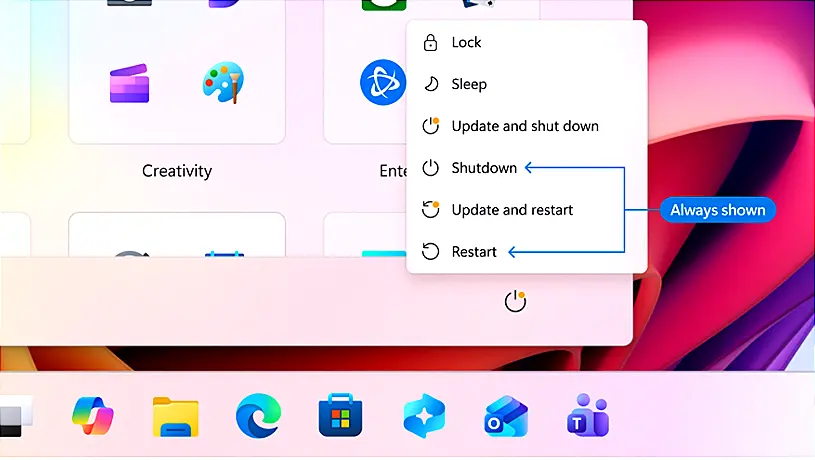
Restarting or shutting down a PC should never require navigating through a secondary menu just to avoid installing pending patches. The updated Start menu now splits power options into two distinct groups. Standard restart and shut down buttons perform exactly those actions without touching background downloads. Update specific choices like update and restart remain available for when the user actually wants to apply changes. This separation stops the common frustration of clicking shutdown only to watch a progress bar appear seconds later. After a normal restart, Windows will also attempt to restore previously open applications faster, which reduces the time spent waiting for recovery prompts.
Clearer driver labels and coordinated monthly reboots
Driver updates have always been a guessing game because Microsoft used to label them with nearly identical names that told users nothing about what they actually touched. The new interface now attaches the device class directly to the update title, so pending patches clearly state whether they affect display, audio, battery management, or other hardware categories. This prevents accidental installations of unnecessary firmware and helps IT admins track exactly which components are receiving changes. On the reboot front, Microsoft is finally coordinating driver, .NET framework, and firmware updates with the monthly quality release. Instead of three separate restarts scattered across a month, all background downloads will wait for a single coordinated installation window. The settings page now collapses everything into one available updates section, making it obvious what is queued without scrolling through fragmented menus.
Reduced download times and automatic failure recovery
Slow connections and failed installations have always been the biggest reasons users skip security patches entirely. Microsoft is compressing update packages to cut overall download duration, which directly benefits laptops that spend most of their time on Wi Fi or devices in areas with spotty broadband. More importantly, the system now attempts automatic background recovery when an installation fails instead of just throwing a generic error code and leaving the device vulnerable. This means longer wait times during the actual patching phase, but it drastically improves success rates for machines that frequently lose power or disconnect mid process.
These changes are rolling out to Dev and Experimental channels first, so expect some rough edges before they hit stable builds. The underlying goal is solid, especially the power menu split and indefinite pause extensions. Keep an eye on the settings page when the update lands, and report any driver mismatches directly through Windows Feedback. Stay safe out there.
Your Windows update experience just got updated
Hey Windows Insiders, Today, we’re excited to share some improvements to the Windows Update experience that are now starting to roll out. These improvements are the direct result of your feedback.