UniGetUI v2026.2.6 Lands with WinUI Refresh, CSV Exports, and Devolutions Stewardship Results
Four months after the acquisition, the package manager manager gets a visual overhaul, export capabilities, and a stack of workflow-focused bug fixes.
Devolutions shipped UniGetUI v2026.2.6. The update brings a WinUI-inspired interface overhaul, CSV export for installed packages and available updates, and Operation History improvements. It also resolves a stack of bugs that were disrupting real workflows. The release signals that the project is moving past the initial investment phase into genuine refinement.
Keep in mind that Devolutions acquired UniGetUI in March 2026. The move brought structural investment, NativeAOT builds for faster startup and reduced attack surface, and a stated roadmap for enterprise readiness while keeping the tool standalone. v2026.2.6 delivers on the visual front more than the feature count suggests.
Managing a dozen package managers across a single machine feels like shepherding cats. You have WinGet for Microsoft apps, Scoop for command-line utilities, Chocolatey for legacy software, and then the Linux equivalents if you're dual-booting. UniGetUI was built to keep that circus from collapsing into chaos. The project sits at 25,300+ stars and counting, which suggests the chaotic landscape of Windows installation tools still hasn't been tamed by Microsoft itself. Real-world reliability. That's what v2026.2.6 is chasing.
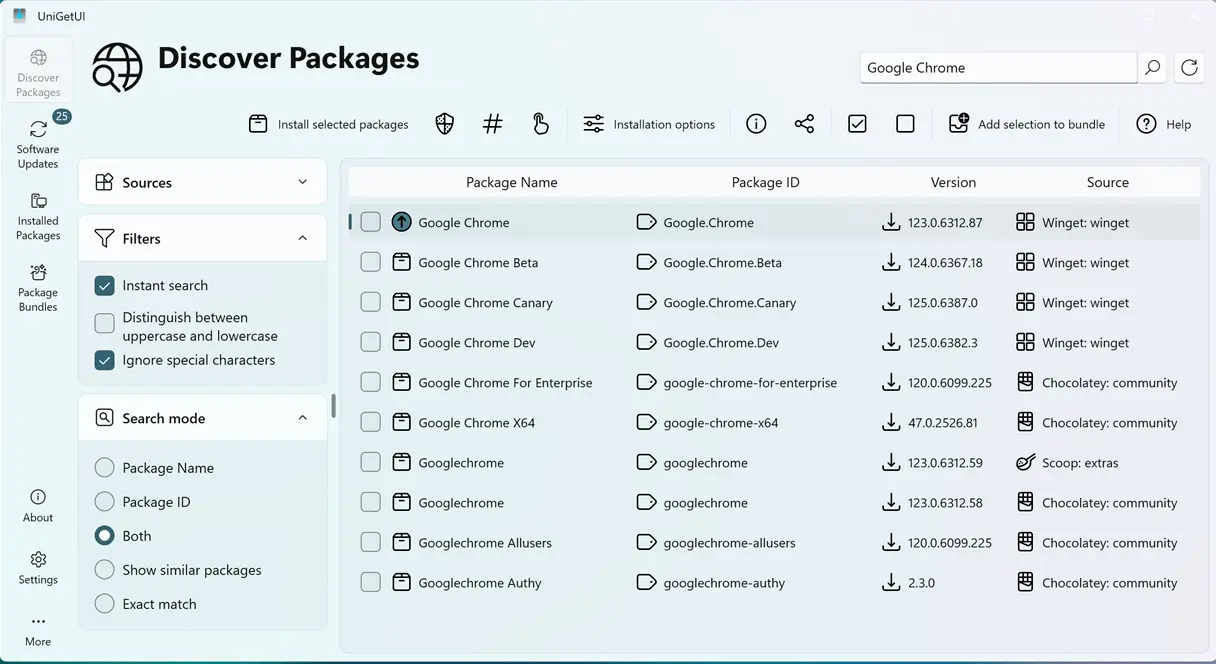
The WinUI Refresh and Export Capabilities
The headline shift is the refreshed WinUI-inspired interface with immersive overlays. If you've used UniGetUI on Windows 11, you know the app already felt at home. This update tightens that fit further.
Main window borders now track the system accent color, with smarter fallbacks when Mica material is inactive. Tray icons also refresh automatically when you switch between light and dark themes. That last change addresses a nagging inconsistency where the tray icon would stick to the old style after a theme change. It's a small fix, but one that matters for users who toggle themes frequently. At this point, the WinUI refresh feels like overdue maintenance rather than a major feature drop.
The Operation History panel received a substantial overhaul. Previously functional but visually sparse, the history view now restructures information for clarity. Operation panels auto-resize to their content, showing up to three visible operations simultaneously without manual adjustment. If you're running bulk installations or mass updates, tracking which packages were installed in what order just got easier.
Export capabilities are new with v2026.2.6. You can now export installed packages and available updates to CSV. Before this, sharing your software inventory with an IT department or migrating via import tools meant manual copy-paste. The new CSV export covers both the installed set and what's available for update. That's useful for capacity planning and batch-upgrade scheduling.
Polish and Bug Fixes
The release rounds out with several quality-of-life tweaks and a list of bug fixes that target real workflow pain points.
The title bar search now includes a Clear button to reset queries in one click. A confirmation dialog before resetting all settings prevents accidental loss of custom configurations. Notifications only fire when UniGetUI is hidden, which reduces interruptions for users who keep the main window open. Custom install arguments and locations now support expanded environment variables, enabling paths like %USERPROFILE%\Apps. Search queries also auto-clear when closing to the system tray, preventing stale state from carrying across sessions.
The bug fixes address issues that were disrupting actual workflows. WinGet update loops for packages whose upgrades never completed are now resolved. PowerShell module updates no longer force the CurrentUser scope, fixing scope mismatches for admins. WinGet updates respect explicitly configured installation locations again. The team also fixed a memory leak when opening embedded web content, duplicate instances spawned from toast notifications, and UAC prompts appearing in the background. Modified activation keys (Alt+Space) also no longer trigger unintended actions.
It's a rather polished release for what is essentially a maintenance cycle. The WinUI refresh brings visual parity with Windows 11, and the CSV export opens doors for IT admin workflows that were missing before. However, at the same time, this release doesn't add massive new capabilities. It's the kind of update that reduces friction day-to-day. For power users managing WinGet, Scoop, Chocolatey, Homebrew, APT, DNF, Pacman, Flatpak, Snap, pip, npm, Bun, Cargo, and more, v2026.2.6 feels like the tool is finally settling into its role as a mature steward.
Head here to for the changelog and the download linksi. The update is available for Windows, macOS, and Linux.


