UniGetUI v2026.3.3 adds a software catalog that can serve its own installers
The free Windows package-manager manager now lets IT admins push approved software straight through that catalog, part of Devolutions' push into the enterprise market.
Get your package managers in a row, then get them working together. That's the pitch behind UniGetUI v2026.3.3, which landed on GitHub on 29 October 2026. The commit (2a9b463) went live just past 20:27 UTC, pushed by GitHub's automation bot, as these updates usually are. It's Devolutions' latest in a fast-moving 2026 cadence, and it carries the tool's biggest shift yet toward a market it never really targeted before: enterprise IT.
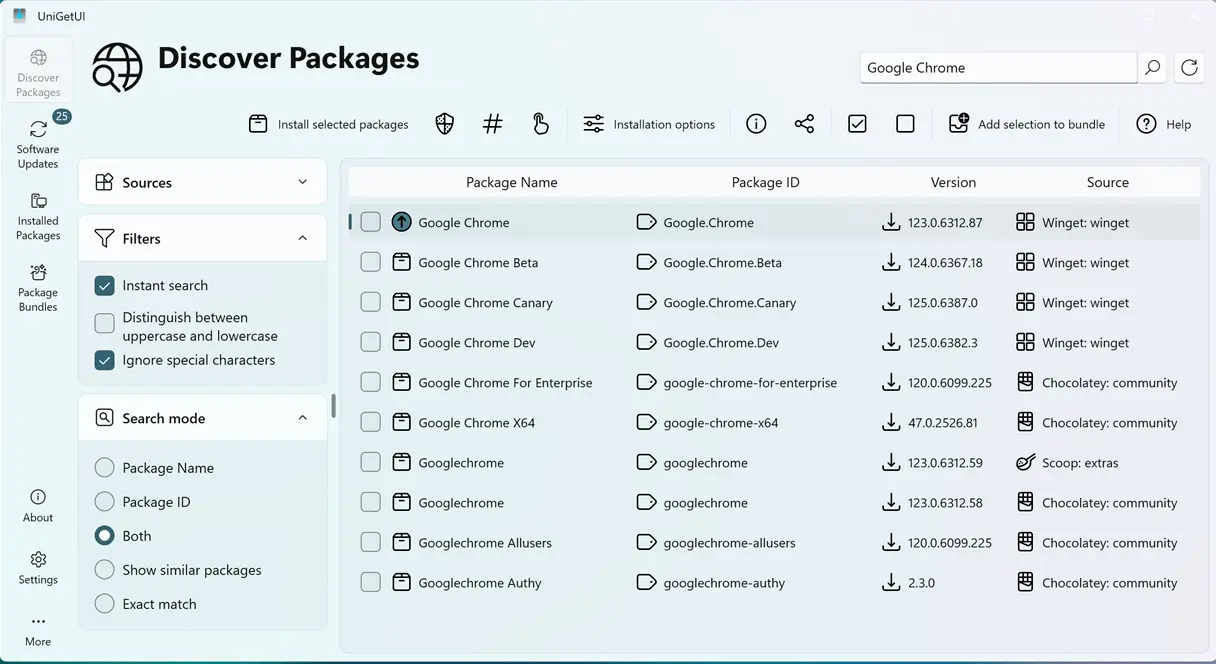
UniGetUI is a graphical front end for a grab bag of command-line package managers including WinGet, Chocolatey, Scoop, Snap, Pip, Npm, the .NET Tool, and PowerShell Gallery. Instead of opening a terminal and running winget upgrade for each one in turn, you get a single window. Discover. Install. Update. Uninstall. No typing required.
The project was built independently by Martí Climent, who started it as a student side project under the name WingetUI. It focused purely on Microsoft's WinGet, which eventually made the name feel too narrow. It became UniGetUI in March 2024. Then, on 10 March 2026, Devolutions Inc. acquired it.
That's a lot to pack into a single year, so keep in mind the key facts. The software stayed open source, stayed under the MIT License, and stayed free, but the backing has changed. Devolutions runs a formal secure-development lifecycle, signs the builds, and verifies its own updates. It also brings resources to a project the founder himself said serves 300,000-plus monthly active users.
Now the actual news.
Serving its own software
The headline addition is an expansion of the Software Catalog. It debuted experimentally earlier this month in versions v2026.3.0 through v2026.3.2 as a curated page of approved software. Where the old catalog just pointed at packages, the new one actually delivers installers.
On Windows it serves .exe and .msi. macOS gets .pkg, .dmg, and .zip. These come from a shared folder or a web folder, like a network share or an internal HTTP endpoint. Here's the part that matters to an IT shop: the installers can be installed, updated, and uninstalled just like any other package.
The idea is clean enough. An admin defines an approved catalog, hosts the installers, and pushes updates without handing out local admin rights. That maps almost neatly onto Devolutions' existing products. Remote Desktop Manager, Agent, and privileged-access tooling make up the company's wheelhouse, and it now has a product to sell to the same buyers.
Not that UniGetUI is turning corporate. It remains, in its own words, unofficial and not affiliated with package managers. It's a third-party front end. But the enterprise framing is unmistakable.
Extensions and other additions
Alongside the catalog, Devolutions added an Extensions framework to Settings. The first extension tracks Git repositories, keeping local clones current on their default branch and showing your worktrees and branches right inside UniGetUI. Extensions are off by default, so you have to opt in.
The rest of the feature set keeps coming. New columns are customizable via a right-click on the header, with changes applying instantly, plus an optional release date column. You can force-update a single ignored package once and leave it ignored. Scoop can now install a specific version, release notes sit one right-click away on the Software Updates page, and deep links open a specific package through the unigetui://package scheme.
There's also a push toward safety and polish. UniGetUI now asks before uninstalling packages and before ignoring updates for several packages at once. The first launch got smarter too, turning off managers whose underlying tool isn't installed instead of falsely reporting that everything is up to date. Cargo no longer needs cargo-binstall or cargo-update, and headless mode picked up update-all and update-manager, along with operations needing administrator rights.
The bug list is long, and in a way that tells you something about the project. Bun packages went missing with a custom folder, npm slipped through on macOS via nvm, and store apps returned placeholder names like ms-resource:AppStoreName. Updates vanished for packages with very large version numbers. And, of all things, logging out or shutting down on Linux was being blocked.
That Linux shutdown bug is exactly the kind of thing that reminds you how much ground one tool now covers. Behind a single window sits a dozen package managers, each with its own quirks, and every one of them is a place where something can break.
A release line on a near-weekly cadence
This release doesn't exist in a vacuum. Devolutions shipped the terminal UI and a cross-platform uniget launcher in v2026.3.1, then the Software Catalog and Catalog Editor, a drag-and-drop sidebar, and the macOS Liquid Glass look in v2026.3.2. v2026.3.3 is the third step in that 3.x series.
The 2026 release line as a whole has produced roughly 34 versions, per Versio.io's version tracker. That's near-weekly. It's a stark contrast to the slower, independent pace Climent kept before the acquisition, and you can credit Devolutions' resourcing for the acceleration.
The numbers behind the project are sizable. It has about 26,750 GitHub stars and 965 forks, with 90+ contributors and 40-plus languages of UI translation. Written in C# under the permissive MIT license, it has been featured by outlets including XDA Developers, WindowsClub, and GHacks.
Worth a look?
It's arguably one of the better solutions to a genuinely annoying problem. Juggling a half dozen package managers on the command line is tedious, and the fact that UniGetUI quietly keeps them all in sync for free is worth something. The enterprise angle might feel like scope creep to some, but the custom-catalog installers are a real addition rather than a buzzword.
For what it's worth, the tool now has the organizational backing and signing rigor that many open-source projects quietly lack, and that matters a lot when software sits on trust ladders this high. Download it from the GitHub release page, where you'll find 25 assets spanning Windows, Linux, and macOS. The x64 installer sits around 34.2 MB, while the macOS disk images land closer to 61 to 66 MB.
Head here for the direct link.
Keep in mind that this is a third-party front end, so treat it like any other software you let manage your system. Full changelog lives on the release page, and the commit-level diff runs from v2026.3.2 to v2026.3.3.


