Microsoft Drops Multi-Channel Windows 11 Insider Builds with Start Menu Overhaul, Braille Support, and AI Memory Boost
July 20’s flight drops a massive set of feature updates across Beta, Experimental, and Release Preview tracks.
Five builds landed today, and if you're keeping score, they cover the Beta (25H2) track at build 26220.8925, the Experimental (26H2) preview at 26300.8935, the next-gen Beta at 28020.2539, the standard Release Preview builds at 26100.8942 and 26200.8942, and the upcoming 26H1 Release Preview at 28000.2597. The highlights span a redesigned Start menu, HID braille display support in Narrator, Voice Isolation for Voice Access, peripheral fingerprint sensor support, and a calendar-based update pause. It's a dense release cycle, but a few clear themes tie it all together.
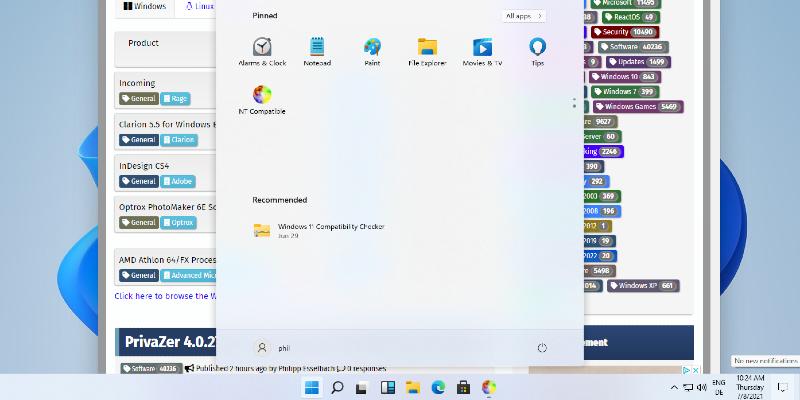
Microsoft is renaming the "Recommended" section to "Recent," adding visibility switches for Pinned, Recent, and All items, and finally introducing Small, Large, and Automatic size options. You can also hide your profile photo and name if you don't want your avatar staring back at you from the taskbar. The Settings page for Start got a modern layout refresh, and the account control flyout now shows a clear subscription badge for quick plan status checks. Keep in mind that this is a long-requested set of controls, though the fragmented state of Windows personalization over the past few years is harder to ignore.
On the hardware front, touchpad users get scroll and zoom speed baselines plus accelerated scrolling in Settings. File Explorer now reports file sizes in proper units, supports middle-clicking to open folders in new tabs from the address bar, and cleans up screen reader announcements during copy and paste conflicts.
Accessibility Wins, Voice Isolation, and the 32 GB AI Boost
Refreshable HID braille displays are now plug-and-play with Narrator. Compatible hardware includes the Orbit Reader 20, Orbit Slate 340, Freedom Scientific Focus 40, and APH Mantis Q40. USB means instant use. Bluetooth means standard pairing in Settings. It even works during the out-of-box experience, so deaf-blind users can set up a PC entirely on their own. Microsoft says the Narrator braille stack was rewritten to meet HID standards rather than relying on legacy proprietary drivers, and the result is noticeably more responsive.
Voice Access gets Voice Isolation in the Release Preview builds for 24H2 and 25H2, which filters background noise and other speakers after a one-time calibration. The feature also rolls out in three new languages on the 26H1 tracks. Peripheral fingerprint sensor support via Windows Hello Enhanced Sign-in Security lands across the release previews, finally letting desktops and non-touchscreen Copilot+ PCs use USB readers for secure sign-in.
Then there's the graphics kernel change. PCs with more than 32 GB of RAM can now run larger local AI models without tripping over memory allocation policies. Microsoft says the tweak was designed to unblock on-device inference workloads for high-RAM configurations. It's a small policy adjustment, but power users running local models on dedicated machines will notice the difference immediately.
Widgets, Bluetooth, and the Calendar Update Pause
Widgets is being dialed back. Badges on the taskbar now use your Windows accent color instead of a jarring red. The panel won't open on hover anymore, which was one of the most frequent complaints from Insiders. The dashboard defaults to a cleaner layout, and the lock screen shows Weather as the only default widget for new users. Microsoft also expanded animated icons on the Widgets taskbar entry point, rolling out dynamically updated content from supported providers to a broader audience.
Bluetooth gets a comprehensive reliability overhaul on the 26H1 Release Preview. Mic mute state now syncs between the audio mixer and Hands-Free Profile, AirPods pair faster, LE Audio reconnects more reliably after drops, and the system no longer throws "Remove failed" messages when the radio changes. Next, the calendar-based update pause in Settings lets you select an end date up to 35 days out. You can re-pause as needed. It's the kind of control enterprise IT and power users have been asking for, though it doesn't exactly solve the "what happens when I'm on vacation and a driver breaks my system" problem.
Head here to the official release notes if you want the full technical breakdown:
Windows 11 Insider Beta Preview Build 26220.8925
Release notes for Windows 11 Insider Beta Preview Build 26220.8925
Windows 11 Insider Beta Preview Build 26220.8925 - Windows Insider Program
Windows 11 Insider Experimental Preview Build 26300.8935
Release notes for Windows 11 Insider Experimental Preview Build 26300.8935
Windows 11 Insider Experimental Preview Build 26300.8935 - Windows Insider Program
Windows 11 Insider Beta (26H1) Preview Build 28020.2539
Release notes for Windows 11 Insider Beta (26H1) Preview Build 28020.2539
Windows 11 Insider Beta (26H1) Preview Build 28020.2539 - Windows Insider Program
Release Preview Build 26100.8942/26200.8942
release notes for release preview build 26100.8942/26200.8942
Release Preview Build 26100.8942/26200.8942 - Windows Insider Program
Release Preview Build 28000.2597
release notes for release preview build 28000.2597
The Beta channel builds are available through Windows Update under the Insider Program. The Experimental 26H2 preview and 26H1 tracks ship via Flight Hub at aka.ms/flighthub. If you're rolling these out on secondary machines, stick with the Release Preview track until the 26H1 image gets a proper RTM push.
It's a substantial drop. Microsoft is clearly prioritizing daily polish, accessibility, and on-device AI infrastructure over radical UI changes. The Start menu tweaks feel like a direct response to years of feedback, and the Bluetooth overhaul addresses issues that have lingered since Windows 10. However, at the same time, the incremental pace means nothing here will convert skeptics. The Insider track has never been more feature-dense, but the bar for what counts as a major update keeps climbing.


