Windows 11 Gets Taskbar Repositioning, Two New Branches, and a PUBG Block in Latest Insider Builds
Windows Insiders on the Beta, Experimental, and next-gen branches got fresh builds yesterday, and Microsoft is finally letting you move the taskbar wherever you want it. The changes arrive across five simultaneous flights, alongside adaptive hibernate policies, auto-expanding search indexing, and a peculiar block on PUBG.
The big news lives in Beta channel build 26220.9022. You can now pin the taskbar to the top, left, or right edge of any screen. The setting hides deep in Personalization > Taskbar > Taskbar behaviors, and it ships with a healthy dose of caveats. Auto-hide won't work in alternate positions. The compact smaller taskbar mode only works at the top and bottom. Touch gestures and the Copilot button are still marked as work in progress.
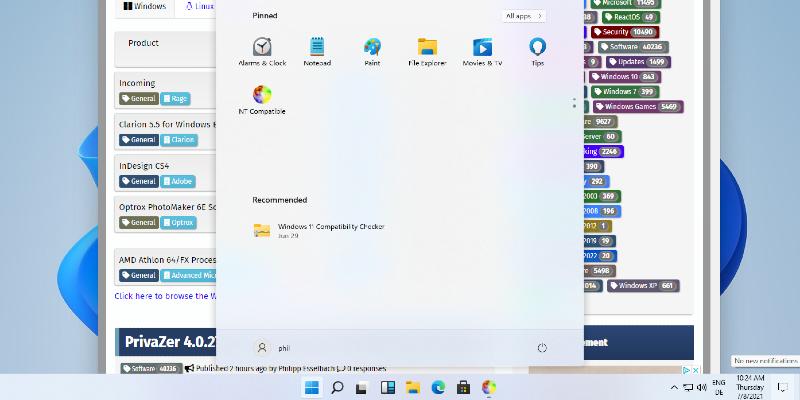
Third-party tools like AutoBar have been solving this exact problem for years. Microsoft took its time, but the native implementation removes the need for a desktop hack.
Microsoft also introduced a genuinely useful compact mode. The new smaller taskbar reduces icon height and padding to reclaim a few precious pixels of screen real estate. It scales the Start button, Search, and system tray proportionally. If you're running a 24-inch panel at 1080p and hating every inch of wasted desktop space, this one's for you.
Windows 11 Insider Beta Preview Build 26220.9022 - Windows Insider Program
Release notes for Windows 11 Insider Beta Preview Build 26220.9022
Windows 11 Insider Beta Preview Build 26220.9022 - Windows Insider Program
Windows 11 Insider Beta (26H1) Preview Build 28020.2623 - Windows Insider Program
Release notes for Windows 11 Insider Beta (26H1) Preview Build 28020.2623
Windows 11 Insider Beta (26H1) Preview Build 28020.2623 - Windows Insider Program
Keep in mind that you're looking at two completely separate codebases running side by side right now. The standard Beta and Experimental channels are still building on Windows 11 version 25H2 and 26H2 enablement packages. Meanwhile, the Beta (26H1) and Experimental (26H1) flights are marching down a distinct next-generation branch. That two-track setup confirms Microsoft is actively developing the next major Windows iteration while shipping the current one.
Power, Search, and Phone Link
The Experimental channel (build 26300.9032) brings a couple of quieter but practical shifts. Adaptive hibernate now watches your battery level like a hawk. Charge it above 80 percent and Windows stays in Modern Standby for instant-on behavior. Drop below 10 percent and it naps into hibernation to preserve data. Search gets automatic scope expansion that learns your file access patterns without forcing you to edit index locations. And hovering over the Phone Link tile in the Start menu will now show inline previews of your recent messages and notifications. Pick up your phone? You can finally stop.
Windows 11 Insider Experimental Preview Build 26300.9032 - Windows Insider Program
Release notes for Windows 11 Insider Experimental Preview Build 26300.9032
Windows 11 Insider Experimental Preview Build 26300.9032 - Windows Insider Program
The 26H1 branches add touchpad gesture tweaks and a unified Windows Update cadence. Driver, .NET, and firmware changes will now bundle with monthly quality updates, which should cut reboot seasons down to a single restart. Admins can also extend update pauses indefinitely, which is a small mercy for anyone managing patch cycles across dozens of endpoints.
Windows 11 Insider Experimental (26H1) Preview Build 28120.2630 - Windows Insider Program
Release notes for Windows 11 Insider Experimental (26H1) Preview Build 28120.2630
Windows 11 Insider Experimental (26H1) Preview Build 28120.2630 - Windows Insider Program
Windows 11 Insider Experimental (Future Platforms) Preview Build 29639.1000 - Windows Insider Program
Release notes for Windows 11 Insider Experimental (Future Platforms) Preview Build 29639.1000
Bugs, Known Issues, and the Certificate Clock
Microsoft didn't just ship features. The team patched a Windows Update rollback loop that was stalling Beta Insiders at error 0xc1900101. SMB backups that threw phantom credential errors finally connect again. File Explorer stopped flagging DFS drives as internet-origin after an offline boot. The Start menu no longer crashes when you drag icons around. Hovering taskbar overflow thumbnails won't immediately dismiss them anymore.
There's one notable blocker. Installing Experimental 26H1 build 28120.2630 prevents PUBG: BATTLEGROUNDS from launching due to a compatibility collision. According to the official release notes, the company is coordinating directly with the developer to resolve the issue. It's an unusual call for a game, though proactive blocking beats letting players chase down half-crashed sessions anyway.
If you're enrolled in the Insider program, keep an eye on August 11. The renewed Windows Insider flight certificate in these builds expires that day. You'll need to update before then or lose the ability to receive future flights. The full FAQ lives at aka.ms/WIPCertExpiry.
It's been a slow rollout for Insider flights this month, but yesterday's batch packs enough punch to justify the wait. The taskbar changes are probably the most requested desktop customization since the early Windows 7 days, and the two-track development strategy proves Microsoft isn't waiting around to modernize the OS. Not every detail is polished yet. Touch support for alternate taskbar positions is still in progress, and the PUBG block shows how spotty the 26H1 branch can be. But if you live on the Beta or Experimental channels, the July 31 flights are worth downloading.


