FluentCleaner 26.11.02 gives its cleaner the Windows Explorer treatment
The open-source cleaner reworks its interface around tabs, an Explorer-style address bar, and a much denser layout.
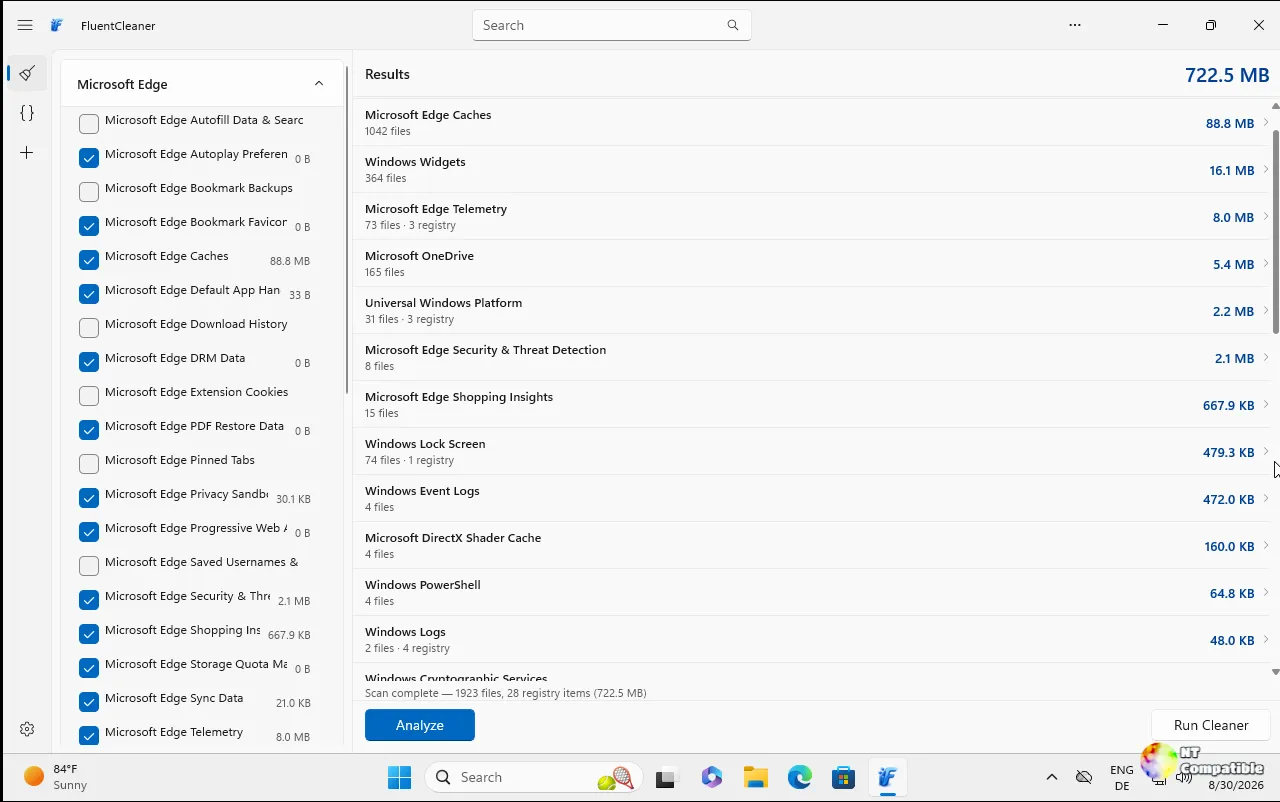
FluentCleaner 26.11.02 shipped on November 12, and the headline change is that your file-cleanup tool now looks like Windows File Explorer. The old navigation sidebar and hamburger menu are gone. In their place come tabs across the top, a breadcrumb address bar, and a results list roughly four times as dense.
What it actually does
FluentCleaner is free, open-source, and MIT-licensed. It scans for disposable files: browser cache, temp folders, logs, leftover traces from apps you installed and uninstalled. Then it shows you exactly what each item is, and nothing gets removed without you selecting it first.
Under the hood runs a single shared core called FluentCleaner.Core. Two front-ends sit on top. The Modern edition uses WinUI 3 and .NET 10, ships self-contained at about 140 MB, and needs Windows 10 build 19041 or later. The Classic edition is WinForms on .NET Framework 4.8, weighs in at roughly 3.57 MB, and runs on practically anything. Both ship as portable ZIPs with no traditional installer, and the Modern one can also be installed via WinGet (winget install --id Builtbybel.FluentCleaner --exact).
The real substance here isn't the window dressing though. FluentCleaner leans on community-maintained databases, chiefly winapp2.ini, a file of thousands of specific rules built up over 15-plus years. Each entry tells a cleaner exactly which temp folders, cache paths, or registry keys to touch for a given app, rather than sweeping broad wildcards across your drive.
The developer admits he was "too lazy to rebuild all cleaners natively," so he wrote his own parser. He says it's "surprisingly fast," faster than the old Piriform version, and you can inspect the exact FileKey and RegKey behind any rule before it runs.
What's new in the Explorer Update
Per the release notes, this one is "almost entirely about the UI" and is "the biggest visual change FluentCleaner has had so far." Four changes, basically.
Tabs come first. Each keeps its page alive, so flipping back to a finished scan doesn't throw the results away. A plus button lets you pick what a new tab should be: Cleaner, Terminal, or Custom, and Settings now opens as its own tab instead of stacking on top. The last tab can't be closed, because an empty window helps nobody.
Then a real address bar. It holds a clickable breadcrumb trail, back and reload controls tied to the active tab, plus search and a page-actions menu on the right. The design calls it an IAddressBarPage contract, a fancy way of saying the breadcrumb always reflects whichever page you're currently looking at.
Then a denser layout. Result rows shrank from 50px down to 26px. Column headers are now 28px and they sort. A status bar along the bottom shows category count, entry count, selection count, and total size found. The old accordion list is gone, so the tree now shows categories and their entries at once.
The developer quantifies it directly. A 900px window used to show 13 collapsed rows and a blank results pane. Now that same window shows the tree, the entries with sizes, and the actual file paths side by side. Fair enough, and that last part is a direct shot at community complaints in Discussion #100, where WinUI critics called it a tremendous waste of screen space.
Under the hood, the active tab now merges with the page below it using a Mica-based fill while the tab strip stays on bare Mica, giving it that Explorer look instead of one flat color. The title bar is hand-built because the stock control wanted the icon to sit to the right of the tabs. The clipped ellipsis button on hover is fixed too. Small stuff.
The developer also flags the rough edges. Some new strings are English-only, and the other 17 languages will catch up next build. The tree pane has a fixed width with no splitter yet, and each Cleaner tab loads its own copy of the database, which is fine for a few tabs and less fine for ten.
Modern or Classic?
Both editions share the same cleaning core, so most cleaning advances land in both. UI and runtime features split apart though. The Cookie Manager reached both editions back in August. Mini mode, that compact always-on-top companion, landed in Classic only. Command-line automation for Classic followed in September.
A community poll with 214 votes found users nearly split: 44 percent for Classic, 37 percent for Modern, 11 percent both, and 5 percent undecided. The comments lay bare a real tension. WinUI critics want screen space. Modern defenders want Windows 11 consistency and the AI-assisted cleaner-explanation feature.
FluentCleaner is a one-person project as well. No company, no investors, no marketing department. Belim funds it optionally through PayPal and Ko-fi donations, posts early builds and development rants on X, and handles issues on GitHub.
He's gradually becoming associated with a small, opinionated family of Windows utilities now. Bloatynosy, his original debloater, got rebuilt in WinForms recently, which is his stated all-time favorite framework. CrapCheckThis is a read-only inspection tool with what he calls "HijackThis energy for modern Windows crap." CrapFixer 2.0 scans, fixes, and restores Windows tweaks, while FlyOOBE and Winslop aim to give users more control over setup and bloat.
The repo sits at roughly 7.1k stars and 244 forks, with active translation work in Azerbaijani, Japanese, Italian, Russian, Polish, and more.
FluentCleaner deliberately skips the features other cleaners bundle. No secure file deletion, since overwrites make no sense on SSDs with TRIM and wear-leveling. No registry cleaner, because orphaned keys have zero measurable performance impact and the risk-reward is inverted. It points to Autoruns for uninstaller residue instead. The README's philosophy boils down to a simple idea: fewer features, honest features.
Keep in mind a few warnings, though. The developer repeatedly insists FluentCleaner has no affiliation with fluentcleaner.org or any third-party site, so the only official source is the GitHub repository. A polished-looking website doesn't make something official.
The aggressive databases, Winapp3 and Winappx, are optional and not for the faint-hearted. Default selections are generally safe, but inspectable rules don't make every definition risk-free. It still deletes files, so take a backup if something feels important. And it won't magically speed up a machine with plenty of free space, even though a genuinely full drive can slow things down and block updates.
If you want the Modern edition, grab FluentCleaner-win-x64.zip or run the WinGet command above. Classic users can take FluentCleaner-Classic-net48.zip. Either way, stick with the default winapp2 database unless you understand the consequences, and keep a restore point handy.
Head here to the GitHub releases to grab it.


