Devolutions ships UniGetUI v2026.3.0 with scheduled maintenance and selective auto-updates
Devolutions released UniGetUI v2026.3.0 on September 15, 2026, and it's the most administration-minded update this open-source package manager has received under the company's stewardship. The headline additions are scheduled maintenance, selective auto-updates, and full portable support. There's also a pile of smaller reliability fixes on top.
Keep in mind that this is the biggest feature drop in a while. The changelog shows 66 commits from 16 contributors touching 367 files. For context, the last feature release, v2026.2.7, landed on July 31. The project's own notes describe this as a "two-week gap." It's more like two months. Either way, you've been waiting a while.
The update aims squarely at power users and IT admins rather than the casual winget user. Devolutions summarizes it as "scheduled maintenance, selective automatic updates, full portable support, expanded shortcut management, and major reliability improvements across package managers and remote operations." That's a fair read of the whole thing.
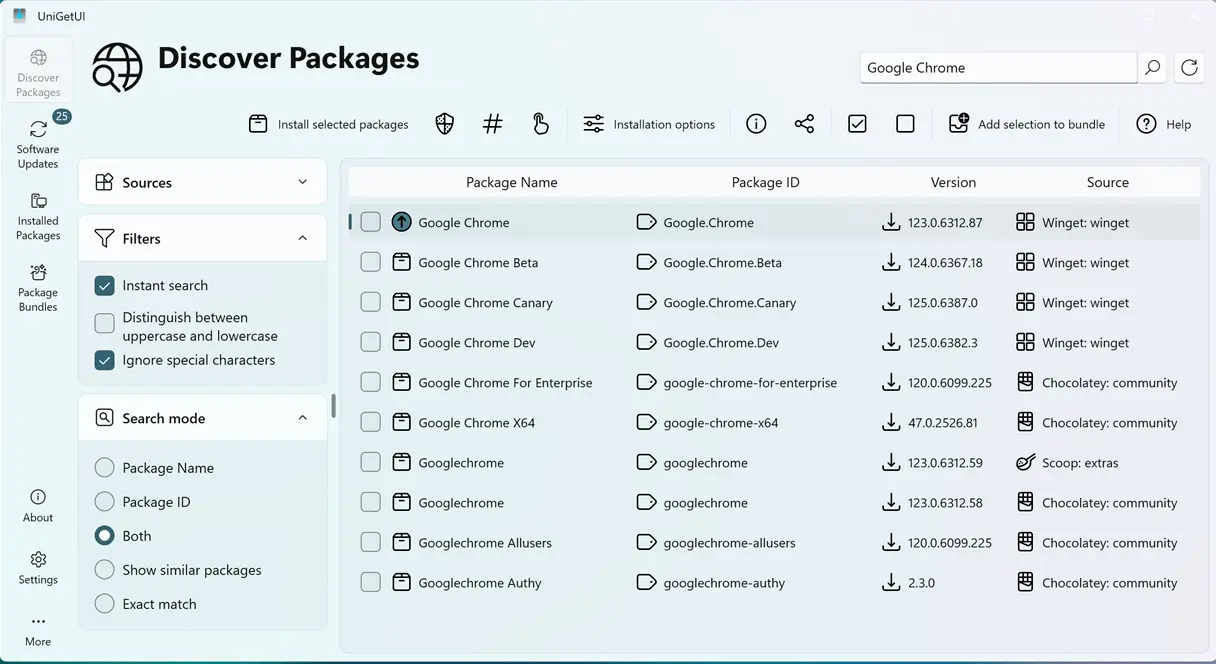
The headline features
Scheduled maintenance is the real story here. UniGetUI's four heavy background tasks are update checks, automatic updates, local backups, and cloud backups through GitHub Gist sync. Each can now run on its own schedule, with independent retries and timeouts. You can check for updates daily at 9 AM while backing up locally once a week and syncing to the cloud monthly. The granularity (interval-based, or daily/weekly at a chosen time) feels like something you'd only see in enterprise deployment tooling.
Selective auto-updates is the companion piece. UniGetUI always let you either auto-update everything or just get a heads-up. Now you can mark individual packages for automatic updates instead of applying it to the whole inventory. Build an allow-list of security-sensitive tools like your antivirus or VPN client and leave the rest on notification-only. It's exactly the kind of whitelist behavior IT teams have been asking for.
Full portable support rounds out the big three. Older portable builds still wrote settings to your user profile. This version keeps the data—the settings and caches—alongside the executable for a genuine zero-footprint run. That helps if you're pulling the tool off a USB stick across a bunch of machines or running separate instances for work versus home.
Under the hood
Everything else is smaller detail, some of it genuinely clever. An installer host column shows each package's download domain, and a tooltip reveals the full installer URL. Given the project's repeated warnings about fake UniGetUI sites, being able to see where an installer actually comes from is useful. Unverifiable version warnings work in the same spirit, flagging packages whose version can't be reliably checked.
The rest is finer tuning. Backup retention limits cap how many timestamped local backups you keep. A %NAME% placeholder lets you build install folders from package names. The Installed Packages page gains "Update" and "Update as administrator" actions right in the list. A responsive toolbar shoves actions into an overflow menu when you shrink the window.
The bug-fix list is long, and a lot of it is Windows-only pain. The non-English WinGet fix is a big one for international users, since search and update checks broke entirely on non-English display languages. So is a silent-failure bug in PowerShell 5.x modules that reported success after errors. Scoop hangs and blank Cargo listings round out the more annoying ones.
Two hardening items matter most. PowerShell package operations now reject shell metacharacters and pass arguments as data rather than splicing them into commands, closing a classic injection vector. Settings imports now refuse unsafe names and stop secure-settings paths from escaping their directory, which blocks path-traversal attacks on restore. Both line up with Devolutions' security focus since it acquired the project in March 2026. And since UniGetUI shells out to a dozen or so package managers, injection defenses actually bite here in a way they don't for most desktop apps.
This release sits on top of a flurry of activity earlier in 2026. June's v2026.2.3 enabled NativeAOT by default, and the weeks since brought a searchable Settings page, WinUI-inspired overlays, CSV export, and configurable environment vars. If you've been tracking the project, the two-month quiet before v2026.3.0 suggests the team simply saved the larger feature batch for now. UniGetUI started as Martí Climent's alternative frontend for winget. It's grown into a unified front for WinGet, Scoop, Chocolatey, npm, pip, Cargo, and more on Windows, plus Homebrew, APT, DNF, Snap, and Flatpak on Linux and macOS. It stays free, MIT-licensed, and community-driven despite Devolutions owning it now.
Assets ship on the GitHub Releases page with SHA-256 checksums, 25 assets in total. Windows users can grab it from the Microsoft Store, WinGet, Scoop, or Chocolatey.
winget install --exact --id Devolutions.UniGetUI --source winget
Linux users get .deb and .rpm packages or a portable .tar.gz, and macOS ships a .dmg or portable archive. All builds compile with NativeAOT for faster startup, and Linux binaries need glibc 2.27 or newer.
It's a sizable release for what is essentially a front end for a command-line tool. The scheduling and selective-update features won't impress casual users, but for anyone juggling software across multiple machines, they're genuinely useful. Nothing here is flashy. That's kind of the point.
Head here to the GitHub Releases page to grab it.


