Devolutions Ships UniGetUI v2026.3.1 With a Terminal UI and CLI Launcher
The new patch release adds a shell-based interface, a cross-platform uniget command-line launcher, and tighter Devolutions Agent controls.
Devolutions shipped UniGetUI v2026.3.1 today, about three weeks after its last big feature drop. Where 2026.3.0 leaned hard into administration and automation, this release pivots. The headline moves chase reach rather than raw power: a terminal UI, a cross-platform uniget launcher, and a Devolutions Agent policy editor that enforces rules instead of merely flagging them.
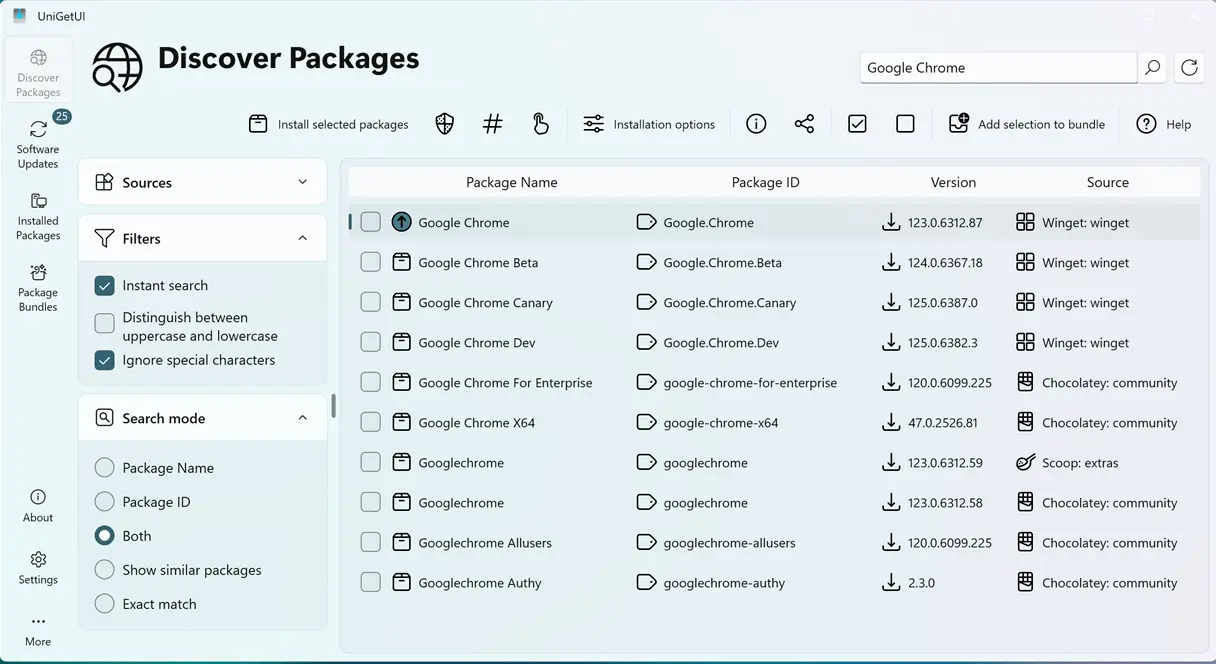
Here's the framing straight from the release notes, quoted verbatim: "This release adds a terminal UI, a package policy editor for Devolutions Agent, and lets you choose which package managers a search covers. It also fixes many package manager and interface bugs."
Short. Plain. No fanfare, and maybe that's the point.
A terminal front-end, not a parallel app
Run uniget tui and you get a shell-based interface that pulls from the same settings and history as the desktop app. It's not a separate install with its own profile. It's the same configuration, just rendered in a terminal. A --fake-data demo flag lets you poke at it without touching anything on your own machine, which lowers the barrier to experimentation nicely.
This matters more than the size suggests. UniGetUI has always been a GUI wrapper over CLI package managers at its core. An in-app terminal UI flips that on its head, and it tracks a wider trend of desktop tools offering first-class terminal experiences for the people who already live in a shell.
The uniget launcher ships on Windows, Linux, and macOS. Windows users pick up an optional "Add to PATH" checkbox in the installer, so the CLI is more scriptable out of the box. It complements UniGetUI's local automation API without being the same thing. Think of it as a top-level entry point.
A few smaller additions deserve attention too. Discover searches can now be scoped to specific package managers, which trims the noise when only a couple sources matter. A download-size column shows each package's footprint, and queue prioritization means manually started installs and updates jump ahead of automatic jobs waiting in line. Restart-required notifications round it out, and you can restart straight from the app.
The Devolutions Agent policy editor is Windows-only, but it's the first real UI-level expression of the Agent integration. Broker requests get checked against the Agent's rules before they're sent, so organizations get enforcement rather than a post-hoc heads-up. For what it's worth, that's Devolutions leaning into its security-tooling strengths.
The fixes are where you'll feel the difference
The feature list grabs attention. The bug fixes are the ones that stick.
Take the WinGet post-upgrade regressions. UniGetUI now handles WinGet updates that went missing after upgrading from 2026.2.7, plus updates that targeted the wrong package ID. That specific reference to 2026.2.7 tells you fallout from an earlier release was still being cleaned up.
The cross-platform crashes matter just as much. Windows-only commands were running on macOS and Linux, both hitting real correctness for sizable chunks of the user base.
The rest of the list is a broad sweep. False "updates" that were the same as or older than what you already have are gone, as are missing Scoop updates from truncated IDs, PowerShell module failures, and UAC prompt spam when batched admin privileges were enabled. Portable mode stopped writing Pinget files to %APPDATA%, and a bundled UI font fixes Chinese characters rendering as squares on Linux.
Not cheap to list all that. But it's the kind of cleanup that separates a mature patch from a rushed one.
Here's the honest read: this isn't a massive release, and it deliberately saves big swings for later. There's no new scheduling or automation work — the maintenance features from 3.0 sit untouched. No glibc or NativeAOT changes either, and the security hardening that 3.0 shipped as a dedicated section is now folded into features rather than called out on its own.
That's fine, honestly. Community engagement was a quiet two reactions versus the dozens 3.0 drew, which is typical for a maintenance release. But the cadence tells a story: roughly three weeks versus the two-month gap to 3.0, which reads clearly as a responsive patch rather than a planned feature batch.
At this point UniGetUI feels like a tool that listens. The TUI and uniget launcher meet power users where they already work, the Agent integration leans enterprise, and a wide net of regressions fixes makes the whole thing feel more predictable. It's arguably the more interesting release of the pair for the everyday user, even if 3.0 had the flashier headline.
Assets live on the GitHub Releases page, complete with SHA-256 checksums across 25 total assets. The verified signature on the commit is a nice touch for anyone watching supply-chain integrity.
Windows users can grab it from the Microsoft Store, WinGet, Scoop, or Chocolatey.
winget install --exact --id Devolutions.UniGetUI --source winget
Or for Scoop:
scoop bucket add extras
scoop install extras/unigetui
On Linux, the Debian package is a simple install command.
sudo apt install ./UniGetUI.linux-x64.deb
Or just extract the portable archive and run it directly.
Keep in mind this is a differential patch, so the value depends on whether you're coming from 3.0 and feeling the regressions. If your installs have been stable, the terminal UI might be the only thing here worth your time. Head here to the GitHub releases page to pull it down and verify the checksums yourself.
Head here to the GitHub release page.


