Windows 11's New Search Overhaul Lets You Actually Do Things, Not Just Find Them
Microsoft pushed fresh Windows 11 Insider Preview builds to the Beta and Experimental channels today. There are five new builds across four development tracks, and the marquee feature reshapes one of the most-clicked entry points in the OS. This time around, Windows Search stops asking you what you want and starts doing it.
The announcement landed on the Windows Insider Blog from Stephen Lines, with a companion deep-dive from Anshul Rawat titled "From searching to doing." Together they mark the third chapter in a long effort to make search feel less like a distraction and more like a tool you can use. It's a meaningful step, though not every build this week delivers something worth your attention.
What you're actually getting
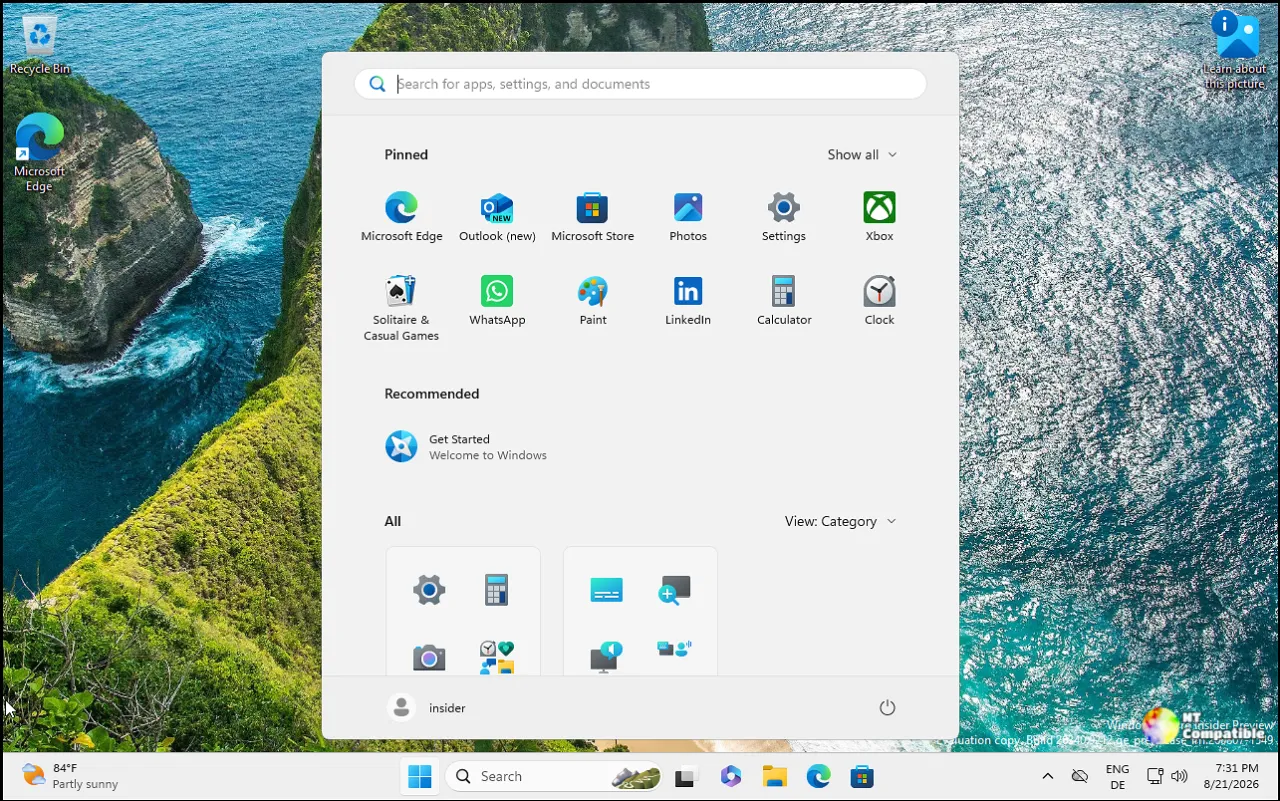
The standout is the WinUI 3 search rebuild, and it's only on the Experimental channel. Builds 26340.9616 (Windows 11, version 26H2) and 28120.3181 (Experimental 26H1) both carry it. Microsoft says the switch to the modern XAML framework trims resource use and memory, and its early testing reportedly shows "substantial improvements in performance and memory usage."
The layout change is the part you'll notice fastest. The old design split things into a results list on the left and a fat preview pane on the right. Microsoft's own data showed that nearly every click came from the left side, so it collapsed everything into one single view. Less clutter. Easier to scan.
The more ambitious bit is inline actions. Windows Search can now handle tasks without opening another app. Say "switch to dark mode," "mute," or "minimize all my windows" and it just does it. It can snap apps side by side when you ask it to arrange your workspace. It's arguably the move that makes this the biggest search change in years.
This is where I'll play devil's advocate for a second. Inline commands in a search box are handy until someone says "turn on Bluetooth" to an empty room. But for people who've complained for years that search is just a slower, ad-laden version of Settings, this is the payoff they wanted.
How to actually try it
The feature rolls out gradually via Controlled Feature Rollout, so you might not see it immediately. If you want it sooner, you can force the issue. Upgrade to Experimental build 26340.9616 or 28120.3181, then head to Settings => Windows Update => Windows Insider Program => Feature flags. Click "Check for updates," restart, and the "New Windows Search Experience" flag should appear.
English is the only supported language for now. Feedback goes through Feedback Hub (WIN + F) under Desktop Environment > Search. Microsoft previews a fuller roadmap too: inline document previews, live web results for things like "weather in San Diego," and eventual integration with the Start menu, Phone Link, and Copilot.
Keep in mind that all of this is experimental. Microsoft repeatedly warns in its Insider docs that previewed features can change, get cut, or never ship. Treat it as work-in-progress.
The other builds, and other stuff
Not everything this week is about search. Here's the rest of what shipped.
The Beta build (25H2, 26220.9606) tightens the lock screen. Weather becomes the primary widget, recommended content gets trimmed, and you get more control over what shows up. It's part of Microsoft's broader push for a "calmer and higher quality" experience, a goal that, frankly, we've heard before, so it's worth seeing if the implementation actually sticks.
On the Experimental 26H1 build (28120.3181), Narrator gains expanded math reading support. It now covers six languages: English (US), English (UK), Traditional Chinese, Finnish, German, and Spanish, plus web content in Edge Stable 153.0.4234.32+ and Chrome Stable 153.0.8010.18+. Blind and low-vision users can read a fraction's numerator and denominator together instead of symbol by symbol, toggling math navigation with Narrator key + Alt + N. That's a genuinely useful accessibility win, and it's one of the less-glossier updates worth applauding.
Head here for the background: this is the third chapter in Microsoft's multi-month search fix. A July 2026 post introduced a calmer box with less clutter and removed promo content. The WinUI 3 rebuild today is the foundation those earlier tweaks were layered on top of. It's the difference between painting over a crack and redoing the wall.
Two more technical notes that mostly matter to a specific crowd.
The Experimental build 26340.9616 enables IAKerb (Identity-Aaware Kerberos) by default for Windows clients. It's a Kerberos extension that lets authentication succeed when there's no direct line to a domain controller. The goal is cutting reliance on NTLM, the older, weaker protocol Microsoft has been trying to phase out for over two decades. For enterprise admins planning NTLM mitigation, this is a concrete step, though full payoff still depends on your domain infrastructure actually supporting the extension.
Task Manager is expanding process grouping so apps can fold separate background processes into one category. Microsoft Defender is the first to use it. File Explorer gains font preview and install straight from the right-click menu. And Microsoft fixed an issue that had blocked Windows Sandbox users from installing updates with error 0x80073712.
Then there are the builds with nothing much on them. The Beta (26H1) flight, 28020.3172, is a routine maintenance run with no individually listed changes. The Future Platforms build (29683.1000) mostly restored missing symbols from the previous flight, but it carries two open issues: some Insiders can't use the internet, and VMware devices are reported to "green screen." Keep an eye on those if you're on that track.
For what it's worth, the Future Platforms flights are Microsoft's look several quarters down the road. They're early architectural shifts not tied to any named release yet, so a broken internet connection on 29683 is the kind of thing you shrug at rather than worry about.
Why it matters
The search redesign is the real story. Microsoft is shifting Windows Search from a discovery tool to an action launcher. It future-proofs the shell, sets the stage for AI-powered features down the line, and lands as a direct response to user frustration and to faster third-party launchers like PowerToys Run.
The IAKerb default flip matters more than the casual reader might expect. It's a concrete move in Microsoft's multi-year plan to retire NTLM, and it cuts the fallback to weaker auth in messy network setups, branch offices, VPNs, hybrid cloud. Real implications for IT shops.
And of course, Microsoft is running four tracks at once: 25H2 in Beta, 26H2 in Experimental, 26H1 in both channels, and Future Platforms still chugging along. The October 7 Windows + Surface event turned up new hardware; these flights keep the software side moving alongside it.
The full list of builds and release notes is below. If you're an Insider, the Experimental channel is where the search action is. Otherwise, treat this as a peek at what's coming and hold your breath until it ships for real.
Windows 11 Insider Beta Preview Build 26220.9606 - Windows Insider Program
Release notes for Windows 11 Insider Beta Preview Build 26220.9606
Windows 11 Insider Beta Preview Build 26220.9606 - Windows Insider Program
Windows 11 Insider Experimental Preview Build 26340.9616 - Windows Insider Program
Release notes for Windows 11 Insider Experimental Preview Build 26340.9616
Windows 11 Insider Experimental Preview Build 26340.9616 - Windows Insider Program
Windows 11 Insider Beta (26H1) Preview Build 28020.3172 - Windows Insider Program
Release notes for Windows 11 Insider Beta (26H1) Preview Build 28020.3172
Windows 11 Insider Beta (26H1) Preview Build 28020.3172 - Windows Insider Program
Windows 11 Insider Experimental (26H1) Preview Build 28120.3181 - Windows Insider Program
Release notes for Windows 11 Insider Experimental (26H1) Preview Build 28120.3181
Windows 11 Insider Experimental (26H1) Preview Build 28120.3181 - Windows Insider Program
Windows 11 Insider Experimental (Future Platforms) Preview Build 29683.1000 - Windows Insider Program
Release notes for Windows 11 Insider Experimental (Future Platforms) Preview Build 29683.1000


