Microsoft Ships Windows 11 Release Preview Builds With Taskbar Relocation and Post-Quantum Crypto
Microsoft has issued new Release Preview builds for Windows 11, and if you have been waiting to anchor the taskbar to the left or top of your screen, the long wait is over. The update lands across three release tracks, with builds 26100.9267 and 26200.9267 heading to the 24H2 and 25H2 release channels, while 28000.2796 takes the wheel for the upcoming 26H1 preview.
These are not trivial maintenance patches. You are looking at one of the most aggressive feature drops in Windows 11 history. Microsoft is addressing a two decade old request, tightening endpoint security with just-in-time administrator privileges, and quietly preparing for the quantum computing threat. Both builds are rolling out now through the Release Preview channel via Windows Update.
The 24H2 and 25H2 Track
I tested the taskbar relocation on a dual 4K setup back in late July, and the flyout timing still stutters occasionally on the left edge. It is not a dealbreaker, but it is noticeable. The headline here is that you can finally place the taskbar on any screen edge. Tooltips, flyouts, and system animations follow the bar regardless of placement. The search box and small taskbar mode still lock to the top and bottom, though. That is a reasonable holdout, though.
A dedicated small taskbar toggle debuts alongside the main feature. It shrinks both the icon size and the bar height, which should make high DPI monitors and cramped netbook layouts actually usable. Next, the Start menu gets a similar treatment.
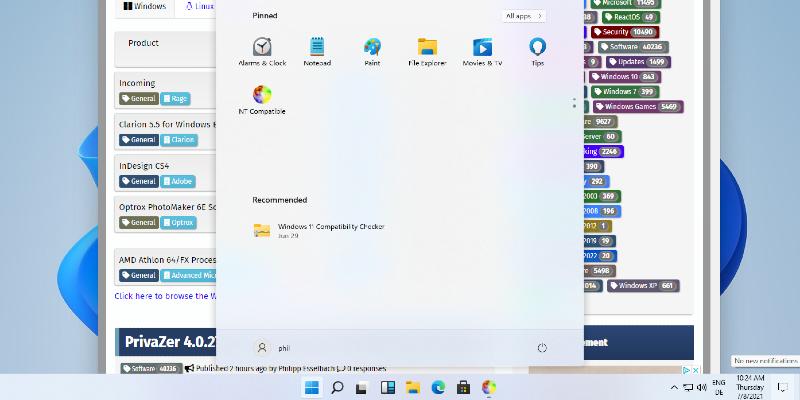
The Start menu now lets you pick between small, large, or the default automatic sizing. The Recommended section has been renamed Recent across the interface and settings. You can also hide your name and profile picture if you prefer a bit more privacy when logging in. Windows Search gets a cleaner home screen and better provenance labels so you know whether a result came from a file, a setting, or the Microsoft Store. There is also a new privacy toggle to kill web and store suggestions, plus automatic indexing of your most frequently used folders. File Explorer Home launches faster and now supports touch scrolling on the recommended carousel.
The security changes are arguably more important than the UI polish. Microsoft is enabling ML-KEM as a standalone option for TLS key exchange. It no longer requires a hybrid configuration. That moves Windows ahead of most desktop OS competitors as NIST finalizes its quantum-resistant standards. Head here to review the full algorithm specifications if you want to dig into the cryptography.
Administrator protection is also rolling out actively. Microsoft writes that the feature "replaces persistent free-floating admin rights with just-in-time privileges." Profile separation hardens the system against elevation-of-privilege attacks. It stays off by default and will need to be managed through Intune or Group Policy for enterprise deployment.
WMIC is dead. The Windows Management Instrumentation Command-line utility has been permanently removed from versions 24H2 and 25H2 starting this month. WMI itself still works, but the deprecated command-line front-end no longer exists as a feature on demand.
Share now lets work and school accounts discover apps from the surface. Virtual desktop switching feels smoother. VPN recovery from background states improves. Windows Update properly returns sleeping PCs to sleep after manual updates, even when auto-sleep is set to Never. Updated progress indicators now track startup, sign-in, restart, shutdown, and update installation.
The 26H1 Track
If you are opting into the newer 26H1 preview track, the changes lean harder into accessibility and input refinement. Voice access now includes a noise-filtering layer called Voice Isolation. It can strip out other speakers, block typing or door-slam sounds, or just pass the raw microphone through. Korean language support has joined the mix as well.
Touchpad users gain scroll and zoom speed adjustments, plus an accelerated scrolling mode for navigating long documents. Windows Hello Enhanced Sign-in Security finally supports external fingerprint readers, so desktop builders can lock down biometric logins without relying on integrated hardware. Fluid dictation in Voice Typing is now disabled by default for new accounts. Microsoft wants first-time users to opt in intentionally rather than wake up to auto-punctuation they did not ask for. Magnifier touch panning bars are also off by default to stop them from cluttering your screen.
Taskbar notification badges now match your Windows accent color instead of always appearing red. The lock screen Widgets experience simplifies with Weather as the sole default widget. Start menu account control gets a subscription status badge for Microsoft account users. You can remove the Image Generation AI component from supported Copilot+ PCs if you do not want it running in the background. Power settings changes now apply consistently across all power plans, and DST data has been corrected for Beirut, Casablanca, Jerusalem, and Nuuk time zones. DHCP renewal reliability improves, especially on NACK responses and Modern Standby devices.
It is a rather heavy feature dump for a release preview, and that brings its own risks. The taskbar relocation will probably break a few niche third-party utilities that assume a fixed bottom anchor. However, at the same time, the lack of upgradability in the taskbar API has been a bottleneck for years. The post-quantum crypto shift is smart, though it will take enterprise security teams a while to adjust their PKI strategies. WMIC disappearing might force some legacy scripts to break, but those scripts probably should have been rewritten three years ago.
You can pull the 24H2 and 25H2 updates under KB5120998, or grab the 26H1 build via KB5120996. Both are hitting Windows Update in the Release Preview channel starting today. If you want to test the taskbar features before they go broad, flip your Windows Insider settings to Release Preview in the beta channel and watch for the download.


