Microsoft Ships New Windows 11 Insider Preview Builds for November 13, 2026
Microsoft pushed fresh Windows 11 Insider Preview builds to the Beta, Experimental, and Release Preview channels today, and the Release Preview updates carry a long feature list that could reach most PCs within weeks.
Microsoft confirmed the releases on the Windows Insider Blog. The post came from Windows Insider Program lead Stephen Lines, and it covered new builds for the Beta (26H1), Experimental (26H1), Experimental (Future Platforms), and Release Preview channels. Release Preview updates span both Windows 11 version 25H2/26H2 and version 26H1.
Some weeks the Beta and Experimental channels open with headline features. Not this time. Microsoft deliberately trimmed today's rollout. The heavier flagship Beta and Experimental builds are landing next week, which gives developers more room between the bigger releases. Keep in mind that the Release Preview builds sit closest to a shipping product and reach the widest audience, so that's where most of the interesting stuff lives.
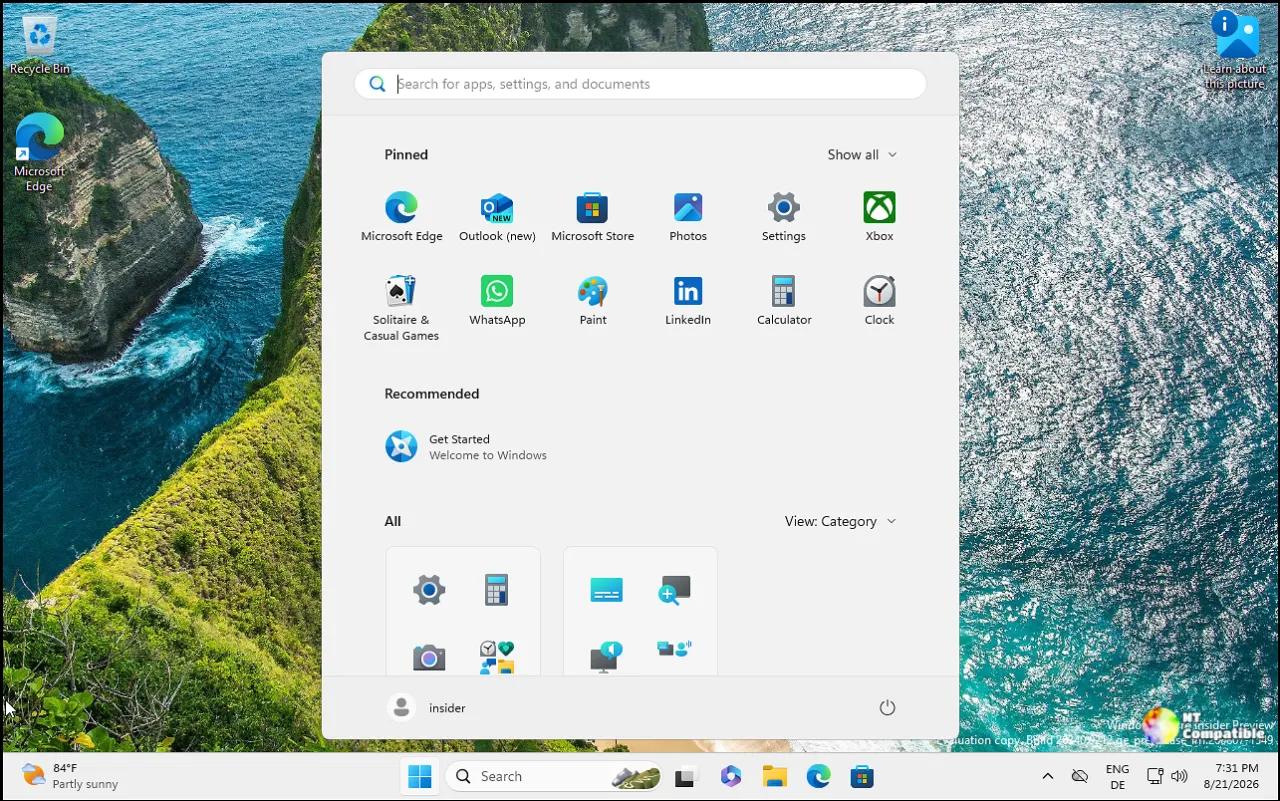
Today's builds, by channel
The Beta (26H1) channel got the lightest treatment, with Build 28020.3532 focused almost entirely on IT shops. It adds a BitLocker preboot PIN that standard users can set without admin rights, plus a fix for RDP connections that failed on a certificate mismatch. Worth a quick warning: the new PIN only works if you've actually aimed a standard-user test group at it. Otherwise those devices just report as non-compliant.
Over on the Experimental (26H1) track, Build 28120.3542 brings the refreshed Run dialog. This isn't a trivial skin job. The Windows Terminal and PowerToys team rebuilt it as a native C/WinUI 3 app on the open-source CmdPal framework, compiled with .NET AOT. It shows in about 94 milliseconds, down from roughly 103ms for the old one. The team also tacked on a ~\ shortcut for fast access to your user folder and quietly killed the browse button, which barely anyone touched. Used by just 0.0038 percent across a sample of 35 million people. That's a decision backed by real numbers, which is refreshing.
The Experimental (Future Platforms) build sits farthest out, and it's where you get a peek at Windows's next generation. Build 29708.1001 simplifies Windows Hello PIN setup for personal accounts, adds a Remote Lock option that lets Intune admins lock a lost device without wiping it, and introduces "Cloud rebuild," a full OS reinstall that works even when Windows won't boot. It also shapes text for Unicode 17.0, adding 4,803 characters and four newly encoded scripts.
Here's a small wrinkle only the most careful readers would catch. The blog text announces Build 29708.1003, while the linked release notes and Microsoft Learn page are actually for 29708.1001. On the Future Platforms track this kind of mismatch is routine, because Microsoft pushes synthetic payload bumps between real builds to stress-test its flighting and update services. The features below line up with the .1001/.1003 release documented on Microsoft Learn.
The Release Preview builds
Release Preview is the build to watch, and this week it ships in two flavors. The 25H2/26H2 builds (26200.10066 and 26300.10066 under KB5132057) begin with a gradual rollout before broadening out, while the 26H1 build (28000.3612, KB5132265) drops a big bag of changes all at once.
The standout is the new Windows Search. Built on WinUI 3, it consolidates results into a single streamlined list, adds inline actions like toggling Bluetooth or brightness, offers quick answers for weather and stocks, and handles typos better. It's English-only for now, but it's the biggest change to search in years. You can probably expect it to reach most machines before long.
Microsoft also pushes the refreshed Run dialog into Release Preview alongside Hello screen-brightening for low-light sign-ins, an XBOX mode refresh, and widgets notifications. On the accessibility front, there's a pointer indicator you can toggle with Win + Ctrl + Shift + X, magnifier upgrades, expanded Narrator math reading, and a screen-capture border that flips from yellow to red.
If you spend a lot of time in File Explorer, the 26H1 Release Preview build earns the most attention. You can now customize the right-click context menu per command, move Properties to the bottom, and choose whether cut/copy/paste show as icons or plain text. The Task Manager Memory page now adds up all installed memory so the numbers actually reconcile. There's also a Cloud rebuild option here, plus HVCI memory-integrity expansion and IPv6 CLAT networking for IPv6-only setups.
Where all of this points
Strip away the build numbers and two threads emerge. First, Microsoft has quietly moved its main Beta channel onto a 26H2 base. The numbers jumped into the 26320 range via an enablement package, but because that ships as an eKB it doesn't automatically mean a pile of new features. It does signal that 26H2 is maturing as next year's major release.
Second, the new Windows Search is a clear through-line building since early November. It started as an experimental preview, moved through Release Preview, and now heads toward general availability. Microsoft framed it as a shift "from searching to doing," and this week marks its most visible step yet.
There's also a strong enterprise bent. BitLocker for standard users, Remote Lock, Cloud rebuild with drive sanitization, expanded memory integrity, web sign-in for Entra hybrid devices, and IPv6 CLAT all point to Microsoft deepening its device-management and zero-trust tooling ahead of the 26H2 era. Accessibility got just as much attention, from pointer indicators to per-monitor zoom to expanded Narrator languages.
What happens next
If you want a taste of what's coming, the Release Preview channels are the sweet spot. They're closest to shipping and cover the widest range of devices. Power users and IT folks should test the enterprise features in isolated environments before rolling out policy changes live. And you may want to skip straight to next week, when the heavier Beta and Experimental flagship builds finally arrive.
Windows 11 Insider Beta (26H1) Preview Build 28020.3532 - Windows Insider Program
Release notes for Windows 11 Insider Beta (26H1) Preview Build 28020.3532
Windows 11 Insider Beta (26H1) Preview Build 28020.3532 - Windows Insider Program
Windows 11 Insider Experimental (26H1) Preview Build 28120.3542 - Windows Insider Program
Release notes for Windows 11 Insider Experimental (26H1) Preview Build 28120.3542
Windows 11 Insider Experimental (26H1) Preview Build 28120.3542 - Windows Insider Program
Windows 11 Insider Experimental (Future Platforms) Preview Build 29708.1001 - Windows Insider Program
Release notes for Windows 11 Insider Experimental (Future Platforms) Preview Build 29708.1001
Release Preview Build 26200.10066/26300.10066 - Windows Insider Program
Release notes for Release Preview Build 26200.10066/26300.10066.
Release Preview Build 26200.10066/26300.10066 - Windows Insider Program
Release Preview Build 28000.3612 - Windows Insider Program
Release notes for Release Preview Build 28000.3612.


