Bloatynosy Origin 1.10 ships the app's biggest redesign yet, plus a hobbyist comeback you won't want to miss
The indie Windows debloater with millions of downloads has finally returned. Bloatynosy 1.10 lands today as the first major redesign of "Bloatynosy Origin," swapping the old long sidebar for cards, flipping to a dark theme by default, and adding a "recipes" feature that lets you save and share your chosen tweaks. It's free. It's portable. It needs no installer and runs as a standard user.
The release dropped today. The release notes list eight changes, but most of them orbit one headline: a redesigned workspace. The old welcome screen is gone. Tweak categories now arrive as cards, each with a description and a live count of items still needing work. Navigation has moved to a compact top bar, and "Open changes" get their own spot so attention-hungry items sit right in front of you. Less introduction, more of what you opened the app for, in the author's words.
On top of that, the dark theme is now the default. Charcoal surfaces, subtle borders, brighter icons, a blue accent here and there. The layout reads flatter, with more room for the tools themselves and fewer layers wrapped around them.
Then there are "recipes," arguably the day-one signature feature. You bundle a selection of tweaks, resets, and app removals into a named recipe, then export, share, or import one from someone else. They sit beside the search box, so there's no hidden toggle to flip. Here's the important part: a preview checks your recipe against the actual current state of your PC before you commit. Confirming only prepares the selection. Applying it is a separate, deliberate step.
That last detail matters. A lot of these utilities pretend to be foolproof. Bloatynosy doesn't.
The core engine also got more careful. Registry checks now tell a missing value apart from a missing key. Binary values compare correctly even when formatting differs. Numbers too large for a DWORD get rejected rather than silently truncated, which is a subtle but real hardening on the security side. And the app debloated itself too: the old profile-activation flow is gone, the recipe dialog now uses the WinForms Designer, unused translations were pruned, and image resources release when windows close.
Keep in mind it still runs on .NET Framework 4.8 over WinForms. The author leans into that loyalty. "Still portable. Still WinForms. Still nothing applied just because you opened the app," he writes.
Why "Origin" actually matters
Here's the bit that makes this more than a version bump. Bloatynosy's timeline is a little bit of indie-software folklore. It launched in mid-January 2023 as Belim's first-ever release, a successor to a project called ThisIsWin11 that ran through a few renames: ThisIsWin11, Debloos, BloatyNosy, and finally Bloatynosy. The README calls these "two identity crises."
By May 2023 the app was briefly in the Microsoft Store before being pulled, with Belim saying he'd been "banned by Microsoft overnight" over a rejected update and a claim the app "does not have a valid certificate." It peaked around v0.85, the version everyone still points to, and later builds stacked on tabs, a plugin store, dark mode, an AI filter, WinGet support, and even a module for installing Windows 11 on unsupported hardware. Belim later wrote that each of those "moved further away from the thing that made the first version worth using."
So the return makes sense. In October 2026 he shipped Bloatynosy Origin 1.0.0, a from-scratch rewrite built around the stripped-down philosophy of v0.85. The trigger was oddly small: he was at "a well-known company" and noticed an employee Googling Bloatynosy and fumbling to download it. That fumble convinced him "the legend lives on." He even admitted the launch build had been sitting in a "ready to publish" folder for eight or nine days because he'd never pressed the button, and it still lacked an icon.
Now that's a story you don't see at most software launches. The follow-ups came fast. Origin 1.01.103 landed on 20 October with a navigation sidebar, about 100 registry-backed tweaks across ten groups, portable JSON profiles, an opt-in AI helper, and finally an icon. Then today's 1.10.
What it does to your machine
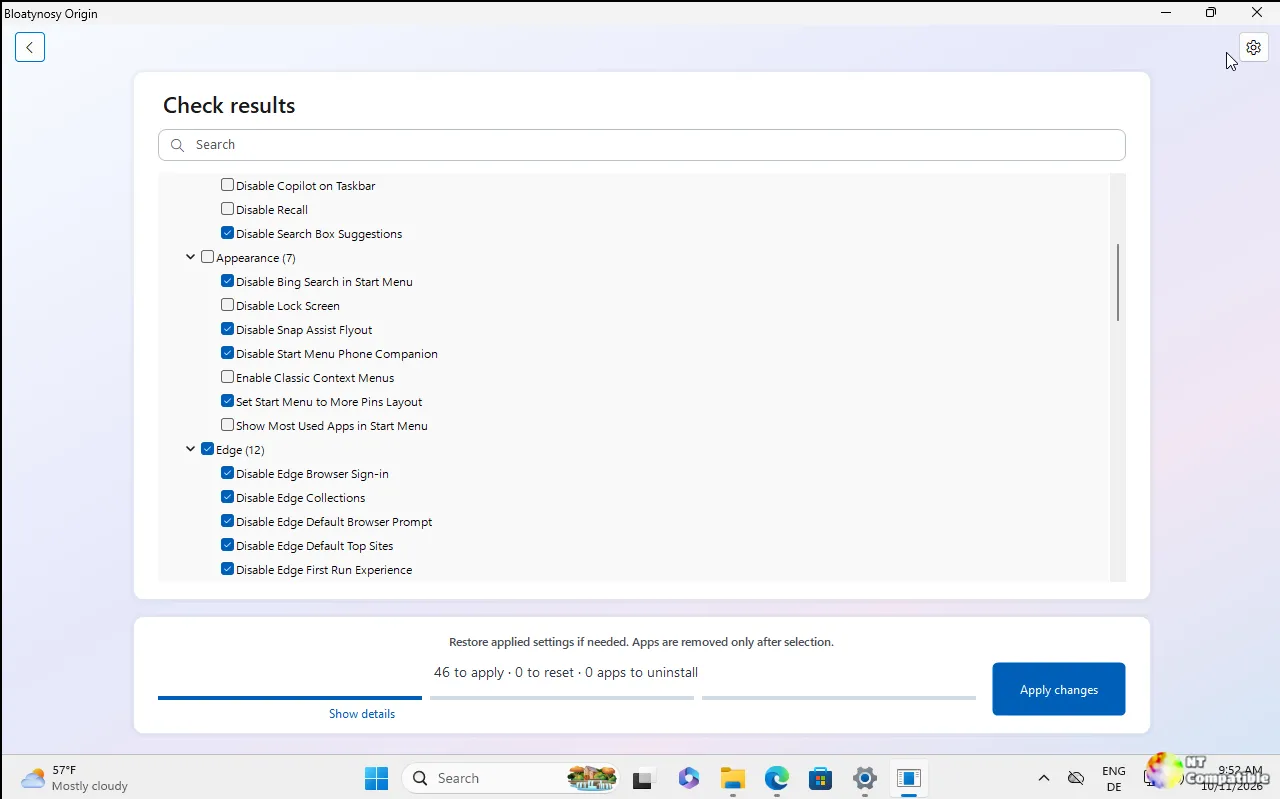
One more thing worth covering, since it shapes whether you'd hand the tool the keys. Bloatynosy runs a three-step flow: check your PC (reads settings and apps, changes nothing), review (tick what goes, untick what stays), then apply (a report says what worked, what didn't, and what needs a restart).
Results group into categories instead of fanning out into hundreds of checkboxes. "Available changes" holds items still needing work; "Already applied" holds ones already set as recommended, so you can restore defaults. The tick means the opposite in each branch, so you do need to read. Selecting a row shows a plain-language description, and "Show details" reveals the actual registry path and value.
The app is blunt about its limits. It doesn't patch system files, doesn't stop services, and has no mysterious "Optimize" button. Each change writes one documented registry value, checks it, then reads it back. If the readback doesn't match, the setting shows as failed. App removal routes through PowerShell's Remove-AppxPackage, and packages Windows won't let you remove get refused. Uninstalls have no real undo, which the app says plainly.
Elevation stays optional and on-demand. It runs as you. Machine-wide writes that need admin get attempted anyway, and if Windows refuses, the report names the specific setting. Start as Administrator only if you want those included.
Here's a genuinely unusual detail, and one worth a dedicated look. Bloatynosy's entire knowledge base lives in plain-text .ini files. No DLL, no manifest, no API. Drop another .ini into the folder and it gets read too. An existing section name overrides the original, so a community file can correct an entry instead of merely appending one. The whole extensibility model is readable and editable by anyone with a text editor.
There's also an optional AI "Explain" helper, off by default, that asks an AI provider for a short second opinion on a single selected entry. It's bring-your-own-key (Groq, OpenAI, Anthropic, or any OpenAI-compatible endpoint), sends only the name and technical details of the one entry you picked, and keeps the key on your machine. Without it, the app is fully local.
Head here to the GitHub release page for the full notes


