CrapFixer 2.0 Returns After Eight Months With a Complete Codebase Rewrite
After months of radio silence, the open-source Windows cleanup utility CrapFixer has returned. Version 2.0 (build 2.00.10) trades the old hardcoded logic for a fully database-driven signature engine, making the tool dramatically more extensible than previous iterations.
If you have spent more time than you care to admit hunting down Windows telemetry, fighting ads in your Start menu, or scrubbing preinstalled apps that simply refuse to die, you already know this category exists for a reason. CrapFixer has been in the picture for roughly seven years. Developer Belim gutted the core engine and rebuilt it from scratch using WinForms and .NET Framework 4.8. The result is a registry tweak utility that no longer relies on baked-in rules. Instead, it pulls directly from an INI-based signature database called Wintweak2.ini.
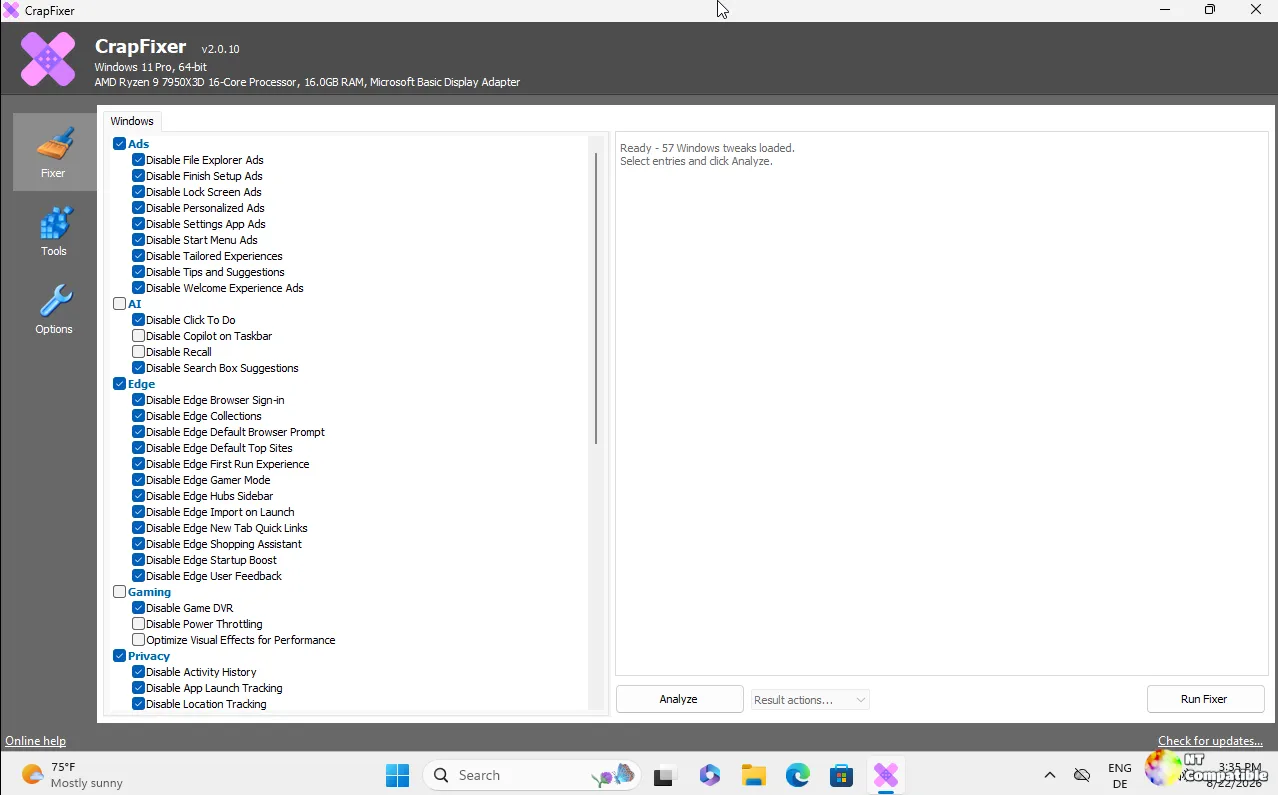
The Signature Engine
Add a new signature to that INI file, and CrapFixer instantly recognizes it as a fresh category. It scans the corresponding registry paths, applies the fix, and even restores Windows defaults without a single recompile. Belim claims it might be one of the first Windows tweak utilities built this dynamically. The architecture solves a real problem. Registry tweaks usually sit in dead ends because maintaining hardcoded logic gets unwieldy fast, and the signature system sidesteps that entirely.
The workflow follows a familiar Scan, Review, Apply, Restore pattern. You click Analyze, sort by incorrectly configured settings, and review an analysis summary that separates the healthy keys from the suspicious ones. Head here to see how it handles individual registry paths. Before any changes land, the tool snapshots the relevant keys automatically. It also handles admin elevation and restart prompts gracefully, which makes it considerably less of a headache than most utilities in this space.
Then there is the optional AI layer. It plugs into Groq, OpenAI, Anthropic, or any OpenAI-compatible provider. The catch is that it never touches the registry. It just explains what a specific tweak does in your chosen language. Think of it as a safety net for modifications that sound terrifying until you actually read what they do. Keep in mind that the AI output is localized to your selected CrapFixer language, and it plays no part in scanning or applying changes.
This is still a one-person operation. Belim runs Builtbybel, which hosts FluentCleaner, FluentTweaker, and FlyOOBE. FlyOOBE crossed 7,200 stars, FluentCleaner sits at 5,500, and FluentTweaker rounds out the trio at 3,500. CrapFixer itself is sitting at roughly 2,400 stars. For a utility that does exactly what it says on the tin, that community is surprisingly robust. The README explicitly calls it his newest and likely last fine-tuning app for Windows. Donations via PayPal and Ko-fi fund the development. Not a corporate pitch. Just a developer keeping the lights on.
What It Actually Does
It is a rather heavy tool for what it does, though the signature system does solve a meaningful usability problem. The long gap between major versions might frustrate some users, and the AI explanations are a nice-to-have, not a necessity. But if you regularly rebuild workstations or manage Windows deployments, having a registry tweak engine that does not require a GitHub pull request to add a new signature is genuinely useful.
Head here to download CrapFixer 2.0 (build 2.00.10) from GitHub. Download the archive, extract the files, and run CFixer.exe as Administrator. Click Analyze, review the red flags, and hit Run Fixer when you are ready to commit changes. If you want a second opinion before modifying your registry, Belim also hosts an optional online log analyzer at his project site.


