FluentCleaner's newest update does the bold thing nobody asked for: it removes things
Belim has released FluentCleaner 26.11.20 today. Its release note opens with a line you almost never see in software marketing. The whole build "mostly takes things away."
The biggest thing gone is the address bar. With it vanished the breadcrumb that displayed the current tab's name and the overflow button with the three dots. What stays is deliberately thin: a tab strip, your content, and one footer line.
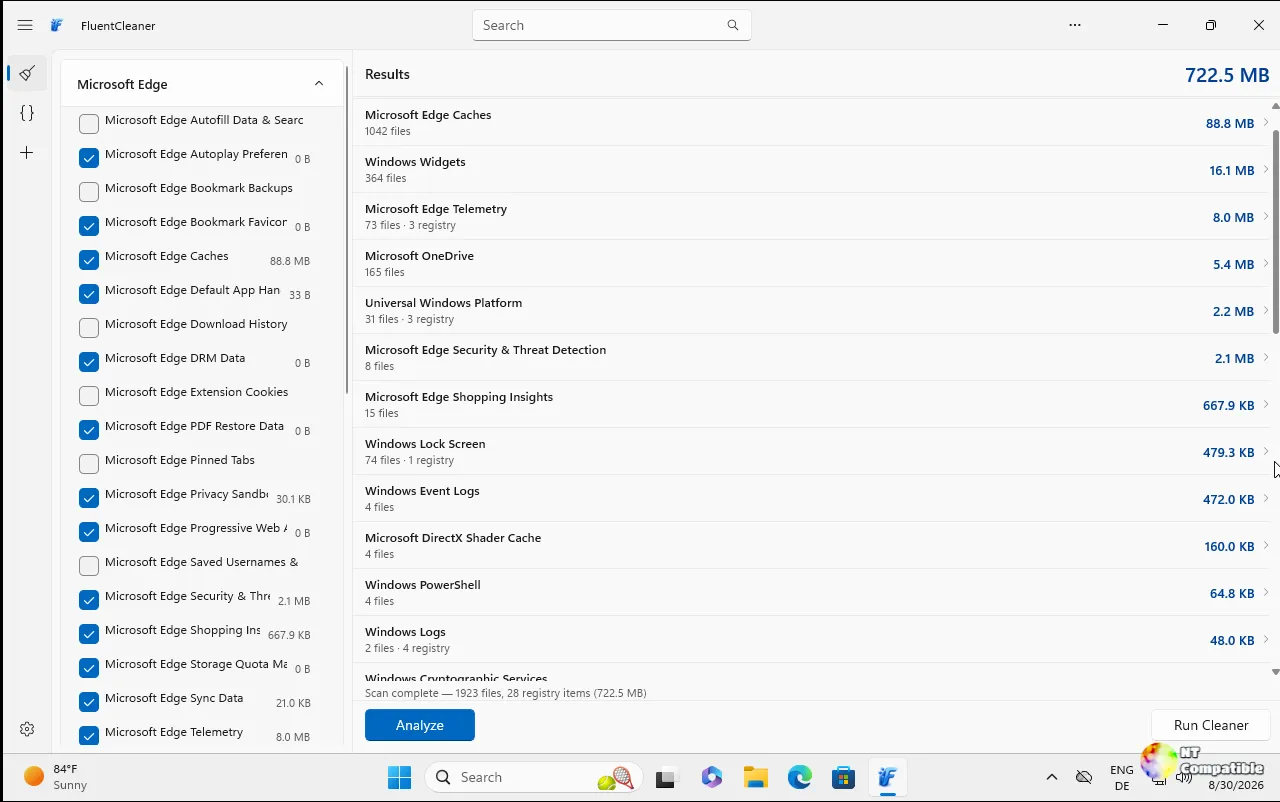
Belim calls it "the most I've ever removed from an app without anyone asking." The app, he says, finally "feels as light as the Windows apps sitting next to it."
The one real addition this round is setup codes. You can hand off your entire configuration as a single string, much like sharing a game seed. Belim freely admits he "kept tinkering on far too long," so don't push him on why it took so long.
FluentCleaner is still free, portable, and ad-free. No telemetry, nothing phoning home. The Modern edition is a roughly 140 MB self-contained download, and the second, tiny Classic edition built on WinForms sits at about 2 MB.
Setup codes, trimmed chrome, and a half-million-file freeze
You reach setup codes through the ∨ > Setup code menu. Pick a configuration and it encodes into a string like FC1-K7Q2XA-9MZ3PD, which is six characters per entry. Paste someone else's code and the app immediately tells you how many of their entries actually exist on your machine, which apps you're missing, and which entries your local Winapp2 database has "never heard of."
Applying a code ticks the matching entries and runs an analysis. Nothing gets deleted until you manually hit "Run Cleaner." Paste the wrong one and "Previous selection" restores your own config. Belim stresses that "the code only holds fingerprints of entry names, no paths, no files, nothing about your machine, and no server involved either." It's all local.
Search has relocated to the tab strip as an icon, opening with Ctrl+F. The icon turns accent-colored while a filter is active, so hidden entries never vanish unexplained. There's now an app menu bolted to the far left of the tab strip, modeled on Edge, housing Settings, support, updates, and per-page actions like select all or refresh.
The status bar got richer as well. After a scan it reports what was found, not just how much: "9413 files, 20 registry items (1,99 GB)." Belim notes this quietly regressed last version, so count it as a fix wearing a feature's mask.
Under the hood, the interface dropped from five "bands" down to three: tabs, content, footer. The list view gained roughly 40 px of vertical room, and the window shell shed 193 lines of code. Only a plus button and search now sit beside the tabs. The old dropdown, which "looked like more ways to open a tab, which it never was," is gone for good.
The Cleaner, Tweaks, and Apps pages now share one footer layout, status left and actions right. The footer renders the Acrylic or Mica backdrop just like the title bar, and the content sheet moved to #282828, the same tone Notepad uses. A redundant "Standard user" label was dropped because, as Belim puts it, "Restart as administrator already says it."
Here's the one that belongs in its own section. Opening an entry with hundreds of thousands of files used to freeze the window. The cause was mechanical: the app appended each path one at a time, so 526,701 files meant 526,701 individual UI updates. Belim only caught it because "someone had half a million temp files," a fact he greets with "You know who you are." The fix collapses it all into a single update.
A companion fix handles a case where WinUI lost track of its own edge past five million pixels of list, drawing paths over the total row. Now the detail view shows the first 10,000 paths plus a line for the remainder. Cleaning still removes every single one. Other fixes chase the small stuff: Classic could miss an app installed after launch, toggling language twice could swallow the restart prompt, and the bottom of the "Analyze" label was getting clipped.
It's a rather counterintuitive move for free software, but that's the point. Belim quietly argues that the app's heaviest sin is doing too much. After a week of building things up and a week of tearing chrome down, the removal actually tracks. And it's worth being honest that whether the dropped address bar reads as an upgrade depends entirely on whether you ever used it.
Reading the last three releases back-to-back explains the shape of this one. The first act hit on Nov 12, "The Explorer Update," landing after two months of silence. It introduced a tabbed interface modeled on File Explorer, a full-width address bar with breadcrumb trail, and a density overhaul that cut result rows from 50 px to 26 px. Two weeks later came "The Great Unification" on Nov 15, the biggest yet. Belim pulled the registry Tweaks plugin, 98 settings, and the Apps plugin, an uninstaller with safety ratings, out of his other tools and folded them in via a plugin architecture. Each tool is just one folder under Plugins, and he kept them beside the cleaner rather than inside it. Paradoxically the result was faster: from double-click to a usable list, 689 ms dropped to 461 ms.
Install is simple enough. The Modern edition goes in via winget install --id Builtbybel.FluentCleaner --exact, and the Classic edition stays portable. Head here to the release page if you want to read the raw changelog yourself.


