Flyoobe 3.01 ships a full rewrite with Windows 7 styling and a scriptable toolbox
Flyoobe just got a new core. The Windows 11 setup and tweak tool released version 3.01 (build 3.01.53) today, and per solo developer Belim, it's the first public drop of a completely rewritten v3.0 core.
The product, formerly known as Flyby11 and later FlyOOBE, is now officially Flyoobe again. It also gains a scriptable "Setup Actions" toolbox and a distinctly Windows 7-flavored interface. Keep in mind that this tool has quietly racked up around 7,300 GitHub stars. Here's what actually changed and why it might matter to you.
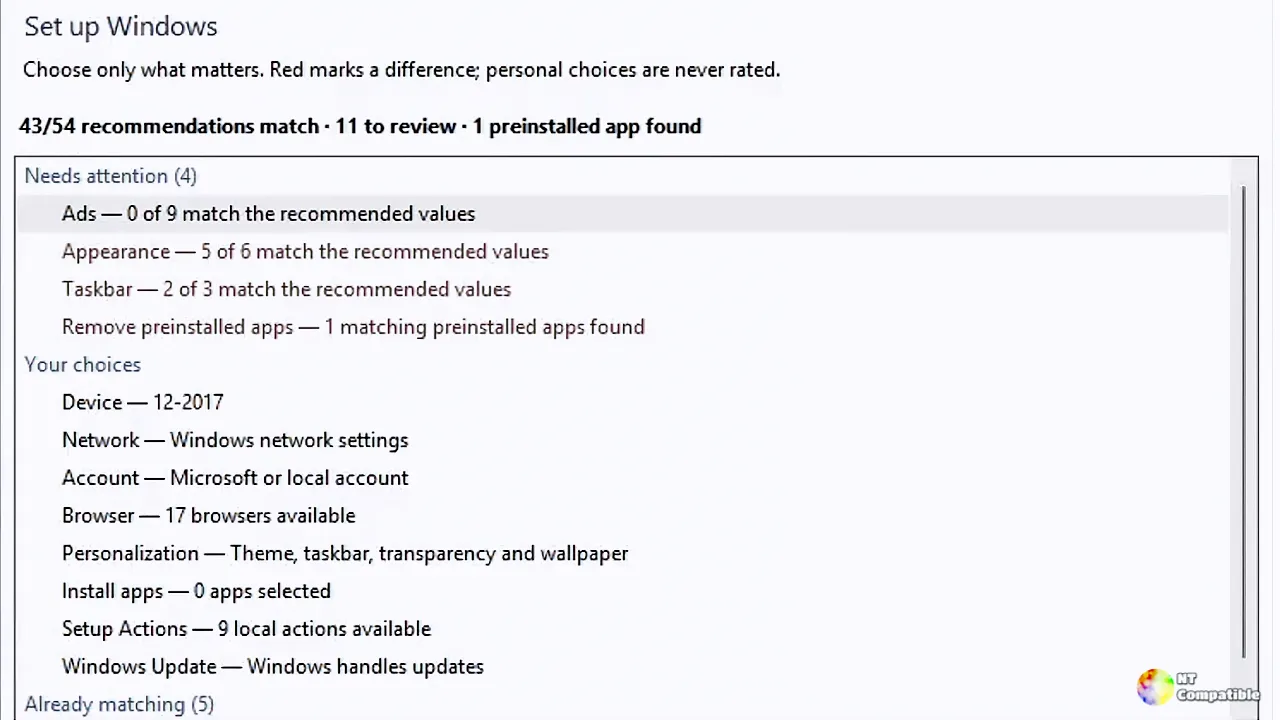
Setup Actions and a Windows 7 redesign
The headline feature is "Setup Actions," a way to bolt post-install capabilities onto Flyoobe without turning the app itself into a fat feature dump. Belim frames it as "a door without rebuilding the entire house."
You now get PowerShell-based actions with dynamic choices, drop-down menus, and optional input fields. Scripts stream live output instead of freezing your screen. Actions can be made recipe-safe, exported, and run as part of a larger recipe. An importer and direct access to your local Actions folder round things out.
The actions stay isolated from the core, so you can disable them entirely if you don't want them. They run through a smaller dedicated runner now and use their own folders and metadata. Belim also fixed a bug where PowerShell progress used to surface as unreadable CLIXML.
After rebuilding the core, the designer felt the interface lacked character. So the team "borrowed a little" from the Windows 7 era. The results are understated but clear: an Explorer-style navigation bar with Back, Forward, and breadcrumbs, plus the filled 7-style separators. The dense overview table became expandable native groups, and every control is stock Windows. No custom skins. No owner-drawn imitations.
"The older I get, the more I appreciate old software," Belim wrote. "Apparent nostalgia is just usability after it has passed a sufficiently long code review." That line says plenty about who's actually maintaining this.
What Flyoobe actually does
For the unfamiliar, Flyoobe is a Windows-only desktop utility that helps you install and configure Windows 11 your way. It sidesteps Microsoft's hardware restrictions and trims unwanted post-install bloat.
The upgrade path is clever. Flyoobe leans on the Windows Server variant of setup, which skips TPM, Secure Boot, and CPU checks while still installing a genuine copy of Windows 11. ISO download and mount are handled automatically through Fido, Peter Ferrie's well-known ISO tool. It mirrors Microsoft's own documented workaround for unsupported hardware.
There is one hard limit you should know about. The POPCNT CPU instruction can't be bypassed, and it's required for Windows 11 24H2. A compatibility checker was added back in v2.3 to warn you when your machine falls short. Worth checking before you force anything.
The rest, and the warnings
Setup Actions ship as an optional Actions.zip asset so the main download stays lean. Grab the file from the release page, extract the included Actions folder into Flyoobe's Data folder, then enable Setup Actions under Settings > Advanced. Close Settings and the new actions load.
The sizes are small by modern measures. FlyoobeApp.zip clocks in at about 639 KB. The Actions pack is a mere 12 KB. Even the press banner is only roughly 1.8 MB.
There's a wrinkle worth flagging though. Back in v1.51.644 (November 2nd, 2025), Belim dropped an explicit warning: do not download FlyOOBE from flyoobe.net. That strongly hints at a look-alike domain impersonating the project, a classic move once a free tool gains traction. The only authoritative source remains the GitHub repository and its release assets. As of now, the project pages site builtbybel.github.io/Flyoobe/ returns a 404, so a dead link shouldn't surprise you.
Flyoobe is one entry in Belim's builtbybel portfolio, a small stable of indie Windows utilities. FluentCleaner, a community-powered CCleaner alternative, sits near 6,100 stars. Bloatynosy is close behind at about 5,600. FluentTweaker and CrapFixer add another 3,500 and 2,500 respectively. The whole portfolio runs on the tagline Belim uses: "Good apps are as little as possible." Flyoobe itself follows that creed as free, MIT-licensed, C#-based, and funded almost entirely by PayPal and Ko-Fi donations. Not cheap, but genuinely free.
Beyond the headline changes, the notes cover housekeeping. Flyoobe can now read additional rule databases placed in the Data folder, and Settings gains a dedicated section listing each loaded database with its entry count. The About page picks up an "unofficially official" pronunciation: Fly-oh-bee. Dead code and redundant paths were cleared out.
Where it stands
Because the release is same-day, the download counts are still early. FlyoobeApp.zip has pulled in about 433 downloads so far, with the Actions pack at 163. The announcement discussion (#494) currently has zero comments. Read those numbers as a starting point, not a verdict.
It's a reasonably ambitious update for a one-person project. The Setup Actions system genuinely extends Flyoobe's usefulness down the line, and the Win7 styling is a nice touch, though the design and small footprint help more than the internals justify. However, at the same time, the tool's core function lives in a gray area. Microsoft doesn't guarantee updates on unsupported hardware, and the POPCNT limitation still applies. Use it with your eyes open.
You can grab the release straight from the builtbybel/Flyoobe GitHub page. Don't forget the Actions.zip asset if you want to try the new toolbox.


