Microsoft Sets November 2026 as the Hard Deadline for .NET 8 and .NET 9
After November 10, 2026, Microsoft stops shipping security patches and technical support for both versions. .NET 10 is the official upgrade path.
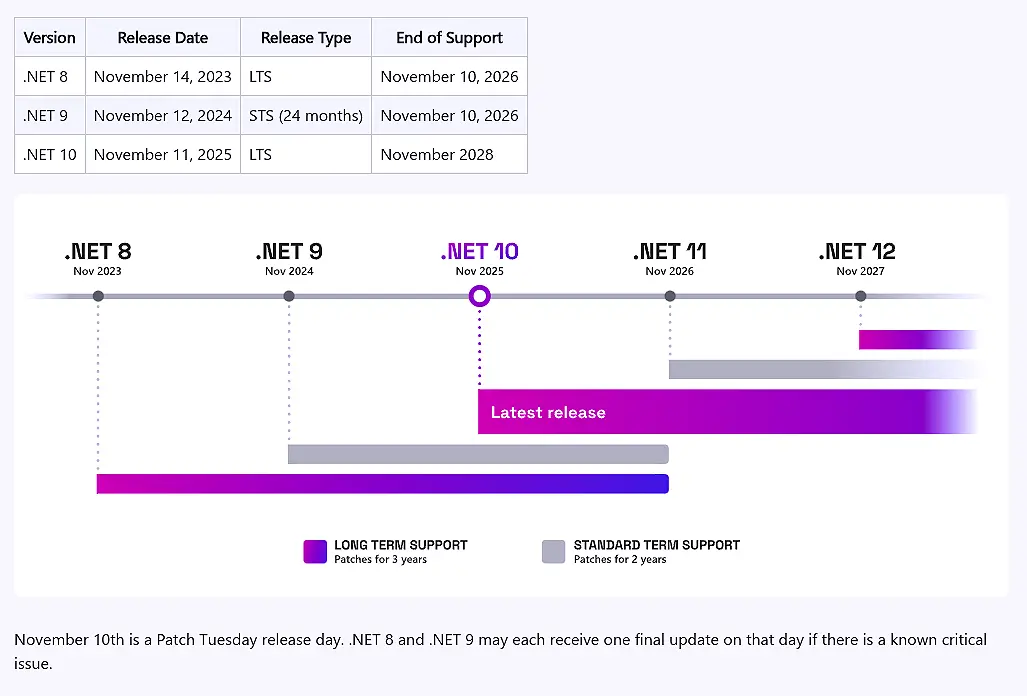
Microsoft just drew a line in the sand for .NET developers. Starting November 10, 2026, both .NET 8 and .NET 9 will officially reach end of support. No more security patches. No more servicing updates. No technical support from Redmond. The message is blunt: migrate to .NET 10, or run your code on your own.
.NET 8 has been the production workhorse since it shipped in November 2023. It brought C# 12, enabled dynamic profile-guided optimization out of the box, and offered three years of LTS coverage. .NET 9 followed a year later with C# 13, a major AI integration push, and performance tweaks that make exceptions run two to four times faster. It was always built as a short-term stopover. Both hit the exact same sunset date.
What Happens After the Deadline
Your apps won't suddenly crash. They'll keep running. But you'll be patching your own security holes starting that Monday, which happens to land on a standard Patch Tuesday. Microsoft may roll out one final servicing update if a critical vulnerability slips through the cracks, but beyond that, you're on your own. Technical support will disappear along with the patches.
Visual Studio 2022 will also quietly flag the .NET 8 and .NET 9 components as out of support in a future servicing update. Existing installations won't break, though you'll need to retarget to .NET 10 or later to stay officially supported. You can use the built-in cleanup option to remove the older components from your IDE if you want a tidy workspace.
The .NET team is steering everyone toward .NET 10, which ships November 2025 and carries LTS status through November 2028. Upgrading requires flipping <TargetFramework>net9.0</TargetFramework> to net10.0 in your project file, followed by the usual environment updates. The official migration guide and the .NET Upgrade Assistant handle most of the heavy lifting. If you're maintaining third-party apps, your vendor needs to make the call on whether they'll ship a .NET 10 build before the cutoff.
Microsoft let us dig into the release notes for both versions back when they shipped. The runtime team clearly treated .NET 9 as a performance showcase, with loop optimizations and adaptive garbage collection doing the heavy lifting. We walked away impressed by the raw numbers. But raw benchmarks don't always match production reality, especially when you're juggling legacy entity queries against a modern runtime.
Switching major versions of a framework that underpins your entire stack isn't exactly a weekend project. Server GC changes, default CET enforcement on Windows, and the removal of legacy exception handling on non-Windows platforms all demand careful regression testing. Some developers have already flagged rough edges in EF Core's LINQ translation under real workloads. Budget extra time for QA.
For what it's worth, .NET remains Microsoft's most admired framework on Stack Overflow, and MAUI app deployments more than doubled on Google Play last year. The ecosystem is healthy. The timeline, however, is unforgiving.
That's the short version. Mark November 10, 2026 on your calendar. Head here to the official .NET Support Policy page for the full breakdown, and stick to the official Upgrade Guide if you start moving your projects to .NET 10 now.


