PeaZip 11.3.0 Ships With Security Fixes, Better ZPAQ Support, and a New "Open With" Picker
The free, open-source archiver now demands a master password.
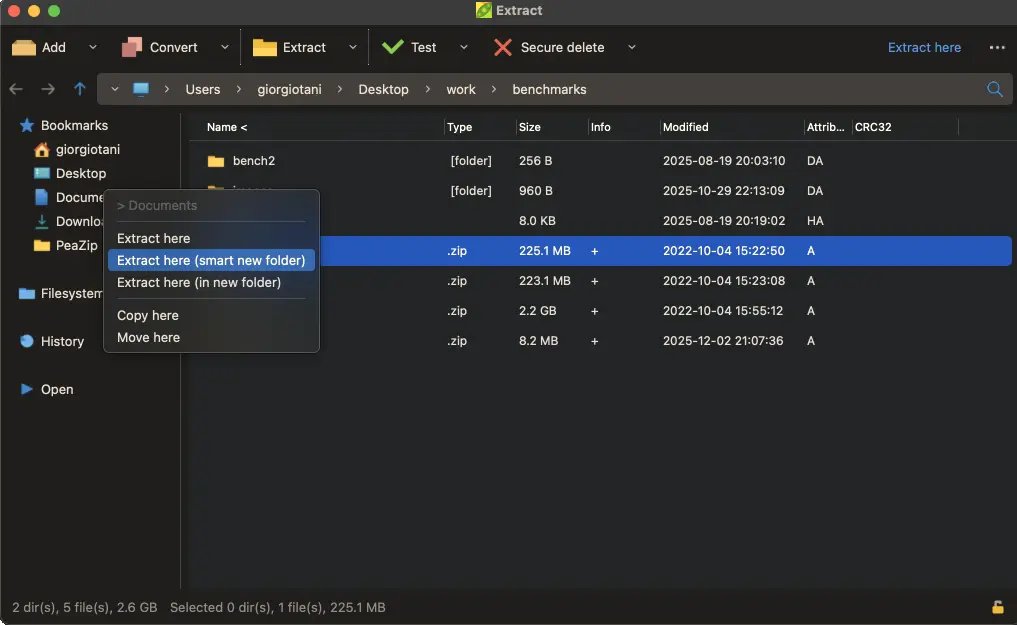
PeaZip's latest point release landed today, and its priorities are impossible to miss. Developer Giorgio Tani is pushing everyone toward this build, mostly because it plugs a bunch of security holes and makes a master password mandatory. There are usability improvements too, but the door-locking is the whole point.
For the uninitiated, PeaZip is Tani's cross-platform archive tool, released under the GNU LGPLv3. It runs off a USB stick with no install, looks the same on Windows, Linux, and macOS, and understands a wild range of compression formats. ZIP and 7Z are the everyday ones. ZPAQ, PAQ, FreeArc, Brotli, and Zstandard show up deeper in the list. Two hundred forty-three file extensions in total, which is a number PeaZip likes to mention and most people probably won't.
The release notes don't bother with framing. "Due to multiple security fixes and improvements it is recommended to update to the new version," it says. That's the developer basically telling you to stop procrastinating.
A master password you can't skip
The change most people will feel is the mandatory master password. The built-in Password Manager used to work with none set, meaning stored credentials sat there unprotected. That gap is now closed.
If you've been leaving it open, export first. Set a master password in your current version, right-click the password list, and pick Export > Encrypted. Then drop that .pm file into the new installation's configuration folder. One extra step. Your saved logins are arguably worth it.
The rest of the security work is quieter but real. PEA extraction now writes to a randomly named temp folder, renames it only after an integrity check passes, and deletes the folder if validation fails. On Windows, the drag-and-drop helper DLL (dragdropfilesdll.dll) loads at runtime only after its hash is verified, instead of being trusted on faith. The default list of sensitive extensions that prompt before launch grew longer, and that check now covers the preview function, not just a double-click.
ZPAQ, pickers, and themes
ZPAQ gets a new "Force typing password interactively" option for encrypted archives, plus a fix for a crash or hang that showed up when you tried to open encrypted ZPAQ files without a password ready.
The usability additions are lighter. A fresh "Open with" picker sits behind Shift+F12, gathering your custom apps, scripts, and associated programs in a single screen. You can still manage them under Options > Settings > Applications, but having them in one place is a small win you'll actually reach for. The archive screen can now show compression ratio instead of percentage, there's an option to auto-open the destination folder after a task, and two new themes arrived: Blue and Blue-Dark.
Under the hood, the 7z/p7zip backend is at 26.03 and PeaZip's own PEA backend is at 1.33, which adds a test mode and clears up a few false-error bugs. Sources are now compiled with Lazarus 4.x, though older 3.x and 2.x toolchains still work.
Why the security focus matters is worth a moment. PeaZip has spent the 11.x series courting the privacy-conscious crowd, and it hasn't been without stumbles. The 11.1.0 release dealt with vulnerabilities researcher Harshit Gupta reported, including a path-traversal bug in .pea extraction and an input-sanitization flaw in PowerShell-invoking functions. 11.3.0 reads as a direct follow-up: hardened PEA handling, extended extension checks, validated DLL loading. The developer's "please update" is less a nudge and more a priority flag for anyone still on an older 11.x build.
PeaZip is a strange case in the archiver space. 7-Zip quietly dominates on popularity and speed, so PeaZip never really challenged it head-on. What it offers instead is a wider format list and a security-forward feature set that 7-Zip mostly ignores. Skip the extras if you don't need AES-256 encryption, two-factor logins, and an encrypted password vault. If they matter, PeaZip is one of the few free options that takes them seriously.
The software is available right now from GitHub and SourceForge, with a Flathub listing for Linux.
Linux users can pick between GTK2, GTK3, and Qt6 interface builds, matching GNOME, KDE Plasma, Xfce, or whatever else runs on their machine. Windows gets an installer plus portable and MSIX variants, macOS ships aarch64 and x86_64 DMGs, and BSD gets a portable tarball. Sources and docs round out the lot.


