UniGetUI 2026.3.2 Adds Curated "Approved Software" and Fixes a pip Bug That Corrupted Environments
Devolutions released UniGetUI 2026.3.2 on October 15, and the headline isn't the usual pile of bug fixes. For the first time, administrators can build a curated list of approved software and let users install it with a single click. It's an early, deliberately experimental step toward making the open-source package manager manager something IT teams would actually govern.
UniGetUI is the graphical front-end people reach for when they have a dozen command-line package managers and the energy to remember none of their syntax. On Windows it wraps WinGet, Scoop, and Chocolatey; add Homebrew on the Mac and a grab bag of Linux tools; and it also folds in language-specific managers like pip, npm, and Rust's Cargo. The app collapses all of that into one window where you can see what's installed, what's out of date, and push everything forward at once. It's free, MIT-licensed, and now pulls in well over 300,000 monthly active users.
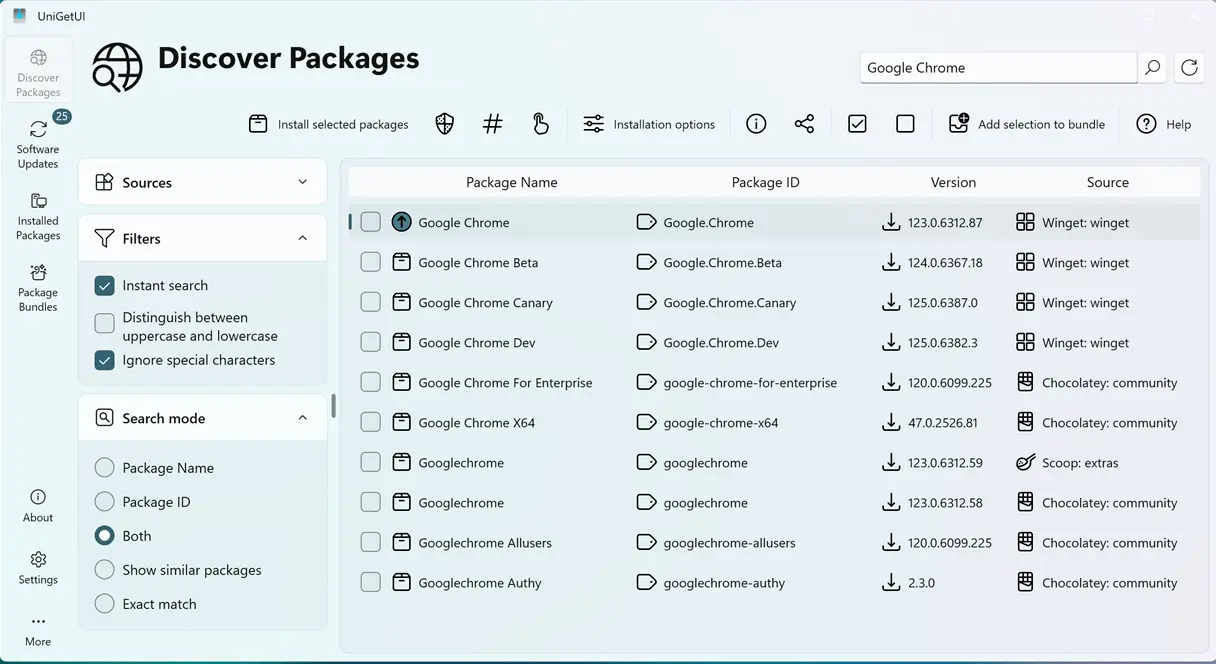
That last number matters more than you'd expect.
A week of work, six contributors
The delta between 2026.3.1 and 2026.3.2 is small on paper but busy underneath: 18 commits touching 115 files, pulled together by six contributors over roughly a week (October 9 through 15). Gabriel Dufresne, known as GabrielDuf on the project, wrote most of the fixes and integrations, while Sébastien Duquette led the new catalog work. The release bot published it around 6:58 p.m. on the 15th, tagged as the current latest.
If you want the one-line summary straight from the release notes, it's: the build adds an experimental Software Catalog and Catalog Editor, lets you reorder sidebar pages by drag and drop, brings macOS's new Liquid Glass look to the Mac app, and fixes a batch of crashes and package-manager bugs. That's a fair digest. Worth knowing what's actually in each of those buckets, though.
The Software Catalog is the real story here
Turn it on under Settings > Experimental and you get a dedicated page listing approved software that normal users can install, update, and uninstall. Administrators do the curation through the new Catalog Editor. They can manage several catalogs, pin specific package versions, and drop packages straight into the approved list from the existing Discover view, no copy-pasting of IDs by hand.
Here's the part that signals where the project is heading. Per the PR behind it, the first version reads its catalog from a JSON file sitting on disk: %PROGRAMDATA%\Devolutions\UniGetUI\SoftwareCatalog.json on Windows, /etc/UniGetUI/SoftwareCatalog.json on Linux, and under /Library/Application Support/ on macOS. That's not fancy, but it's the exact shape an enterprise wants: a centrally defined, policy-enforceable list of what can and cannot be installed.
It's arguably competing with things organizations already have in Active Directory or Intune, but it's cheap to adopt because it slots on top of package managers people are already using. The Software Catalog is the first concrete piece of Devolutions' "simple today, enterprise-ready tomorrow" roadmap, and this release makes that roadmap legible for the first time.
The small changes that actually change your day
The drag-and-drop sidebar reordering is a quality-of-life tweak that people who actually use the app daily will appreciate. Rearrange the navigation pages by dragging them or with Alt+Up/Down, and the keyboard shortcuts follow the new order, so you don't lose muscle memory. There's a reset-to-default option under Settings > User interface.
macOS users get Apple's new Liquid Glass styling, so the Mac build at least matches the latest macOS design language instead of looking like it arrived the same week as the rest of the app. And a handful of usability fixes land under the hood: the package list now keeps its scroll position after an operation instead of yanking you back to the top, and screen readers announce real expander and cell names instead of generic control-type labels.
Where the fixes actually matter
The one that deserves the most attention is the pip fix. Before this release, pip updates could corrupt your Python environment because pip operations ran at the same time and raced each other. Now they run one at a time, serialized, which eliminates the race condition. If you've ever opened a Python install and found it half-broken after a "quick" update, you know why this is a big deal.
Other fixes round out the release. PowerShell 7 modules installed for all users can now be uninstalled, a change that had been broken. Chocolatey packages requiring admin rights will actually retry as administrator instead of silently giving up. There are also several crash fixes covering startup, unreadable icon files, screen-reader (UIA) handling, and a duplicated top bar in the terminal UI that came with a crash when double-width CJK text hit the right edge. Not bad for a week's work.
It's a bit of a surprise to see the development notes credit GitHub Copilot with autofixes around accessibility announcements and filtering. It's a concrete, if small, example of a mainstream open-source project being shaped by AI-assisted pair-programming, Copilot or not.
The acquisition you can't skip
Devolutions bought UniGetUI in March 2026, and this is the first major product milestone under its stewardship. The project stays standalone, free, and MIT-licensed, but Devolutions brings a security team, a formal secure development lifecycle, and structured code review. CEO David Hervieux put it plainly in the announcement: UniGetUI "remains open and community-driven, now backed by the structure and security discipline needed to scale."
That framing explains the Software Catalog and it also explains the security posture running under the hood. Earlier this year the project shipped a fix for CVE-2026-10696 (Devolutions advisory DEVO-2026-0019), a High-severity package-correlation flaw in the WinGet backend that let an attacker-controlled catalog get matched with an unrelated program and install in its place. That was fixed in 2026.2.1, so 2026.3.2 is comfortably past it. It's a useful reminder that software which installs and updates other software sits at a suspiciously high level of system trust, and that's exactly the risk profile Devolutions buys into.
Where to get it
UniGetUI 2026.3.2 is spread across as many distribution channels as the project supports. On Windows the Microsoft Store version is the recommended path, but you can grab a direct installer, a portable zip, or push it through WinGet (winget install Devolutions.UniGetUI), Scoop, or Chocolatey. NativeAOT builds ship for Windows, macOS, and Linux. Apple silicon and Intel on the Mac, .deb/.rpm/portable on Linux, with glibc 2.27 or newer required. The app has a built-in autoupdater and can update like any other package when installed via a manager.
Head here to the GitHub release announcement.


