Flyoobe 3.02 brings a Windows 7-inspired interface to the Windows 11 setup companion
The free setup tool picks up a "Windows 7 detour" rework, a file-based changelog, and new registry rules, even as the project warns users about fake download sites.
Flyoobe is roughly half a million downloads heavy and now sits near 7,500 stars on GitHub. It exists for that moment every PC builder knows too well: the Out Of Box Experience, the gauntlet of setup screens that otherwise hand your machine back configured to Microsoft's defaults.
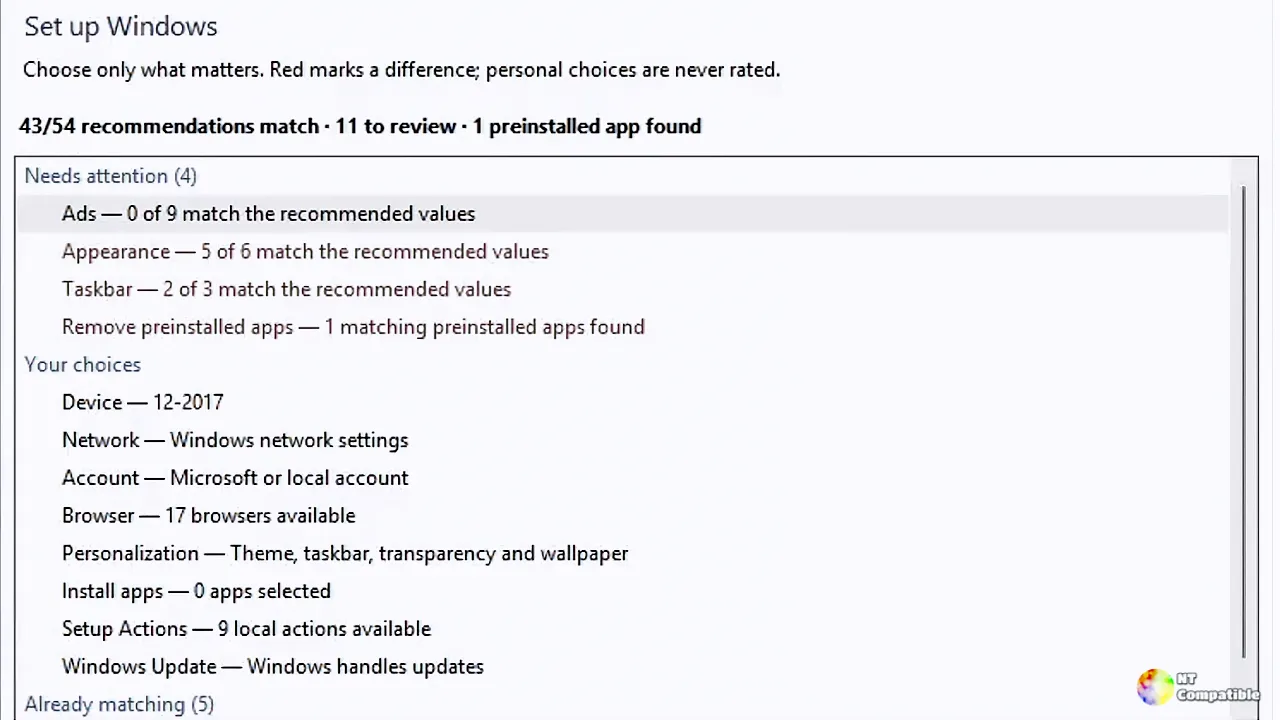
On September 23, the developer known as Belim shipped version 3.02. It's internally billed as "Flyoobe 3.1: The Windows 7 detour." The tag and the nickname describe the same build, released at 11:47 that day.
Belim has been quietly rebuilding Flyoobe from the ground up under the 3.x line. It isn't a skin. It's a refactor around a smaller core, file-based rule catalogs, explicit recipes, and a new Setup Actions model. The cleaned-up source isn't public yet, which is why the repo's default branch still shows the previous generation. "A source tree another human can navigate is the part worth finishing," Belim wrote, "beyond a mere code dump."
The Windows 7 detour
The headline change is the navigation header. Belim admits they finished the core and still felt the interface was missing character, so they "borrowed a little from what is probably my favorite era of Windows UI."
What does that mean in practice? A central Explorer-style search field now sits beside the breadcrumb trail. You can search across the Overview, recommendations, apps, preinstalled apps, and Setup Actions. Settings moved out of a separate bottom button and into the header as a gear icon. Belim isn't shy about the reasoning. "Two doors into the same room never made much sense."
There's also a smarter hint line in the reading pane. On rule pages it offers to explain the item in plain words. Wherever else you are, it points you toward Setup Actions.
The more technically interesting addition is the optional changelog. Every change Flyoobe makes can now be written to a plain text file. It covers winget installs, removed preinstalled apps, and Setup Actions, too. Recipes flow through the same code path, so they log automatically.
A toggle and an open-file button live under Advanced settings. It's off by default, and for a sound reason: "A tool that rewrites your registry should not also start keeping files about your PC unless you said so."
Whether you find the Windows 7 look charming or a bit of a time capsule depends on your age. Either way, the reorganized header does cut down on the menu-hunting, and that's the point.
New rules, real fixes
Flyoobe 3.02.72 adds an Updates rule category. It captures the static half of the old Flyoobe 2 "Windows Update Tamer" script as plain registry rules, meaning no PowerShell required. You can keep a long pause window available, skip reboots while someone's signed in, download updates but wait for a click, skip driver updates, and disable scheduled restarts.
The notes point out that Microsoft "is only now getting around to fixing" some of these pain points in an Insider build. Until that ships, these registry switches are what actually work today. There's a caveat: these update policies are historically Pro territory, so Home editions "may quietly ignore them."
A second new rule hides the Phone Link companion pane in the Start menu. That pane arrived with KB5052094 and now covers iPhone, which is why it began "turning up uninvited." The rule clears both the toggle and the companion registration in one pass.
Most of the fixes run hot on multi-monitor and high-DPI setups. Windows 10 rules no longer bleed into Windows 11 installs, and vice versa. An old bug meant OsVersion was read but ignored, so roughly a dozen rules sat in the list forever reporting "not applied" on incompatible machines. They're now dropped at load time.
Detail text used to stop wrapping at high DPI, boxed in by a hardcoded pixel width that never scaled. Users at 150% DPI had to drag the splitter just to read it. It measures itself properly now. Progress indicators also moved to sit along the upper page edge, just below the main navigation, so they no longer freeze the interface.
The extensibility angle
Setup Actions are a defining feature of the 3.x line. It's a lightweight way to extend the workflow with small PowerShell jobs without turning Flyoobe into a grab-bag of hard-coded utilities. In this release they're packaged as an optional asset, keeping the main download lean.
Download the Actions asset, extract the folder into Flyoobe's Data directory, flip the toggle under Settings > Advanced, and close to load them. Nothing runs automatically after extraction. Actions stay isolated. "Flyoobe never runs an action merely because the package exists," the documentation stresses. Authoring is deliberately minimal: a little PowerShell, an optional INI file, and no plugin framework hiding behind it. Three phases exist: Prepare, Finish, and Utility. You should read an action before running one, especially when it requests admin rights or downloads code.
It's arguably the project's strongest idea. A one-developer tool that still lets people extend it safely, without bloating the core, is a nice problem to have.
Where it stands
Per the repo's status table at the time of release, Flyoobe 3 releases are active, the refactored 3.x source is still being prepared, and the branch currently live shows the previous generation. Flyby11, the original hardware-bypass utility, is retained as a historical predecessor but no longer actively maintained. Flyoobe 2.4 (2.4.854) and Flyby11 Classic remain downloadable for "deliberate legacy use."
Flyoobe has come a long way from that single-purpose bypass tool. Version 3.02.72 matures the redesign, pushes configuration toward auditable, file-based rules, and formalizes a safer way to extend the app. It's a warmer, more familiar interface with deeper, more transparent options. It's free, to be clear, MIT licensed, though the developer does run a PayPal donation link to keep the lights on.
Head here to download the release from GitHub


