NVIDIA's RTX Spark N1X chip arrives in two premium laptops, the HP OmniBook Ultra 16 and Microsoft Surface Laptop Ultra, earning praise for local AI performance but facing heavy criticism over steep pricing. Reviewers both call the machines powerful and beautifully built, yet flag weak battery life, fan noise, and Copilot+ features that aren't ready yet, leaving them hard to justify for non-AI users. Builder-friendly picks stand out on value: the LattePanda Mu Ultra module, be quiet!'s feature-packed Light Loop LCD cooler, and XPG's overclockable, recycled-material DDR5 kit all score well. If local AI is your goal, these are among the most capable machines available, but most buyers are better served by the cheaper, more practical components.
Six reviews today: NVIDIA's RTX Spark laptops meet value DDR5 and a LattePanda module
The RTX Spark / Windows-on-Arm era is arriving in two very expensive laptops, plus a handful of builder-friendly picks that have nothing to do with AI.
The NVIDIA RTX Spark N1X is finally shipping in real machines. Three of today's six reviews cluster around this Arm-based chip, which is NVIDIA's push to make "Windows on Arm" a serious professional platform. Two laptops use it. Reviewers are mostly impressed, and mostly cautious about the prices.
The RTX Spark wave settles in
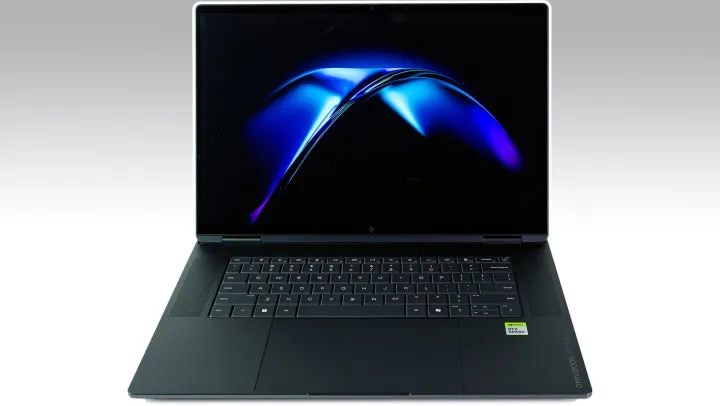
HP's OmniBook Ultra 16 is the first retail machine built around the N1X. HotHardware calls it a "first-class premium AI powerhouse." The spec sheet is a mouthful: 128 GB of LPDDR5X running at 9400 MT/s, a 2TB PCIe 5.0 SSD, and a Blackwell-class iGPU with 48 shader modules. That's two more than a laptop RTX 5070 Ti and on par with a desktop RTX 5070.
Then it throttles to laptop power limits and a shared memory bus, which is always the catch with integrated graphics. The 16-inch HDR OLED is gorgeous at 1,100 nits, and the all-aluminum body feels solid. Price is the problem. This one lands at $6,229 as tested, starting at $3,199 for 32 GB. Battery life is mediocre, and plain web and office work underwhelm. Native Arm64 apps run fine. Everything without a native build falls into emulation.
HotHardware: HP Omnibook Ultra 16 Review: An All-Aluminum RTX Spark Portable AI Powerhouse
HP's first machine based the NVIDIA RTX Spark N1X processor delivers a first-class premium portable experience and outstanding local AI performance
HP Omnibook Ultra 16 Review: An All-Aluminum RTX Spark Portable AI Powerhouse
Microsoft's Surface Laptop Ultra is arguably its most powerful PC ever. Windows Central has lived with it and calls it the closest thing to a MacBook Pro alternative. You get its first-ever Mini LED panel, the world's first laptop with magnetic USB-C charging, and a removable SSD you can upgrade later. The top config runs 128 GB of memory with a 20-core, 6,144-core GPU, and NVIDIA claims up to 1 petaflop of AI compute.
Microsoft says that lets it run 120B-parameter models locally. That's a big number, though it's not a normal workload for most buyers.
The price of this machine has been a sharper debate point than its performance. It starts at $2,599 for a base 24 GB model. The fully specced version you're looking at today costs $5,899. That's laptop money that would buy a decent desktop and still leave change over.
The screen tops out at 2,000 nits across 1,344 local dimming zones. It's bright, but reviewers note it's not best-in-class, flagging blooming and ghosting in dark scenes. Most of them would happily trade brightness for OLED contrast.
Windows Central: I've lived with Microsoft's Surface Laptop Ultra, and here's how it stacks up against MacBook Pro
Microsoft's top of the line Windows 11 PC is finally here, and it's giving the MacBook Pro a real good run for its money.
I've lived with Microsoft's Surface Laptop Ultra, and here's how it stacks up against MacBook Pro
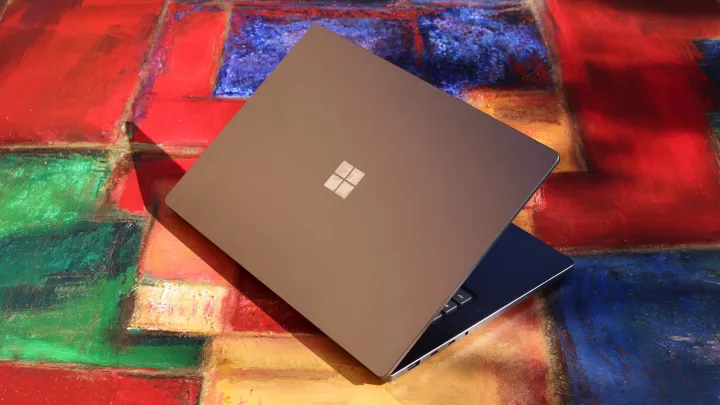
Tom's Hardware sees the same laptop and mostly agrees. Andrew E. Freedman calls it "the most beautiful laptop Microsoft has ever made," then adds the complaints the others gloss over: fan noise, weight, and a 2.0 kg chassis that feels heavy in the hand. Most pointedly, he argues that if you don't run AI models, there's nothing novel here for a normal Windows user.
Copilot+ features are the bigger story. The NPU is present at 50 TOPS, but it doesn't do anything yet. Microsoft promises those features "in the coming months," which leaves a genuine gap today.
Tom's Hardware: Microsoft Surface Laptop Ultra review: RTX Spark in a straight-up beautiful Windows PC
Useful for AI models, but still waiting for more Windows 11 features to take advantage of.
Microsoft Surface Laptop Ultra review: RTX Spark in a straight-up beautiful Windows PC
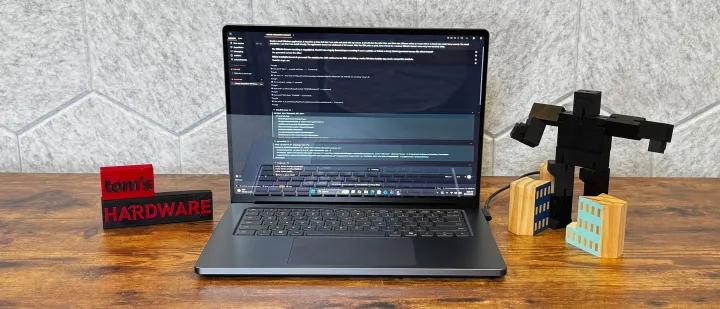
Two laptops, same chip, different priorities. HP leans workstation. Microsoft leans design and inputs. Both end up at roughly the same conclusion: stunning, powerful, and pricey for everyone except AI workloads.
The builders' corner
Not everything here is about AI. Some of the more interesting stories are for people who build their own machines.
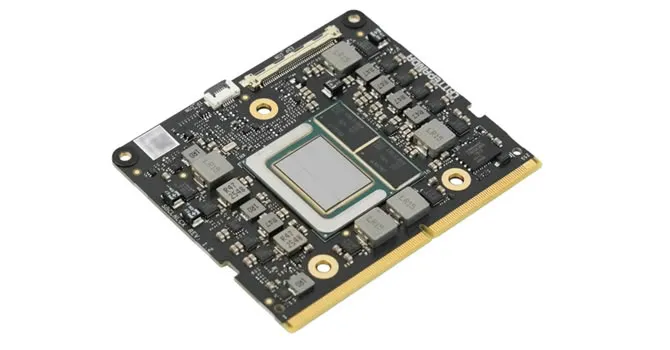
The LattePanda Mu Ultra is a tiny x86 compute module aimed at embedded work, robotics, vision, and edge AI. TechPowerUp paired it with LattePanda's Mini Carrier Board and an active cooler to form a complete system. Under the hood sits an Intel Core Ultra 5 226V, 8 cores, Arc 130V graphics, and an NPU combining for up to 97 TOPS peak. The memory is soldered at 16 GB, and you still have to source your own SSD and power supply. The AI Development Kit runs $643 for the module, carrier, and cooler combined. Buy those three separately and it totals $683, so the bundle saves you a little. For what it's worth, it punches well above its weight with strong Arc graphics and excellent idle efficiency.
TechPowerUp: LattePanda Mu Ultra Review
The LattePanda Mu Ultra packs a surprising amount of capability and hardware into a small embedded x86 development platform. Strong Arc 130V graphics, excellent idle efficiency, and a flexible Mini Carrier made it fun to test, with plenty of potential for compact builds and custom projects.
be quiet! sent APH Networks its Light Loop IO LCD 240mm in white, and the pitch is simple. The on-block LCD screen and integrated IO controller. APH frames the review around one question: does that justify a higher price? The fans spin to 2,100 rpm, pushing 61.8 CFM at under 28 dB at half speed. The pump is adjustable between 2,000 and 2,900 rpm. It's a feature-rich option for builders who want display and pump control without a separate board, and yes, you pay for those extras as you would expect. Detailed performance numbers continue on the review's later pages.
APH Networks: be quiet! Light Loop IO LCD 240mm White Review
Have you ever thought of making a full meal using ingredients only from a dollar store? You probably are not thinking about buying food from this discount shop, but every time I walk inside one, I am always shocked by the multiple aisles dedicated just for groceries. A couple of weeks ago, my girlfriend and I ran a cooking competition with our friends. Each team was tasked with making three dishes for under $20, but they could only buy from Dollarama. Despite the limitations, I think our team's biggest problem was not accounting for how much time it took to shop, cook, and plate. As such, we had several elements of dishes we could not serve since they were not fully cooked. We came in last as a result. Even so, it was quite fun to see teams come up with different dishes. One team, for example, put canned meat into all their dishes, including candying it as part of their dessert. However, I wonder what more we could do if we had a larger budget. We would obviously still be constrained by making three dishes, but there might be more complexity or dimension to the taste and presentation. In a similar vein, competing products at different price points may fulfill the same purpose, but a higher-priced product will likely come with more features or better specifications. Today, we have a be quiet! Light Loop IO LCD 240mm White, which is an all-in-one cooler that comes with a few more extras and features for a higher corresponding price. What are the extras? How does this AIO compare with other options in terms of performance? Let us read on to find out!
be quiet! Light Loop IO LCD 240mm White Review (Page 1 of 4) | APH Networks
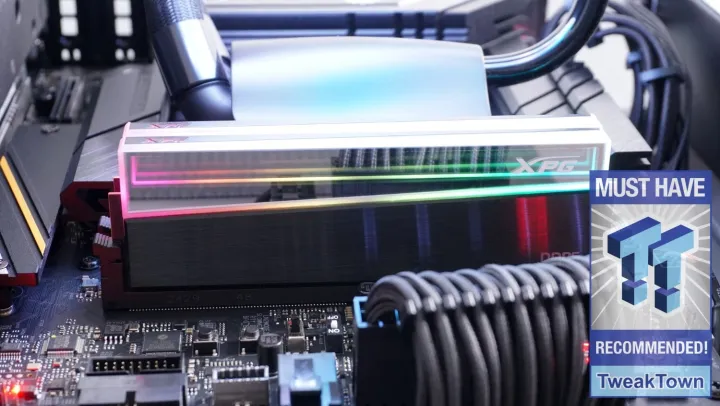
Finally, the memory. This is probably the most useful item on the list for actual buyers. TweakTown gives the XPG NOVAKEY RGB ECO DDR5-6000 32 GB kit a 97 percent "Recommended." That's high for a value stick. It's built with 85 percent recycled plastic and 50 percent recycled aluminum, runs XMP at 30-40-40-76, and overclocked to 6,666 MT/s on an i7-265K with tighter timings. Read speeds topped 92 GB/s, and it beat kits rated far higher, including an 8,000 MT/s module. The MSRP is $562.99, with street prices sitting around $390. The one wrinkle is the mirrored IC coating, which can lift off if you peel the spreaders wrong. DDR5 prices across the board are in a rough right now, ranging from about $459 up to nearly $1,200, so a sub-$400 kit that also overlocks is a genuine standout.
TweakTown: XPG NOVAKEY RGB ECO DDR5-6000 UDIMM 32GB Dual-Channel Memory Kit Review
Here comes a new way to display RGB, and it's placed on a set of DDR5 that punches well above its weight class with the Novakey RGB ECO from XPG.
XPG NOVAKEY RGB ECO DDR5-6000 UDIMM 32GB Dual-Channel Memory Kit Review
If you're shopping, the RTX Spark laptops aren't for everyone. But if local AI is your thing, they're arguably among the most capable machines you can buy today. The value picks, the XPG kit and the LattePanda, are the smarter bets for most builders. Those after the full write-ups can find the HP, both Surface reviews, the LattePanda, the cooler, and the memory kit linked from the original coverage.


