UniGetUI 2026.1.9 Update Fixes Critical Bugs and Restores App Stability
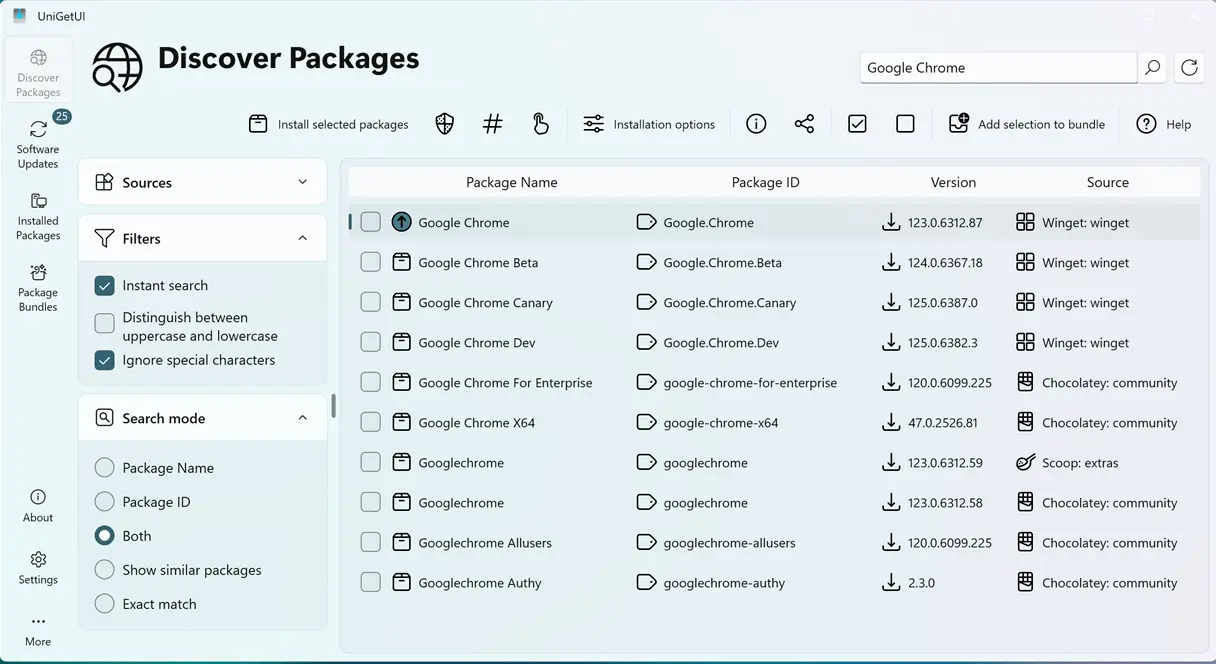
The latest UniGetUI 2026.1.9 update drops today with a heavy focus on squashing bugs that have been tripping up both Windows and macOS users. Readers should expect a smoother package management experience after the developers patch several crashes, fix permission prompts, and clean up the interface. The release does not introduce major new features, but it does clean up the exact friction points that cause power users to abandon the tool mid workflow.
macOS Code Signing and Trust Prompts
Apple has tightened security checks across recent macOS versions, and UniGetUI used to trigger unnecessary security warnings when users tried to run updated binaries. The 2026.1.9 patch applies proper code signing to all macOS build artifacts, which means the system will stop flagging the application as unverified. Users who previously clicked through multiple security dialogs or saw red warning banners will notice the prompts disappear after upgrading. This change aligns the tool with modern Apple expectations and removes a major roadblock for anyone managing packages on a Mac.
Windows Elevator and WebView Crash Fixes
The Avalonia framework powers the modern interface for UniGetUI, and recent updates exposed a few rough edges that broke core functionality. The Windows elevator service stopped responding to privilege requests, which forced users to manually restart the app or run it as administrator just to install software. Another issue caused the entire application to crash whenever the integrated webview component loaded. Both problems are resolved in this patch, restoring the expected behavior for package installation and embedded documentation. The developers also adjusted how the update queue handles finished tasks, so completed packages now automatically clear from the pending list instead of lingering indefinitely.
Package Management and Interface Glitches
Several smaller but annoying issues made it into the changelog, and they actually impact daily workflow more than the headline crashes. The portable version previously deleted itself during routine updates, a behavior that left users scrambling to reinstall the tool after a simple version bump. Color rendering for operation outputs also broke when switching themes, making terminal style logs impossible to read in dark mode. The Pinget detection routine and Avalonia WinGet settings received targeted fixes that prevent misconfigured package sources from blocking installations. These adjustments might seem minor on paper, but they remove the exact friction points that cause users to abandon package managers in favor of slower manual downloads.
Release UniGetUI v2026.1.9
Devolutions UniGetUI 2026.1.9 This release is focused on important bug fixes and improvements for all platforms, providing a more stable experience.
The UniGetUI team clearly prioritized stability over feature bloat in this release. Grab the update when the notification pops up, and the package manager should behave exactly as expected. Keep the tool updated, and it will keep the system tidy.


