Microsoft has released Windows Admin Center version 2610 in public preview, the first to merge its Administration Mode (aMode) and Virtualization Mode (vMode) installers into a single download. The preview rolls out new vMode capabilities including Azure Arc onboarding, backup and restore, AD CS certificate management, and live-migration awareness. It also pulls the VMware-to-Hyper-V Conversion extension from the feed due to a Broadcom VDDK availability problem.
Windows Admin Center 2610 merges its two installers into one
The new public preview combines the Administration and Virtualization Modes under one download, and adds backup, certificate management, and Azure Arc onboarding to vMode.
Microsoft has released Windows Admin Center version 2610 in public preview, and the headline feature is almost disarmingly simple. There's now a single installer for the two modes that used to ship separately.
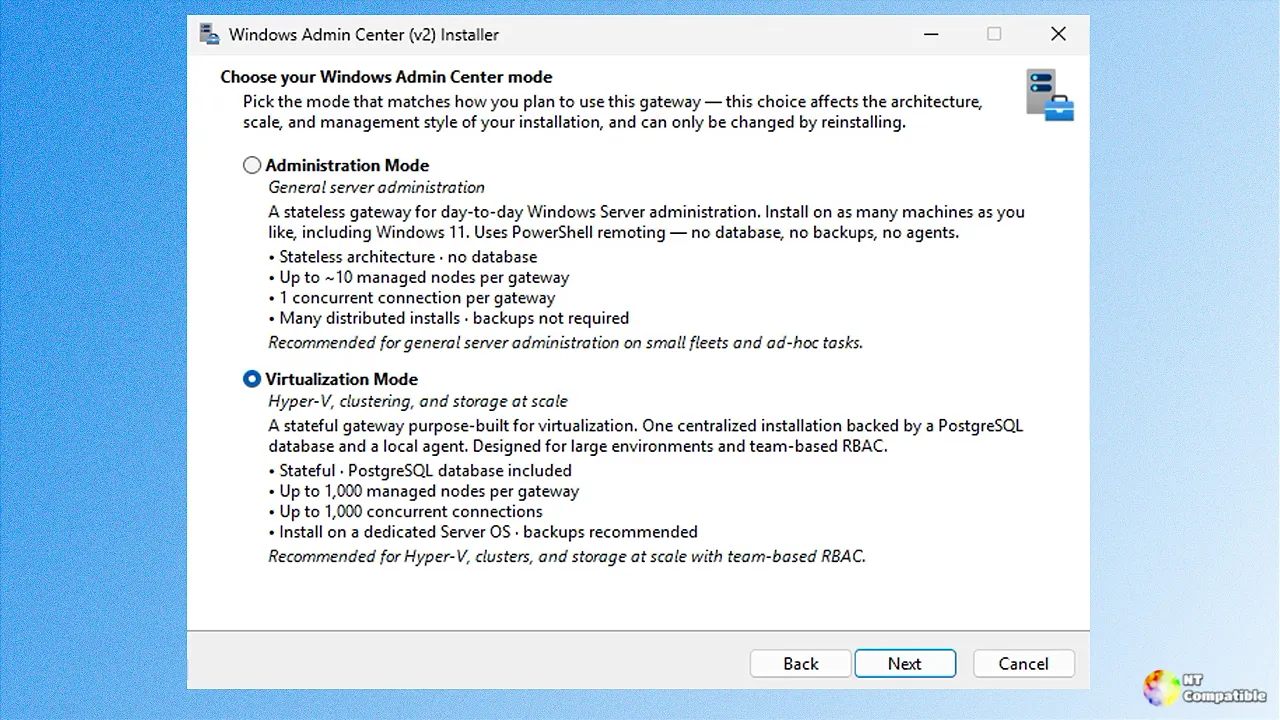
For a long stretch you had to download one installer for Administration Mode (aMode) and another for Virtualization Mode (vMode). Not anymore. The 2610 preview hands you one download and asks, during setup, which mode you actually want.
It's a modest move with a real payoff: faster deployment, less overhead, one fewer file to lose when you're standing in front of a fresh box.
Here's the rub, though. You still pick exactly one mode per installation. Microsoft is explicit that running both aMode and vMode on the same machine is not supported. If you were hoping to run both worlds at once, this release quietly reminds you to choose a lane.
New in vMode and the Azure tweaks
The second reason for 2610 is a batch of new Virtualization Mode capabilities. vMode is Microsoft's rearchitected, purpose-built experience for managing Hyper-V infrastructure: servers, storage over SAN, NAS, or HCI, and networking through Network ATC. It first showed up at Microsoft Ignite 2025 and has been circling toward general availability ever since.
In this release it earns a cluster of enterprise-grade additions: Azure Arc onboarding, backup and restore packages that capture inventory, cluster metadata, gateway config, certificates, RBAC, templates and operational state, certificate lifecycle management through Active Directory Certificate Services (AD CS), and live-migration awareness inside the Virtual Machines tool.
The certificate piece is worth unpacking a little. Self-signed certs still work for quick testing and non-production setups, no CA or PKI required. For production, you now hand certificate issuance to AD CS for centralized control, templates and auto-renewal. You'll find it under Gateway => Settings => Certificates.
There's also a redesigned Azure registration flow, and this is the part that'll make sysadmins exhale. It connects WAC to Azure with fewer clicks, requests only the permissions the user actually needs, and most importantly no longer demands tenant-level administrator consent. Teams used to have to round up a highly privileged tenant admin just to sign off. You can now lean on Azure RBAC to keep tighter control over who does what. It lives under Gateway => Settings => Register.
Not everything converts cleanly, though. Microsoft has removed the preview VM Conversion extension (the VMware-to-Hyper-V tool) from the extension feed. The cause is a Broadcom change jamming up availability of the Virtual Disk Development Kit (VDDK), which the extension depends on.
The company says it's evaluating ways to keep supporting VMware migrations but has no alternative ready yet. The standing advice is plain: stop evaluating the tool for now. If you're mid-migration, fall back on System Center Virtual Machine Manager for on-prem Hyper-V moves or Azure Migrate (agent-based) for anything heading to Azure.
It's a genuine snag for anyone with a VMware-exit timeline. Broadcom controls the supply chain again, and admins planning their moves are the ones catching the fallout.
On the developer side, the Windows Admin Center SDK jumped to v6.0.0. It adds commands for upgrading existing extensions to Angular 20 and for building and testing React-based extensions. Updated "Preparing your development environment" and "Creating a tool extension" guides accompany the release, and the SDK sits at @microsoft/windows-admin-center-sdk on npm.
There's also a fixed bug worth flagging. The earlier GA release, WAC 2606, shipped with an installer failure ("RegCreateKeyEx failed, code 5") that people reported in the comments. That's been addressed in 2610.
The preview isn't spotless. Known issues include a possibly inaccurate Azure Arc status table when collapsed, some links within tool extensions that redirect back to an aMode interface, and live migration that can fail when source and target nodes use different authentication methods.
Merging the installers reads as a real signal that vMode is maturing. Lowering deployment friction shrinks the barrier for teams still on the fence about virtualization management, while the Azure Arc and rebuilt registration pull vMode deeper into Microsoft's hybrid-cloud story. The backup, certificate and workflow resume/retry features address genuine enterprise pain points: disaster recovery, PKI governance, resilient large-scale deployments.
WAC 2610 is in public preview now. Head here to download the release and here to provide feedback.


